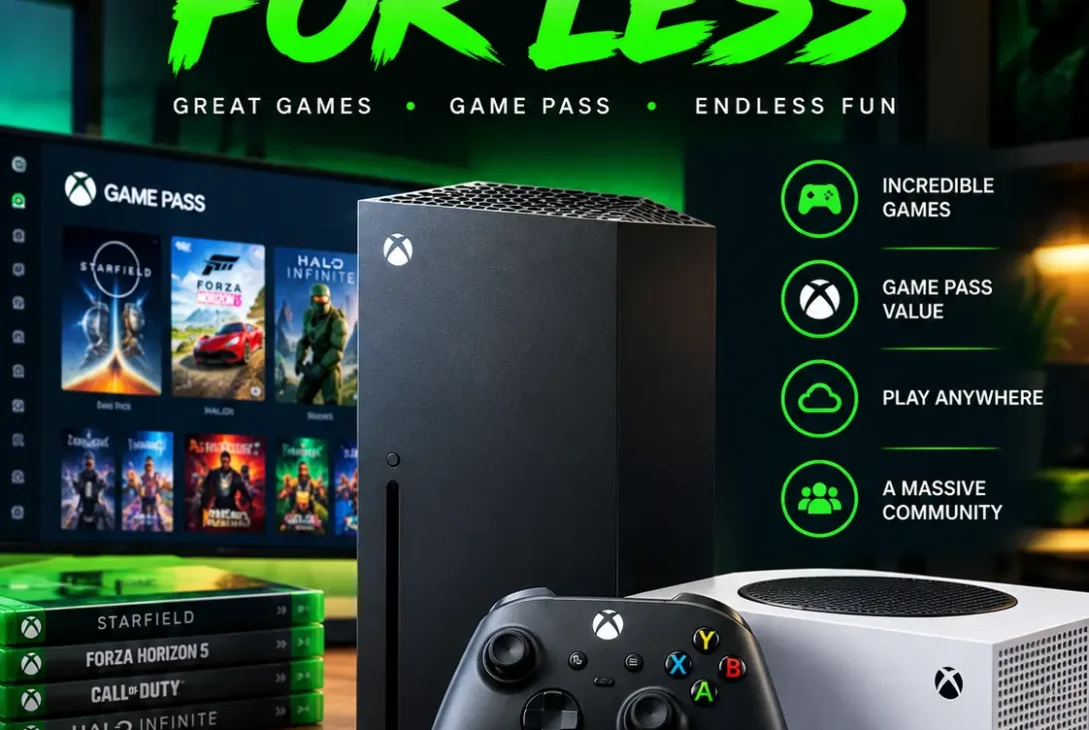
The Xbox platform has grown far beyond being a traditional gaming console. Microsoft’s gaming ecosystem now combines dedicated hardware, PC gaming, subscriptions, cloud services, backward compatibility, and a large library of games.
In 2026, gamers can choose between the Xbox Series X and Series S, depending on their budget and performance requirements. Microsoft is also continuing to expand Game Pass and cloud gaming, giving players more ways to access games without purchasing every title separately.
For new buyers, however, choosing the right console can be confusing. The Series X and Series S have different hardware capabilities, while the various Game Pass plans offer different benefits.
This guide explains what you need to know before buying an Xbox in 2026, including the current consoles, Game Pass, cloud gaming, PC integration, accessories, games, and the advantages and disadvantages of Microsoft’s gaming ecosystem.
Table of Contents
- What Is Xbox?
- Xbox Series X
- Xbox Series S
- Series X vs Series S
- Game Pass
- Cloud Gaming
- Games and Backward Compatibility
- PC Gaming
- Accessories
- Is It Good for Casual Gamers?
- Is It Good for Competitive Gaming?
- Pros and Cons
- Frequently Asked Questions
- Final Verdict
- SEO Details
What Is Xbox?
Xbox is Microsoft’s gaming ecosystem, covering consoles, PC gaming, online services, subscriptions, accessories, and cloud-based gaming.
The current console generation includes the Series X and Series S. Both machines use solid-state storage and support modern features such as fast loading, high frame rates, and backward compatibility with many older titles.
One of Microsoft’s biggest changes has been expanding gaming beyond the physical console. Players can now access parts of the ecosystem through PCs and supported cloud devices.
This makes the platform particularly attractive to people who want flexibility instead of being locked to one type of gaming hardware.
Xbox Series X
The Xbox Series X is Microsoft’s high-end current-generation console.
It is designed for players who want stronger hardware, native 4K gaming, fast loading, and support for demanding games.
The standard Series X includes a 1TB SSD and an optical disc drive. Microsoft also supports features such as up to 120 frames per second in compatible games, Dolby Vision, and Dolby Atmos. Official Xbox Series X specifications
The console is particularly well suited to gamers with a 4K television or high-refresh-rate gaming monitor.
Its additional processing power also gives developers more room to target higher resolutions, improved visual effects, and smoother performance.
Another advantage is physical media support. Players who own older discs or prefer buying physical games can continue using compatible titles.
The main downside is its size and higher cost compared with the Series S.
Xbox Series S
The Xbox Series S is Microsoft’s smaller and more affordable current-generation console.
It is designed primarily for digital gaming and does not include a disc drive. Microsoft targets the system around 1440p gaming, although supported content can be upscaled for 4K displays.
The Series S is significantly smaller than the Series X, making it easier to fit into compact entertainment setups.
It can be a particularly good choice for people who mainly buy digital games or use Game Pass.
Storage is an important consideration, however. Modern games can occupy a substantial amount of space, so the smaller storage configuration can fill up quickly.
For casual gamers, students, families, and buyers who want a lower entry price, the Series S remains an appealing option.
Series X vs Series S
The choice between the two consoles mainly comes down to performance, resolution, storage, physical media, and price.
| Feature | Series X | Series S |
|---|---|---|
| Target Gaming | High-end | Mainstream |
| Resolution | Up to native 4K | Primarily 1440p |
| Disc Drive | Yes | No |
| Storage | 1TB and larger options | 512GB or 1TB depending on model |
| Performance | Higher | Lower |
| Size | Larger | Compact |
| Best For | Enthusiasts | Budget-conscious players |
The Series X is the better option for gamers who own a 4K television and want maximum console performance.
The Series S makes more sense for people who prioritize affordability and compact size.
Both provide access to the wider game library and online services, although performance and graphical settings can differ between them.
Game Pass
Game Pass is one of Microsoft’s most important gaming services.
Instead of purchasing every game separately, subscribers can access a large rotating library depending on the plan they choose.
Microsoft currently offers several tiers, including Essential, Premium, Ultimate, and PC Game Pass. The benefits and game libraries differ between plans.
According to Microsoft’s current information, Essential provides access to more than 50 games, Premium includes more than 200 games, and Ultimate offers more than 400 games across supported platforms.
Ultimate is aimed at players who want the broadest package. It includes a larger catalog, online console multiplayer, cloud gaming, in-game benefits, and access to new first-party releases on day one.
The value depends on how frequently you play.
Someone who only plays one or two games throughout the year may save money by purchasing individual titles. Someone who regularly experiments with different games can get significantly more value from a subscription.
Cloud Gaming
Cloud gaming allows supported games to be streamed over the internet instead of being installed locally.
This means players can use compatible phones, tablets, PCs, TVs, and other supported devices without requiring a powerful gaming machine.
Microsoft has made cloud gaming an important part of its broader gaming strategy, although availability varies by region, device, game, and subscription plan.
There is an important change coming in November 2026.
Microsoft announced that included cloud gaming time will be limited according to the Game Pass tier:
- Essential: 5 hours per month
- Premium: 10 hours per month
- Ultimate: 15 hours per month
Additional cloud gaming time can be purchased after the included allowance is used.
For people who primarily play through streaming, these limits are worth considering before choosing a subscription.
Games and Backward Compatibility
Games remain one of the strongest reasons to enter Microsoft’s ecosystem.
Players can access major franchises such as Halo, Forza, Gears of War, and numerous third-party releases.
Game Pass also receives new additions regularly. Microsoft’s September 2026 updates include titles such as RuneScape: Dragonwilds, SpeedRunners 2: King of Speed, and The Royal Writ. September 2026 Game Pass update
Backward compatibility is another major advantage.
Selected games from older generations can be played on current consoles, with some titles benefiting from improved loading times, higher resolutions, or performance enhancements.
This gives players access to a much larger library than only the games released for the current generation.
PC Gaming
Microsoft’s gaming strategy also includes Windows PCs.
PC Game Pass gives computer users access to a large selection of games without requiring a console.
The Xbox app for Windows provides access to supported games, downloads, subscriptions, and other gaming features.
This is useful for people who already own a capable gaming PC but do not want to purchase a separate console.
Some first-party releases are available across both console and PC, while cloud gaming provides another option for supported titles.
This cross-device approach makes the overall ecosystem more flexible than a traditional console-only model.
Accessories
The official wireless controller remains one of the most important accessories.
It works with compatible consoles and can also be used with Windows PCs and supported mobile devices.
Players can also purchase headsets, rechargeable batteries, storage expansion cards, charging docks, and other accessories.
Storage expansion can be especially useful for the Series S because modern games can consume a significant amount of internal storage.
A good gaming monitor or television is also worth considering.
A 4K display can help users take advantage of the Series X’s capabilities, while a high-refresh-rate screen can provide smoother gameplay in supported titles.
Is It Good for Casual Gamers?
Yes. Microsoft’s platform can work very well for casual players.
The Series S offers a relatively affordable way to access current-generation games, while Game Pass provides an easy way to experiment with different titles.
Families can also benefit from the variety of genres available across the service.
However, buyers should think about storage before choosing the smaller console.
If you frequently install large games, additional storage may eventually become necessary.
Cloud gaming can also provide another way to try supported titles without downloading them, although the experience depends heavily on internet quality.
Is It Good for Competitive Gaming?
Competitive gamers can also benefit from the platform.
The Series X provides more powerful hardware, while both current systems can support high frame rates in compatible games.
For competitive play, a high-refresh-rate display and responsive controller can make a noticeable difference.
Network quality is equally important.
A stable wired or wireless connection can help reduce latency during online multiplayer sessions.
Cloud gaming is less predictable for highly competitive players because streamed gameplay depends on the quality and consistency of the internet connection.
For serious competitive gaming, locally running a game on the console or PC will generally provide a more consistent experience.
Pros and Cons
Pros
- Powerful Series X hardware
- More affordable Series S option
- Large Game Pass library
- PC integration
- Cloud gaming support
- Backward compatibility
- Strong first-party franchises
- High-frame-rate support
- Wide accessory selection
- Digital and physical gaming options
Cons
- Series S is less powerful than Series X
- Series S does not support physical discs
- Storage can become limited
- Game Pass requires a recurring subscription
- Cloud gaming depends on internet quality
- New cloud gaming time limits begin in November 2026
Frequently Asked Questions
Which Xbox should I buy in 2026?
Choose the Series X if you want maximum performance, native 4K gaming, and physical-disc support. Choose the Series S if affordability, compact size, and digital gaming are more important.
Is Game Pass worth it?
It can be excellent value for frequent players. The subscription becomes particularly useful when you regularly play different games rather than buying every title individually.
Can I play Xbox games on PC?
Yes. Microsoft supports PC gaming through the Xbox app and PC Game Pass, although availability varies between games.
Does Xbox support cloud gaming?
Yes. Cloud gaming is available through supported Game Pass plans and compatible devices. Microsoft is changing the included monthly allowances from November 2026.
Is the Series S good for a 4K TV?
The Series S can connect to a 4K television and upscale supported content, but it is primarily designed for 1440p gaming. The Series X is the better choice for native 4K gaming.
Does the Series X have a disc drive?
Yes. The standard Series X includes a UHD Blu-ray disc drive.
Is Xbox better than PlayStation?
There is no universal answer. The choice depends on the games, services, hardware, and ecosystem you prefer. Microsoft’s biggest advantages include Game Pass, PC integration, backward compatibility, and cloud gaming.
Final Verdict
The Xbox ecosystem in 2026 offers considerably more than a traditional gaming console.
The Series X is the strongest choice for enthusiasts who want high-end console performance and 4K gaming, while the Series S provides a smaller and more affordable route into the current generation.
Game Pass remains a major part of Microsoft’s strategy, giving subscribers access to a large and frequently changing selection of games. PC support and cloud gaming further expand how players can access the service.
The biggest consideration for cloud-focused players is Microsoft’s upcoming monthly usage system. From November 2026, the included cloud gaming allowance will depend on the Game Pass tier.
For a traditional console experience, the Series X and Series S remain compelling choices. Your budget, display, storage requirements, physical-game preferences, and playing habits should determine which model makes the most sense.
Overall, Microsoft’s gaming ecosystem remains a strong option for players who want flexibility between console, PC, subscription, and cloud gaming.