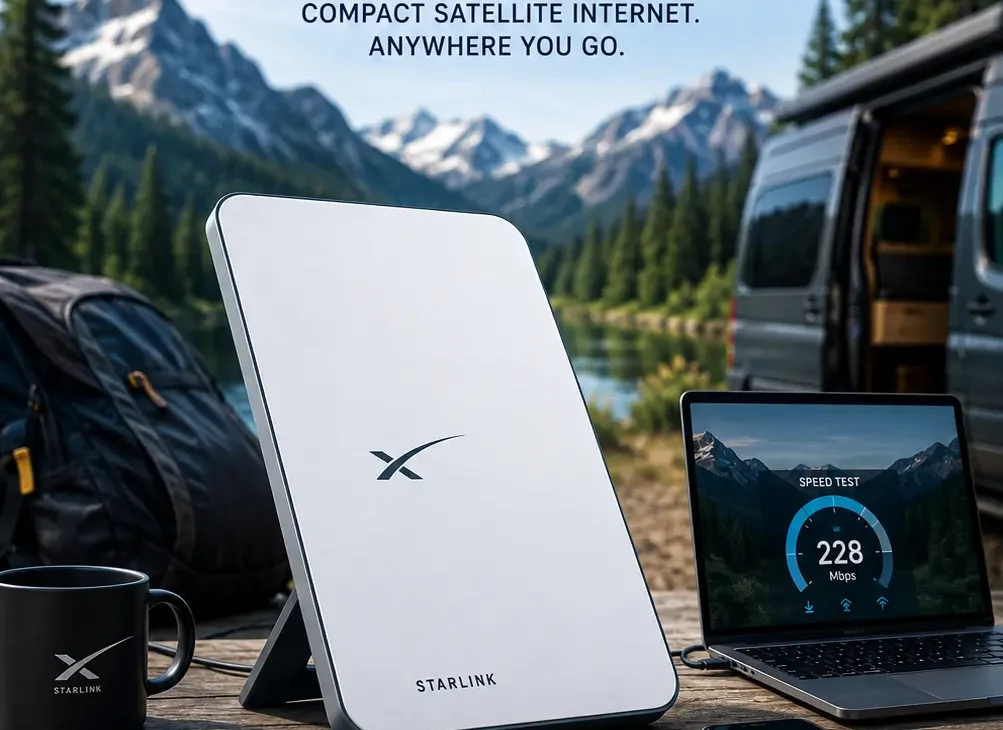
Starlink Mini is one of the most interesting options for people who want satellite internet without carrying a large home-internet dish. It is a compact Starlink terminal designed for portability, with built-in Wi-Fi, DC power support and average power consumption of around 20–40 watts according to Starlink’s current support information.
Unlike a traditional home Starlink setup, the Mini is designed to be easier to carry and deploy. Starlink describes it as a compact portable kit that can fit in a backpack, with maximum download speeds of over 200 Mbps depending on service and network conditions.
That makes it particularly interesting for RV owners, campers, remote workers, travelers and people living in areas where traditional broadband or cellular internet isn’t reliable.
But there are trade-offs. The Mini has a smaller coverage area than Starlink’s larger standard hardware, and actual internet speeds depend on your location, service plan, network congestion and whether the dish has a clear view of the sky.
In this guide, we’ll look at the Starlink Mini specifications, speed, power consumption, portability, setup, pricing considerations, advantages, disadvantages and how it compares with a standard Starlink setup.
Table of Contents
- What Is Starlink Mini?
- Starlink Mini Specifications
- How Fast Is Starlink Mini?
- Starlink Mini Power Consumption
- Starlink Mini Size and Weight
- How Does Starlink Mini Work?
- Starlink Mini vs Standard Starlink
- Who Should Buy Starlink Mini?
- Who Should Avoid Starlink Mini?
- How to Set Up Starlink Mini
- Starlink Mini for Camping and RVs
- Starlink Mini for Remote Work
- Starlink Mini Pros and Cons
- Frequently Asked Questions
- Final Verdict
What Is Starlink Mini?
Starlink Mini is a smaller Starlink user terminal designed to provide satellite internet in a more portable package.
Instead of requiring a large dish and a separate conventional router, the Mini combines the satellite antenna and Wi-Fi functionality into a compact unit. Starlink says the Mini has an integrated Wi-Fi router, DC power input and a design intended for portable use.
The hardware uses an electronic phased-array antenna, allowing it to communicate with Starlink satellites without requiring the user to manually point the dish at a particular satellite. Initial positioning is assisted through the Starlink app.
This is one of the biggest differences between Starlink and older satellite internet systems.
You don’t need to manually track satellites throughout the day. Once the terminal has been positioned correctly with a sufficiently clear view of the sky, the system handles satellite tracking electronically.
What Makes Starlink Mini Different?
The main idea behind the Mini is simple:
Satellite internet, but smaller and easier to carry.
The official specification sheet lists the Mini at approximately 298.5 mm × 259 mm × 38.5 mm, with the antenna weighing about 1.10 kg (2.43 lb). With the kickstand attached, the listed weight is about 1.16 kg.
That is considerably easier to transport than larger Starlink hardware.
Starlink also says the Mini can cover up to approximately 112 m² (1,200 ft²) and supports up to 128 connected devices under its listed hardware specifications.
Starlink Mini Specifications
Before deciding whether the Mini is right for you, it’s worth looking at the hardware itself.
| Feature | Starlink Mini |
|---|---|
| Antenna | Electronic phased array |
| Field of view | 110° |
| Dimensions | 298.5 × 259 × 38.5 mm |
| Antenna weight | 1.10 kg |
| Weight with kickstand | 1.16 kg |
| Wi-Fi | Wi-Fi 5 |
| Coverage | Up to 112 m² / 1,200 ft² |
| Devices | Up to 128 |
| Average power | Around 20–40W |
| Idle power | Around 15W |
| Operating temperature | -30°C to 50°C |
| Weather rating | IP67 |
| DC input | 12–48V |
| Maximum download claim | Over 200 Mbps |
The exact performance you experience will depend on your location, service plan, obstructions, network conditions and other factors. Starlink itself states that advertised speeds are not guaranteed and that actual speeds can be lower during periods of high network usage.
How Fast Is Starlink Mini?
Speed is probably the first question most people have about Starlink Mini.
Starlink currently describes the Mini as capable of maximum download speeds over 200 Mbps.
However, you shouldn’t interpret that number as a guaranteed everyday speed.
Satellite internet performance can change depending on:
- Your location
- Service plan
- Network congestion
- Time of day
- Obstructions
- Weather
- Satellite availability
- The device you’re using
- Wi-Fi conditions
Starlink’s own specifications explain that actual speeds can be lower than maximum figures, particularly during periods of high usage.
Is 200 Mbps Enough?
For most normal internet activities, yes.
A properly performing Mini connection can be suitable for:
- Web browsing
- YouTube
- Netflix
- 4K streaming
- Video calls
- Remote work
- Cloud applications
- Online gaming
- Large file downloads
- Social media
The more important question isn’t whether the Mini can theoretically exceed 200 Mbps.
It’s whether your location can consistently receive a good Starlink connection.
If the terminal is surrounded by trees, buildings or other obstructions, you can experience interruptions even if the hardware itself is capable of much higher speeds.
Starlink Mini Power Consumption
One of the Mini’s biggest advantages is its relatively low power requirement.
Starlink’s current support documentation lists the Mini at approximately 20–40 watts average consumption, with about 15 watts while idle.
That is important if you’re using it somewhere without reliable mains electricity.
For comparison, Starlink’s larger Standard 4 and Standard 4 X hardware is listed at approximately 75–100W average consumption.
This makes the Mini particularly interesting for:
- Camping
- RV travel
- Boats
- Remote cabins
- Solar-powered setups
- Battery-powered internet
- Emergency connectivity
Can Starlink Mini Run From a Battery?
Yes.
Starlink specifically says the Mini can be powered from a battery as long as the power source meets its requirements. It can operate from 12–48V DC, with a 60W input rating, and Starlink also supports USB Power Delivery using an appropriate setup.
For USB-C PD operation, Starlink says a 100W, 20V/5A source is required for optimal operation and that USB PD sources below 65W are not sufficient.
This is a major advantage over larger satellite-internet hardware when you’re trying to build a portable setup.
How Much Battery Does It Use?
A simple example shows why power consumption matters.
If the Mini averages around 30W, a 300Wh battery could theoretically provide around:
300Wh ÷ 30W = 10 hours
That’s before accounting for power-conversion losses and other devices connected to the battery.
Your real-world runtime will therefore be lower depending on the battery, inverter or DC power setup, Wi-Fi usage and environmental conditions.
Starlink Mini Size and Weight
Portability is where the Mini really separates itself from larger Starlink terminals.
The official specifications list the antenna at approximately 1.10 kg, while the Mini with its kickstand weighs around 1.16 kg.
That’s light enough to make the Mini practical for travel.
You can place it in a backpack along with:
- Laptop
- Power bank
- USB-C cables
- Phone
- Small accessories
The built-in kickstand also makes deployment easier. Starlink says the kickstand can fold away for storage or flip out for quick setup, while the Mini can also be mounted more permanently using compatible mounting accessories.
For someone who moves locations regularly, that flexibility can be more valuable than the higher performance of a larger Starlink terminal.
How Does Starlink Mini Work?
The Starlink Mini connects directly to Starlink’s satellite network using its built-in phased-array antenna. Instead of relying on a traditional cable or fiber connection, the terminal communicates with satellites orbiting above the Earth and sends the connection back to your devices through its integrated Wi-Fi router.
The Mini automatically manages its satellite connection, so you don’t need to manually track satellites as they move across the sky.
The Starlink app is used during setup to help you find a suitable location and check for obstructions.
Does Starlink Mini Need a Clear View of the Sky?
Yes. This is one of the most important things to understand before buying Starlink Mini.
The terminal needs a sufficiently clear view of the sky to maintain a reliable connection. Trees, buildings, roofs and other objects can block the satellite signal and cause interruptions.
Starlink recommends using its app to check for obstructions before permanently installing the terminal.
For camping or RV use, this can be particularly important because a beautiful campsite surrounded by tall trees may not actually be a good Starlink location.
Starlink Mini vs Standard Starlink
The biggest question for many buyers is whether they should choose the Mini or a larger Starlink terminal.
The Mini prioritizes portability and lower power consumption, while larger Starlink hardware is generally better suited to fixed home installations.
| Feature | Starlink Mini | Standard Starlink |
|---|---|---|
| Portability | Excellent | Lower |
| Size | Compact | Larger |
| Weight | About 1.1 kg | Heavier |
| Average power | About 20–40W | About 75–100W |
| Built-in Wi-Fi | Yes | Depends on hardware generation |
| Battery-friendly | Excellent | Less convenient |
| RV/camping | Excellent | Good |
| Permanent home setup | Good | Better |
| Coverage | Up to about 112 m² | Generally larger |
| Main advantage | Portability | Home performance |
The exact specifications vary between Starlink hardware generations, so buyers should check the current hardware offered for their location before ordering.
Which One Is Better?
Choose Starlink Mini if you frequently move around and want an internet connection that can run from a relatively small power source.
Choose a larger Starlink system if you’re installing satellite internet at a permanent home and don’t care as much about portability or power consumption.
Starlink Mini for Camping and RVs
Camping is one of the clearest use cases for the Mini.
If you’re traveling through areas where mobile networks are weak or unavailable, Starlink Mini can provide a high-speed internet connection as long as you have sufficient sky visibility and an appropriate Starlink service plan.
It can be useful for:
- Streaming movies
- Working remotely
- Video calls
- Uploading photos
- Checking maps
- Social media
- Downloading large files
- Staying connected while traveling
The low power requirement also makes it easier to use with a portable battery or solar setup.
What About RV Travel?
For RV owners, the Mini can be more convenient than carrying a larger satellite terminal.
You can store it when traveling, then place it outside when you reach your destination.
The main limitation is the environment.
If your RV is parked under dense trees, the connection may be unreliable. In that situation, moving the Mini to a more open area can make a significant difference.
Starlink Mini for Remote Work
The Mini can also make sense for remote workers who regularly travel away from traditional broadband.
A reliable satellite connection can support:
- Zoom and Teams calls
- Slack
- Google Workspace
- Microsoft 365
- Cloud applications
- Remote desktop connections
- File uploads
- Website management
For remote workers, however, latency and reliability can matter more than maximum download speed.
A connection that briefly drops during an important video meeting can be more frustrating than a connection that is slightly slower but stable.
That’s why checking obstructions is particularly important if you plan to use Starlink Mini for work.
Can You Game on Starlink Mini?
Yes, online gaming is possible on Starlink, but expectations should be realistic.
Many online games don’t require extremely high download speeds. Instead, they benefit from consistent latency and a stable connection.
Starlink can provide sufficiently low latency for many online activities, but satellite internet can still behave differently from fiber or cable broadband.
Competitive gamers who depend on extremely consistent ping may still prefer a good wired broadband connection.
For casual gaming, multiplayer games and game downloads, the Mini can be perfectly practical when the connection is strong.
Starlink Mini for Travel
Portability is arguably the biggest reason to choose the Mini.
The hardware is small enough to transport relatively easily, and its lower power requirements make it more suitable for mobile setups.
You could potentially use it while traveling between:
- Campsites
- Remote cabins
- Rural properties
- RV parks
- Work locations
- Temporary accommodation
However, service availability and plan restrictions depend on your country and Starlink’s current offerings.
Before buying the hardware specifically for international travel, check Starlink’s official availability and service information for every country you plan to visit.
How to Set Up Starlink Mini
Setting up the Mini is relatively straightforward.
Step 1: Find an Open Location
Place the Mini somewhere with a clear view of the sky.
Avoid:
- Tall trees
- Buildings
- Large walls
- Roof overhangs
- Other major obstructions
Step 2: Position the Terminal
Use the built-in kickstand or an appropriate mounting solution.
For temporary use, the kickstand is usually enough.
For a permanent installation, use a suitable mount designed for the Mini.
Step 3: Connect Power
Connect the supplied power equipment or a compatible DC power source.
The Mini supports a 12–48V DC input according to Starlink’s specifications. (starlink.com)
Step 4: Open the Starlink App
Install the Starlink app on your smartphone.
The app helps with setup and can show whether your chosen location has obstructions.
Step 5: Connect to Wi-Fi
Once the Mini has established its satellite connection, connect your phone, laptop or other devices to its Wi-Fi network.
You can then configure your network settings through the Starlink app.
How Many Devices Can Starlink Mini Support?
Starlink’s specifications list support for up to 128 connected devices. (starlink.com)
That doesn’t mean 128 devices can all perform demanding activities simultaneously at maximum speed.
If multiple people are streaming 4K video, downloading large files and making video calls at the same time, available bandwidth will naturally be divided between them.
For a small family, couple or individual user, the Mini should have more than enough device capacity for normal everyday usage.
Does Starlink Mini Have Ethernet?
The Mini includes built-in Wi-Fi, but wired networking can depend on the accessories and network configuration you’re using.
For people who need Ethernet for a desktop computer, security camera, network switch or other wired equipment, check the current Starlink accessory options available in your market.
This is especially important for users building a more advanced home or RV network.
Starlink Mini Weather Resistance
The Mini is designed for outdoor use and has an IP67 enclosure rating, according to Starlink’s specifications. Its listed operating temperature range is approximately -30°C to 50°C. (starlink.com)
That makes it considerably more suitable for outdoor deployment than ordinary consumer networking equipment.
Still, outdoor installation should be done correctly.
Don’t leave power connections exposed to water, and make sure cables are routed and secured properly.
Starlink Mini Pros and Cons
Pros
- Very compact design
- Lightweight
- Built-in Wi-Fi
- Lower power consumption than larger Starlink hardware
- Supports DC power
- Good option for camping and RVs
- Easy to transport
- Useful in rural locations
- Can provide high-speed internet where traditional broadband isn’t available
Cons
- Requires a clear view of the sky
- Performance varies by location
- Maximum advertised speed isn’t guaranteed
- Smaller Wi-Fi coverage than some larger home setups
- Not necessarily the best choice for a permanent house
- Service-plan availability varies by country
- Can be expensive compared with ordinary fiber or cable broadband where those options are available
Is Starlink Mini Worth It in 2026?
For the right user, Starlink Mini is absolutely worth considering in 2026.
Its biggest advantage isn’t simply speed.
It’s the combination of satellite connectivity, portability, integrated Wi-Fi and relatively low power consumption.
Someone living in a city with inexpensive fiber internet probably has little reason to choose the Mini as their primary connection.
But someone traveling through rural areas, working remotely from different locations or living somewhere without reliable wired broadband has a much stronger reason to consider it.
The Mini essentially turns Starlink into a more portable internet solution.
Who Should Buy Starlink Mini?
Starlink Mini makes the most sense for:
RV owners: Easy to transport and deploy while traveling.
Campers: Useful when cellular coverage is poor.
Remote workers: Provides another connectivity option away from traditional broadband.
Rural users: Useful where fiber, cable or reliable fixed wireless isn’t available.
Travelers: Compact enough to carry between locations, subject to service availability and plan restrictions.
Emergency preparedness: Can provide an alternative communication route when conventional connectivity is unavailable.
Who Should Not Buy Starlink Mini?
The Mini may not be the best option if you already have fast, affordable fiber broadband.
You may also want larger Starlink hardware if:
- You need maximum home coverage
- Power consumption isn’t important
- The terminal will remain permanently installed
- You have a large property
- You need a more traditional home networking setup
In those situations, standard Starlink hardware may provide a better overall fit.
https://www.starlink.com/
Final Verdict
The Starlink Mini is one of the most practical satellite internet devices for people who value portability.
Its compact size, integrated Wi-Fi, relatively low power consumption and ability to work from DC power make it especially attractive for RV owners, campers and remote workers.
The hardware isn’t perfect. You still need a good view of the sky, actual speeds can vary significantly and Starlink service plans differ depending on location.
For a permanent urban home with fast fiber, the Mini probably isn’t necessary.
For someone who needs portable internet in places where traditional broadband isn’t available, however, the Starlink Mini is a compelling option in 2026.
The key is to choose it for the right reason: flexibility and connectivity where conventional internet can’t easily reach, rather than simply buying it because the maximum speed number looks impressive.
Frequently Asked Questions
What is Starlink Mini?
Starlink Mini is a compact satellite internet terminal designed for portable use. It includes an integrated Wi-Fi router and is designed to consume less power than larger Starlink hardware.
How fast is Starlink Mini?
Starlink lists maximum download speeds of over 200 Mbps, although actual speeds vary depending on location, network congestion, service plan and obstructions.
Does Starlink Mini need a clear view of the sky?
Yes. A clear view of the sky is important for maintaining a reliable satellite connection. Trees, buildings and other obstructions can cause interruptions.
How much power does Starlink Mini use?
Starlink lists average power consumption at approximately 20–40 watts, with around 15W while idle. Actual consumption can vary depending on conditions and usage.
Can Starlink Mini run from a battery?
Yes. The Mini supports DC power and can be used with a suitable battery or compatible USB-C PD power setup. Starlink specifies appropriate power requirements for these configurations.
Is Starlink Mini good for RVs?
Yes. Its small size, low power consumption and portability make it particularly suitable for RV travel and camping.
Can Starlink Mini replace home Wi-Fi?
It can provide internet and Wi-Fi for a home, but whether it’s the best option depends on your location. If fast fiber or cable broadband is available at a reasonable price, traditional broadband may offer better value.
Can Starlink Mini be used for gaming?
Yes. It can support online gaming, but competitive players should understand that satellite internet may not provide the same consistency as a good fiber connection.
How many devices can Starlink Mini support?
Starlink’s hardware specifications list support for up to 128 connected devices, although actual performance depends on how heavily those devices use the connection.
Is Starlink Mini worth buying in 2026?
For campers, RV owners, remote workers and people in areas without reliable broadband, the Mini can be an excellent option. For users who already have affordable high-speed fiber, it may not offer enough advantages to justify the cost.