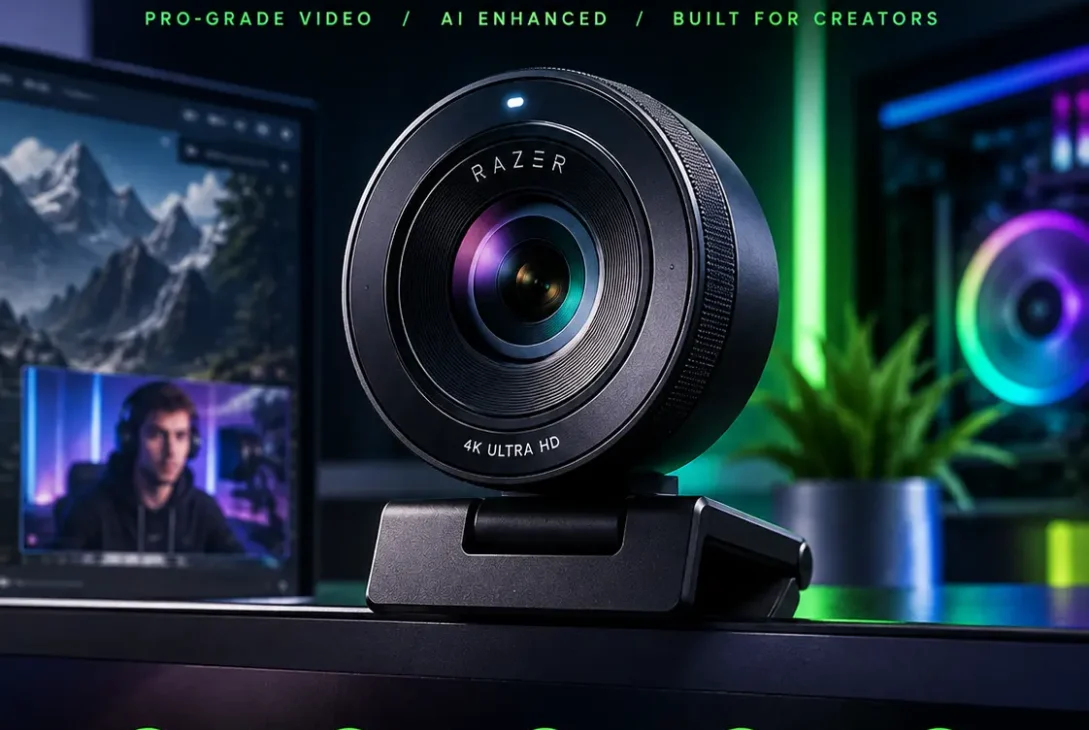
The Razer Kiyo Pro Ultra is a premium 4K webcam designed for streamers, content creators, remote professionals, and anyone who wants a more camera-like image from a desktop webcam. Unlike many basic webcams that rely heavily on software processing, the Razer Kiyo Pro Ultra uses a large Sony STARVIS 2 sensor and a wide f/1.7 aperture to capture more light and detail.
Razer launched the Kiyo Pro Ultra as its first 4K webcam, and it remains one of the most interesting cameras in the Kiyo family. It can record at 4K 30fps, 1440p 30fps, and 1080p up to 60fps. It also includes autofocus, HDR, AI-powered imaging features, a built-in privacy shutter, and extensive manual controls through Razer Synapse.
But with newer webcams now offering 4K at 60fps, the important question is whether the Razer Kiyo Pro Ultra still makes sense for buyers in 2026.
This review looks at its camera quality, sensor, low-light performance, autofocus, microphone, software, design, connectivity, limitations, and who should consider buying it.
Table of Contents
- What Is the Razer Kiyo Pro Ultra?
- Razer Kiyo Pro Ultra Specifications
- Camera and Sensor
- 4K Video Quality
- Low-Light Performance
- Autofocus and AI-Powered Imaging
- HDR and True Bokeh
- Field of View and Digital Controls
- Microphone Quality
- Design and Privacy Features
- Razer Synapse Software
- USB Connectivity and Setup
- Razer Kiyo Pro Ultra for Streaming
- Razer Kiyo Pro Ultra for Video Calls
- Pros and Cons
- Is the Razer Kiyo Pro Ultra Worth It in 2026?
- Frequently Asked Questions
- Conclusion
What Is the Razer Kiyo Pro Ultra?
The Razer Kiyo Pro Ultra is a high-end USB webcam built primarily for streaming and content creation. It sits above conventional 1080p webcams by combining 4K video capture with a much larger image sensor and a fast lens.
Razer describes it as having the largest sensor ever used in a webcam. The camera uses a 1/1.2-inch Sony STARVIS 2 sensor with 2.9 μm pixels and an f/1.7 aperture. According to Razer, the larger sensor can capture substantially more light than typical webcam sensors.
The result is a webcam designed to produce more natural-looking footage, particularly when compared with inexpensive cameras that have tiny sensors.
Another important characteristic is its optical design. Instead of depending entirely on artificial background blur, the lens can create a natural depth-of-field effect that gives the image a more traditional camera appearance.
The Razer Kiyo Pro Ultra also provides manual controls for users who want to fine-tune their image rather than relying entirely on automatic settings.
Razer Kiyo Pro Ultra Specifications
| Feature | Razer Kiyo Pro Ultra |
|---|---|
| Maximum Video Resolution | 4K at 30fps |
| 1440p | 30fps |
| 1080p | Up to 60fps |
| Sensor | Sony STARVIS 2 |
| Sensor Size | 1/1.2-inch |
| Image Resolution | 8.3 MP |
| Aperture | f/1.7 |
| Autofocus | Yes |
| HDR | Yes |
| Field of View | 72°–82° |
| Connection | USB 3.0 / USB-C |
| Microphone | Stereo, omnidirectional |
| Software | Razer Synapse |
| Privacy | Built-in physical shutter |
| Tripod Mount | 1/4-inch |
| Lens Cover | Included |
Razer’s support documentation lists 4K at 30fps, 1440p at 30fps, and 1080p at 60/30/24fps, along with the Sony STARVIS 2 sensor, autofocus, HDR, USB 3.0 connectivity, and an f/1.7 aperture.
Camera and Sensor
The sensor is one of the biggest reasons to consider the Razer Kiyo Pro Ultra.
Many webcams use relatively small sensors. A larger sensor can collect more light and provide more flexibility when shooting in less-than-perfect conditions. Razer pairs its large sensor with an f/1.7 lens, giving the webcam a strong hardware foundation for image quality.
The camera has an 8.3-megapixel image resolution and uses a Sony STARVIS 2 sensor. This combination helps the webcam capture detailed footage without depending completely on aggressive software sharpening.
The large sensor can also contribute to a more natural separation between the subject and background.
This is particularly useful for streamers and creators who want their face to remain the visual focus without placing an artificial blur filter over everything behind them.
4K Video Quality
The Razer Kiyo Pro Ultra can capture 4K video at 30 frames per second.
That is enough resolution for highly detailed talking-head footage, tutorials, product demonstrations, YouTube videos, and other types of content where image detail matters more than extremely high frame rates.
Razer also supports 1080p at up to 60fps, making the camera more suitable for situations where smooth motion is more important than maximum resolution.
However, there is an important limitation.
The camera does not provide native 4K at 60fps. That means users who want extremely smooth 4K footage for fast-moving content may prefer a newer 4K 60fps webcam.
Razer itself has since introduced the Kiyo V2 Pro, which supports 4K 60fps, showing how quickly the webcam market has moved since the original Kiyo Pro Ultra launched.
For traditional streaming and talking-head content, however, 4K 30fps remains perfectly usable.
Low-Light Performance
Low-light performance is another major strength of the Razer Kiyo Pro Ultra.
Its large 1/1.2-inch sensor and f/1.7 aperture allow the camera to gather more light than many conventional webcams. Razer specifically designed the camera around this combination to improve clarity in challenging lighting conditions.
This does not mean you can completely ignore lighting.
A dedicated key light will still produce better results than relying on the webcam alone. However, the Kiyo Pro Ultra gives you more flexibility when your room is not perfectly illuminated.
The large sensor can also help preserve detail and produce a less artificial-looking image compared with webcams that compensate for poor lighting through aggressive digital processing.
For creators who frequently record at night or in rooms with moderate lighting, this is one of the most appealing aspects of the camera.
Autofocus and AI-Powered Imaging
The Razer Kiyo Pro Ultra features autofocus and AI-powered face-tracking imaging.
Its autofocus system is designed to keep the subject sharp while the camera automatically adjusts exposure. Razer says the camera can track the user’s face and adjust lighting levels to maintain exposure.
This can be useful when you move around during a stream or presentation.
For example, if you lean toward the camera to show a product and then move back to your normal position, autofocus can help maintain sharpness without requiring constant manual adjustments.
The camera also provides manual focus controls for users who prefer a fixed focus distance.
This is particularly useful for creators who sit in a consistent position and want to eliminate unwanted autofocus changes during recording.
https://www.razer.com/streaming-cameras/razer-kiyo-pro-ultra
HDR and True Bokeh
HDR is another feature included with the Razer Kiyo Pro Ultra.
HDR is designed to help manage scenes containing both bright and dark areas. The camera can process lighting and contrast to help retain more visual detail in difficult exposure situations.
Razer specifies HDR operation at 30fps.
The camera also has what Razer calls a true bokeh effect.
Unlike software-based background blur, the shallow depth of field comes from the camera’s lens and large sensor. This can produce a more natural transition between the subject and background.
The effect is especially useful for talking-head videos because it can make a desk setup appear less distracting without making the background look artificially cut out.
Field of View and Digital Controls
The Razer Kiyo Pro Ultra provides an adjustable field of view between approximately 72 and 82 degrees, depending on configuration and lens distortion compensation.
A wider view is useful when you want to show more of your desk, room, or gaming setup.
A narrower view can make the frame feel more focused on your face.
Razer Synapse also provides additional camera controls, including zoom and other framing adjustments. Razer’s current support documentation explains that field-of-view adjustments depend on resolution, zoom levels, and camera profiles.
This gives creators more control than a basic plug-and-play webcam.
Microphone Quality
The Razer Kiyo Pro Ultra includes built-in stereo microphones with an omnidirectional pickup pattern.
For ordinary video calls, the built-in microphones can be useful because you do not need a separate microphone just to communicate.
However, serious streamers and content creators should still consider using a dedicated USB or XLR microphone.
A webcam microphone has to operate from a very small enclosure, which limits how much audio processing and isolation it can provide. Independent testing from Tom’s Hardware found the Kiyo Pro Ultra’s microphone usable but not a replacement for a dedicated microphone.
For casual meetings, Discord conversations, and basic calls, the integrated microphones can be convenient.
For professional YouTube videos, podcasts, livestreams, or voiceovers, a dedicated microphone remains the better approach.
Design and Privacy Features
The Razer Kiyo Pro Ultra has a large, round design that looks more like a camera lens than a conventional rectangular webcam.
The physical construction is substantial, which makes the webcam noticeably larger than many entry-level models.
One of its best design features is the built-in physical privacy shutter.
Instead of relying on software to disable the camera, you can physically close the shutter by rotating the camera’s outer ring. Razer also includes a separate lens cover for additional protection.
That is a useful feature for people who regularly keep their webcam connected.
The camera also supports a standard 1/4-inch tripod mount, so it can be placed on a tripod or other compatible mounting system instead of sitting directly on a monitor.
Razer Synapse Software
Razer Synapse is where the Razer Kiyo Pro Ultra becomes much more customizable.
Users can adjust settings such as focus, exposure, white balance, zoom, image processing, HDR, noise reduction, and other camera parameters.
This makes it possible to create a setup tailored to a particular room and lighting environment.
However, software is also one of the camera’s biggest weaknesses.
Tom’s Hardware praised the camera’s image quality while criticizing the Synapse experience, particularly the reliability of settings and the workflow required to configure the webcam.
For casual users, this may not be a major issue because the default image quality is already strong.
For professional creators who constantly change camera settings, software reliability becomes much more important.
Razer’s current support documentation also notes that users should disable the camera preview in Synapse before restarting the computer or disconnecting the webcam if they want advanced settings to be saved properly.
USB Connectivity and Setup
The Razer Kiyo Pro Ultra uses USB connectivity and is designed to work directly with a computer.
One important detail is that 4K 30fps requires significant bandwidth. Razer recommends using the original cable and connecting the camera directly to a compatible computer port rather than routing it through a hub.
This matters for people using laptops with USB-C docks.
If you experience dropped frames, resolution limitations, or inconsistent performance, connecting the webcam directly to the computer should be one of the first troubleshooting steps.
The camera works with popular broadcasting software such as OBS and XSplit, giving creators flexibility when building a streaming setup.
Razer Kiyo Pro Ultra for Streaming
For streaming, the Razer Kiyo Pro Ultra still has several advantages.
The large sensor provides detailed footage, the f/1.7 lens helps with light gathering, autofocus can track the subject, and 1080p 60fps provides smooth motion when 4K is unnecessary.
For a typical facecam stream, 1080p 60fps may actually be the more practical setting.
Streaming platforms often compress video heavily, so the difference between 4K and 1080p may not always be obvious to viewers.
If you create locally recorded videos, however, 4K becomes more useful because the additional resolution gives you greater flexibility when cropping and editing.
Razer Kiyo Pro Ultra for Video Calls
The Razer Kiyo Pro Ultra can also be used for professional video calls, although it may be more webcam than most people need.
Applications such as Zoom, Microsoft Teams, and Google Meet may not deliver the full benefit of a 4K camera depending on their current video-resolution limitations and account settings.
This means a large portion of the camera’s hardware capability may remain unused during ordinary meetings.
Still, the large sensor can provide benefits even when the final video is delivered at a lower resolution because the source image can start with more detail and better light capture.
For people who use the same webcam for meetings, streaming, and content creation, this flexibility can be valuable.
Pros and Cons
Pros
- Excellent image quality
- Large 1/1.2-inch Sony STARVIS 2 sensor
- Fast f/1.7 aperture
- 4K video at 30fps
- 1080p video at 60fps
- Autofocus
- HDR support
- Natural-looking background separation
- Built-in physical privacy shutter
- Tripod mounting support
- Extensive manual controls
- Strong low-light capability
Cons
- No native 4K 60fps recording
- Large physical design
- Premium pricing compared with ordinary webcams
- Built-in microphone is not ideal for professional audio
- Synapse can be frustrating for advanced users
- 4K may be unnecessary for many video-call platforms
- Direct USB connection is recommended for maximum bandwidth
Is the Razer Kiyo Pro Ultra Worth It in 2026?
The answer depends heavily on what you need from a webcam.
The Razer Kiyo Pro Ultra remains attractive if your priorities are image quality, sensor size, low-light performance, natural background separation, and manual camera control.
Its 1/1.2-inch Sony STARVIS 2 sensor and f/1.7 lens remain impressive hardware characteristics, and Tom’s Hardware continues to list it among its webcam recommendations for image quality in its 2026 webcam guide.
However, the webcam market has changed.
Newer cameras now offer features such as 4K 60fps, making the Kiyo Pro Ultra’s 4K 30fps limitation more noticeable than it was when the camera launched.
Razer itself introduced the Kiyo V2 Pro in September 2026 with 4K 60fps video, giving buyers another option within the company’s own Kiyo lineup.
Therefore, the Kiyo Pro Ultra makes the most sense for people who value sensor size and image characteristics more than maximum frame rate.
If your main goal is simply having a good webcam for Zoom meetings, buying a premium 4K model may not be necessary.
But if you are a creator who records videos, streams games, produces tutorials, or wants a more camera-like webcam image, the Kiyo Pro Ultra remains a capable option.
Frequently Asked Questions
Is the Razer Kiyo Pro Ultra 4K?
Yes. The Razer Kiyo Pro Ultra supports 4K video at up to 30fps. It can also record 1440p at 30fps and 1080p at up to 60fps.
Does the Razer Kiyo Pro Ultra support autofocus?
Yes. The webcam includes autofocus and AI-powered face-tracking imaging designed to keep the subject sharp and properly exposed.
Does the Razer Kiyo Pro Ultra have HDR?
Yes. The Razer Kiyo Pro Ultra supports HDR, with HDR operation specified at 30fps.
Is the Razer Kiyo Pro Ultra good in low light?
It is designed for strong low-light performance. Its 1/1.2-inch Sony STARVIS 2 sensor and f/1.7 aperture allow it to capture substantial amounts of light, although a dedicated light can still improve image quality.
Can the Razer Kiyo Pro Ultra record at 60fps?
Yes, but 60fps is available at 1080p rather than native 4K. The camera supports 1080p 60fps and 4K 30fps.
Does the Razer Kiyo Pro Ultra have a privacy shutter?
Yes. It has a built-in physical privacy shutter that can be opened or closed by rotating the camera’s outer ring. It also comes with a separate lens cover.
Can you use the Razer Kiyo Pro Ultra with OBS?
Yes. Razer lists OBS and XSplit among the broadcasting applications that can be used with the webcam.
Does the Razer Kiyo Pro Ultra need USB 3.0?
Razer recommends a direct USB 3.0 connection for the camera, particularly when using high-bandwidth modes such as 4K 30fps. Razer also recommends avoiding a hub for 4K 30fps and using the original cable.
Conclusion
The Razer Kiyo Pro Ultra remains a serious webcam for people who care about image quality rather than simply wanting the cheapest camera for video calls.
Its large Sony STARVIS 2 sensor, f/1.7 aperture, autofocus, HDR support, natural background separation, and 4K recording give it a more camera-like character than many conventional webcams.
The biggest limitation in 2026 is its lack of native 4K 60fps. Newer webcams, including Razer’s own Kiyo V2 Pro, now offer smoother 4K capture.
Even so, the Razer Kiyo Pro Ultra can still be a strong choice for creators who prioritize sensor size, low-light performance, image quality, and manual controls.
For casual video calls, it is probably more capability than most people need. For streaming, YouTube production, tutorials, and professional-looking desktop video, however, its hardware remains highly capable.