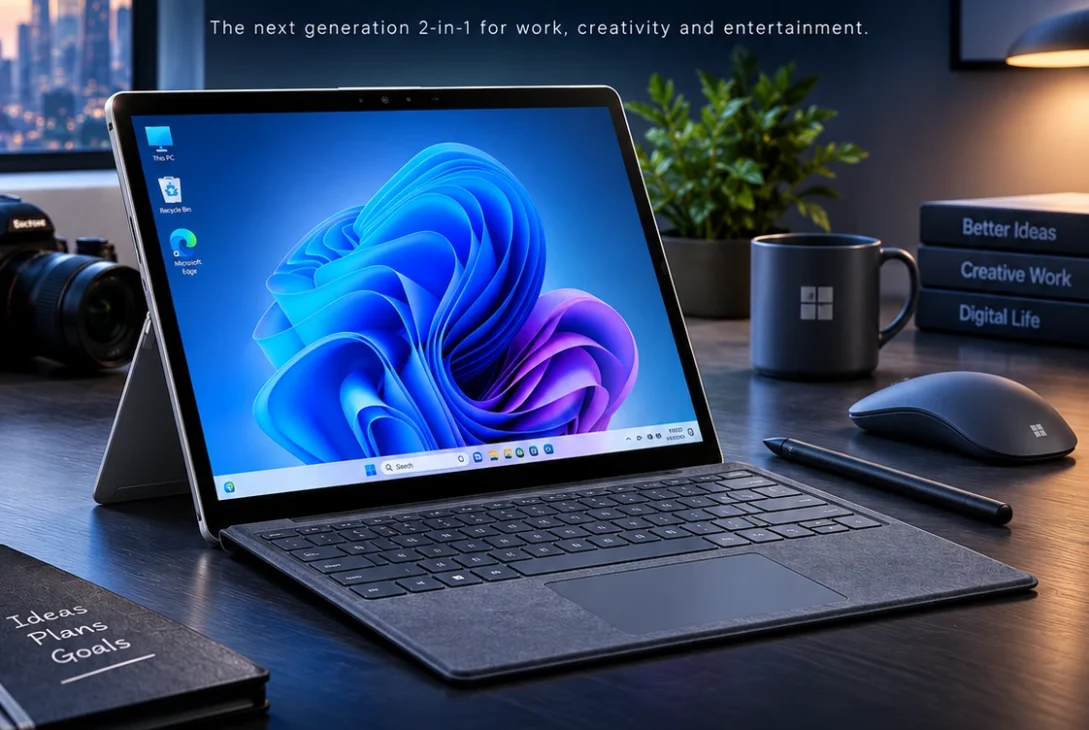
The Surface Pro 12 is Microsoft’s compact 2-in-1 Windows PC designed for people who want the flexibility of a tablet without giving up the software and productivity capabilities of a traditional laptop. The latest 2026 refresh adds Qualcomm’s Snapdragon X2 Plus processor, improved graphics performance, faster on-device AI, a brighter touchscreen, and improved battery efficiency.
Microsoft positions the device as its most portable Surface Pro, with a fanless design that can switch between tablet and laptop use. The latest version starts at $1,149.99 and is scheduled to become available from October 13, 2026, in select markets.
With its detachable keyboard, Surface Slim Pen support, Windows 11, and touchscreen interface, the Surface Pro 12 is aimed at students, professionals, creators, and anyone who wants a lightweight computer that can adapt to different workflows.
Table of Contents
- What Is Surface Pro 12?
- Surface Pro 12 Design
- Display and Touchscreen
- Snapdragon X2 Plus Performance
- RAM and Storage
- Battery Life
- AI Features
- Ports and Connectivity
- Keyboard and Surface Slim Pen
- Windows 11 Experience
- Surface Pro 12 for Students
- Surface Pro 12 for Work
- Surface Pro 12 for Creators
- Gaming Performance
- Surface Pro 12 vs Traditional Laptop
- Surface Pro 12 vs MacBook Air
- Price and Availability
- Pros and Cons
- Is Surface Pro 12 Worth Buying?
- Frequently Asked Questions
- Final Verdict
- SEO Details
What Is Surface Pro 12?
The Surface Pro 12 is a 2-in-1 Windows computer from Microsoft that combines tablet portability with laptop-style productivity.
Instead of permanently attaching the keyboard, Microsoft allows users to remove it completely. This makes the device useful for typing documents at a desk, taking notes with a pen, watching videos in tablet mode, or drawing directly on the touchscreen.
The newest generation uses Qualcomm’s Snapdragon X2 Plus processor and maintains the lightweight, fanless design of the smaller Surface Pro family.
Microsoft says the latest generation delivers up to 17% faster Office productivity performance, more than 60% faster graphics, and up to 95% faster local AI inference compared with the previous generation.
That makes the device more interesting than a simple cosmetic refresh.
Surface Pro 12 Design
One of the biggest strengths of the Surface Pro 12 is its physical design.
The device is built around a tablet-style body with an integrated kickstand. When you need a laptop-like setup, the detachable keyboard connects to the bottom.
When you want a tablet, you can remove the keyboard and use the touchscreen independently.
The fanless construction is also important.
Without a traditional cooling fan, the computer can remain quiet during everyday workloads. Microsoft designed the Snapdragon X2 Plus version specifically around efficient performance and portable computing.
The new model retains the compact form factor while introducing a Black color option alongside other Surface finishes. Microsoft also says the enclosure uses 86% recycled content.
Display and Touchscreen
The Surface Pro 12 uses a 12-inch PixelSense touchscreen with a 3:2 aspect ratio.
The display is designed for both touch and traditional Windows applications, making it suitable for documents, browsing, note-taking, presentations, and creative work.
The latest refresh increases brightness to 500 nits, which Microsoft says is 25% brighter than the previous version.
The 3:2 aspect ratio is also useful for productivity.
Compared with a traditional 16:9 display, the taller screen provides more vertical space for documents, websites, spreadsheets, and coding windows.
For artists and students, touchscreen support adds another advantage because the display can be used with the Surface Slim Pen.
Snapdragon X2 Plus Performance
Performance is one of the biggest changes in the latest Surface Pro 12.
Microsoft has moved to Qualcomm’s Snapdragon X2 Plus processor, designed specifically for thin and lightweight Windows PCs.
The processor combines CPU performance with integrated graphics and a dedicated NPU for AI workloads.
Microsoft claims:
- Up to 17% faster Office productivity
- More than 60% faster graphics
- Up to 95% faster local AI inference
- Up to 18% more efficient battery performance
These figures are Microsoft’s own comparisons and should not be treated as independent benchmark results.
For everyday work, the performance should be more than sufficient for browsing, Microsoft 365, video calls, document editing, research, and multitasking.
The more interesting question is how well Windows applications perform on the ARM platform.
RAM and Storage
The new model starts with 16GB of RAM and 256GB of storage.
Microsoft has also announced higher storage configurations, giving buyers more flexibility depending on their needs.
Sixteen gigabytes is a much more comfortable starting point for Windows 11 than an 8GB configuration.
It gives users more room for browser tabs, Office applications, communication tools, background services, and other everyday workloads.
For students, 256GB can be enough if most files are stored in cloud services.
Professionals working with large media files should consider a higher-capacity configuration.
Battery Life
Battery life is another major reason to consider the Surface Pro 12.
Microsoft rates the Snapdragon X2 Plus model for up to 15.5 hours of local video playback and up to 13 hours of active web browsing.
Actual battery life will depend on brightness, applications, network connections, workload, and power settings.
Still, the efficiency improvements are important for a device designed to be carried throughout the day.
The combination of ARM architecture and a fanless design gives the computer an advantage for portable productivity.
AI Features
The Surface Pro 12 is also designed as a Copilot+ PC.
The Snapdragon X2 Plus includes an NPU that handles certain AI workloads locally.
Microsoft says the new generation can deliver up to 95% faster on-device AI inference compared with the previous generation.
The device also introduces Microsoft Ink Canvas, an AI-powered, pen-first experience for sketching, annotating, generating images, and summarizing text directly on the canvas.
This could make the device particularly useful for students, designers, researchers, and professionals who regularly work with handwritten notes or visual ideas.
Ports and Connectivity
The compact Surface Pro 12 prioritizes portability, so its port selection is not as extensive as a traditional laptop.
The device includes two USB-C ports, allowing users to connect displays, storage devices, accessories, and other compatible hardware.
Wireless connectivity is also modern, with Wi-Fi 7 and Bluetooth 5.4 reported for the refreshed model.
For users who need many peripherals, however, a USB-C hub or docking station may still be necessary.
This is especially relevant for people who want to connect multiple monitors, wired networking, external storage, or other desktop accessories.
Keyboard and Surface Slim Pen
The detachable keyboard is central to the Surface experience.
With the keyboard attached, the device behaves much more like a conventional laptop. Remove it, and the computer becomes a lightweight tablet.
The Surface Slim Pen adds another layer of functionality.
Students can use it for handwritten notes, while designers can use it for sketching and annotations.
The ability to switch between typing and pen input is one of the main advantages of a 2-in-1 design.
However, buyers should remember that Microsoft traditionally sells the keyboard and pen separately on many configurations, so the actual cost of a complete setup can be higher than the advertised base price.
Windows 11 Experience
The Surface Pro 12 runs Windows 11, giving users access to the full desktop Windows environment rather than a mobile operating system.
That means users can install traditional desktop applications, use Microsoft 365, browse with desktop browsers, manage files, connect peripherals, and work across multiple windows.
However, ARM compatibility remains an important consideration.
Many major applications now support Windows on ARM natively, but some specialized applications and older software may still rely on emulation.
Before buying, professionals should check whether their most important applications are fully compatible with Windows on ARM.
Surface Pro 12 for Students
For students, the Surface Pro 12 can be an attractive option because it combines several devices into one.
A student can use it as a laptop for:
- Essays
- Research
- Presentations
- Web browsing
- Microsoft 365
- Online classes
- Video meetings
Then the keyboard can be removed for:
- Reading
- Note-taking
- Drawing
- Annotating PDFs
- Watching lectures
Its relatively compact design also makes it easier to carry between classes.
The main concern is price. Once the keyboard and pen are added, the total cost can become significantly higher than the base device price.
Surface Pro 12 for Work
Professionals who travel frequently may appreciate the combination of Windows productivity and tablet flexibility.
The device can handle everyday business tasks such as email, documents, spreadsheets, presentations, web applications, video conferencing, and research.
Its lightweight design also makes it practical for people who frequently move between offices, meetings, airports, and home workspaces.
For demanding professional workloads, however, buyers should carefully evaluate software compatibility and performance requirements before purchasing an ARM-based Windows computer.
Surface Pro 12 for Creators
The touchscreen and pen support make the Surface Pro 12 appealing to creative users.
It can be useful for:
- Sketching
- Digital notes
- Photo annotations
- Concept development
- Basic image editing
- Graphic design
- Presentations
- Content planning
However, professional creators should be more careful.
Applications such as advanced video editing, 3D software, and specialized creative tools can have different levels of ARM support.
If your workflow depends heavily on Adobe or other demanding professional applications, check current ARM compatibility before purchasing.
Gaming Performance
The Surface Pro 12 is not primarily designed as a gaming PC.
The Snapdragon X2 Plus provides improved integrated graphics performance, but the device lacks a dedicated gaming GPU.
Casual games and some less demanding titles may work well, while demanding modern AAA games are not its main purpose.
For serious gaming, a dedicated gaming laptop or desktop remains a better option.
The Surface is better suited to users who prioritize portability, productivity, touchscreen functionality, and battery efficiency.
https://blogs.windows.com/devices/2026/09/23/introducing-surface-pro-12-inch-and-surface-laptop-13-inch-with-snapdragon-x2
Surface Pro 12 vs Traditional Laptop
The biggest difference between the Surface Pro 12 and a traditional laptop is flexibility.
A conventional laptop is usually better when you spend most of your time typing.
The Surface becomes more attractive if you regularly want:
- Tablet mode
- Pen input
- Touchscreen interaction
- Detachable keyboard
- Lightweight portability
- Windows desktop software
The trade-off is that a traditional laptop often provides more ports, a more stable keyboard base, and better value once accessories are included.
Surface Pro 12 vs MacBook Air
The Surface Pro 12 and MacBook Air target users who want lightweight computers, but they take very different approaches.
MacBook Air offers a traditional clamshell design with Apple’s silicon and macOS.
Surface focuses on Windows 11, touchscreen input, a detachable keyboard, and pen support.
Choose Surface if you value:
- Windows applications
- Touchscreen interaction
- Tablet mode
- Pen support
- Detachable keyboard
Choose a MacBook Air if you prefer:
- macOS
- Traditional laptop design
- Apple’s ecosystem
- A built-in keyboard and trackpad
- Strong battery efficiency
For many users, the decision comes down more to operating system and form factor than raw performance.
Price and Availability
Microsoft lists the new Surface Pro 12-inch with Snapdragon X2 Plus at a starting MSRP of $1,149.99.
The company says availability begins October 13, 2026, in select markets.
That starting price is higher than the original smaller Surface Pro configuration launched in 2025.
The additional cost becomes more important when buyers add Microsoft’s keyboard and Surface Slim Pen.
For that reason, shoppers should compare the price of the complete setup rather than looking only at the tablet’s base MSRP.
Pros and Cons
Pros
- Lightweight 2-in-1 design
- Detachable keyboard
- Touchscreen support
- Surface Slim Pen compatibility
- Snapdragon X2 Plus processor
- Improved graphics performance
- Dedicated AI processing
- 16GB RAM starting configuration
- Wi-Fi 7
- Fanless operation
- Strong claimed battery life
Cons
- Keyboard costs extra
- Pen costs extra
- Limited physical ports
- ARM software compatibility can vary
- Not designed for serious gaming
- Complete setup can become expensive
Is Surface Pro 12 Worth Buying?
The Surface Pro 12 makes the most sense for users who genuinely want a hybrid Windows device.
If you want a conventional laptop and rarely use touch or pen input, a standard Windows laptop may offer better value.
But if you want one device that can work as a laptop, tablet, digital notebook, and lightweight creative tool, Microsoft’s design becomes much more compelling.
The new Snapdragon X2 Plus processor also makes the refreshed model more interesting than the previous generation.
Microsoft’s claimed improvements in graphics, Office performance, AI processing, and battery efficiency could make the latest version a meaningful upgrade for people who prioritize portability.
Frequently Asked Questions
What is Surface Pro 12?
It is Microsoft’s compact 2-in-1 Windows PC with a detachable keyboard, touchscreen, kickstand, and Surface Slim Pen support.
How much does Surface Pro 12 cost?
The new Snapdragon X2 Plus model starts at $1,149.99 in the US according to Microsoft’s announced MSRP.
When is Surface Pro 12 available?
Microsoft says the refreshed 12-inch model becomes available starting October 13, 2026, in select markets.
What processor does Surface Pro 12 use?
The refreshed 2026 model uses Qualcomm’s Snapdragon X2 Plus processor.
How much RAM does Surface Pro 12 have?
The new base configuration starts with 16GB of RAM.
Does Surface Pro 12 have a touchscreen?
Yes. It uses a PixelSense touchscreen designed for both finger and pen input.
Does Surface Pro 12 support a pen?
Yes. It supports the Surface Slim Pen for handwriting, drawing, annotation, and other touch-based tasks.
Is Surface Pro 12 good for students?
Yes. Its lightweight design, Windows software, touchscreen, pen support, and detachable keyboard make it useful for school and university work.
Can Surface Pro 12 run Photoshop?
Windows on ARM supports many creative applications, but software compatibility can vary. Users who depend on specific Adobe workflows should verify current ARM support before purchasing.
Is Surface Pro 12 good for gaming?
It is better suited to productivity and casual gaming than demanding AAA gaming. Users looking for serious gaming performance should consider a dedicated gaming laptop or desktop.
Does Surface Pro 12 come with a keyboard?
The keyboard is generally sold separately, so buyers should factor the accessory cost into the total purchase price.
Final Verdict
The Surface Pro 12 is one of Microsoft’s most interesting compact Windows computers because it combines tablet flexibility with the functionality of a full Windows PC.
The latest Snapdragon X2 Plus refresh improves the formula with faster graphics, better claimed AI performance, improved efficiency, a brighter 500-nit touchscreen, and a 16GB RAM starting configuration.
Its biggest strength remains versatility.
You can type with the detachable keyboard, write with the Surface Slim Pen, browse in tablet mode, and use Windows desktop applications when you need a traditional PC experience.
The biggest drawbacks are the accessory costs, limited ports, ARM compatibility considerations, and relatively high price.
For students, mobile professionals, and users who genuinely want a laptop-tablet hybrid, the Surface Pro 12 is a compelling option. For buyers who simply want the best-value conventional laptop, there are likely better choices.