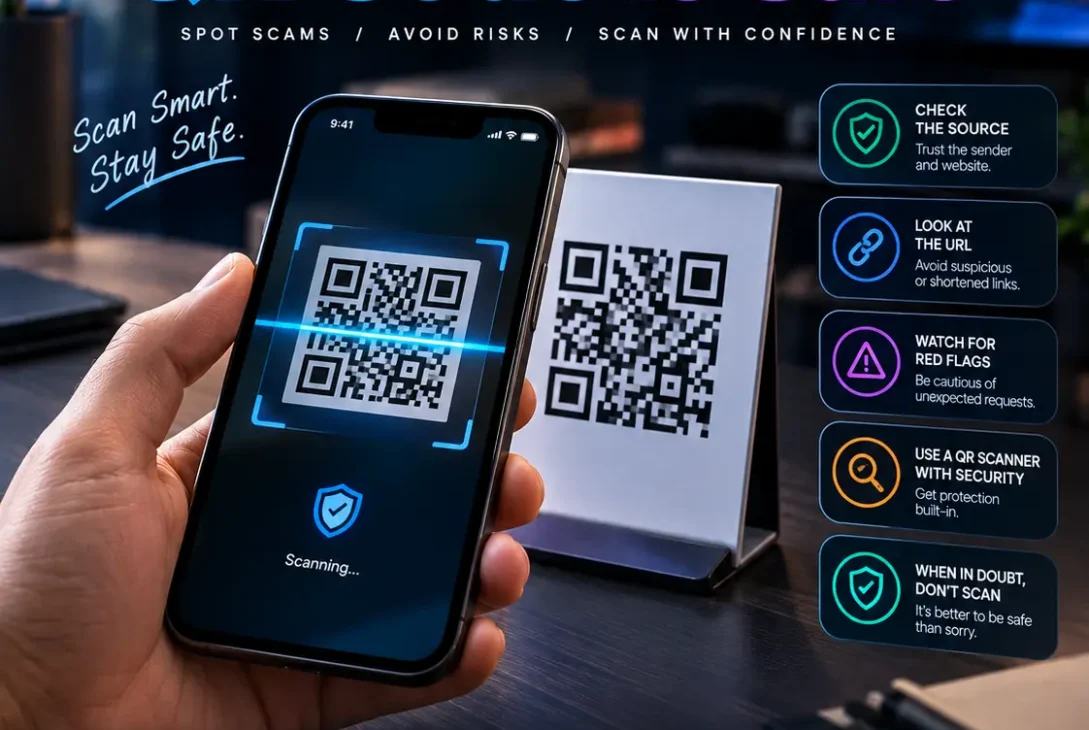
QR codes make everyday tasks easier. You can scan one to open a website, view a menu, pay a bill, download an app, or access event information. Unfortunately, scammers can also use QR codes to hide dangerous links, imitate trusted companies, and steal passwords or payment details. Learning how to check if a QR code is safe helps you use this technology without trusting every code you encounter.
A QR code is simply a way to store information. Understanding how to check if a QR code is safe is important because the pattern itself does not reveal whether its destination is legitimate. It may contain a website address, contact details, or another action. The risk usually comes from the destination and what you do after scanning. A code can look professional and still lead to a fake login page or fraudulent payment website.
The Federal Trade Commission warns that scammers use QR codes to direct people to spoofed websites or malicious downloads. Microsoft has also described QR codes as a method used in phishing campaigns. The safest approach is to preview the destination, verify it independently, and avoid sharing sensitive information with an unfamiliar website.
Table of Contents
- Why QR Codes Can Be Dangerous
- How to Check If a QR Code Is Safe
- 11 Ways to Identify a Suspicious QR Code
- What to Do After Scanning a Suspicious Code
- Can Scanning a QR Code Hack Your Phone?
- QR Code Safety on iPhone and Android
- Common QR Code Scams
- Frequently Asked Questions
- Final Verdict
- SEO Details
Why QR Codes Can Be Dangerous
A QR code hides its contents inside a square pattern. Until your phone reads it, you usually cannot tell which website or action it represents just by looking at the image. That makes QR codes convenient, but it also gives scammers a way to disguise malicious links.
This technique is often called QR code phishing, or quishing. A criminal may put a fake code in an email, text message, public place, parking notice, restaurant menu, or package. The code might open a page designed to steal account credentials, ask for a payment, or encourage an unsafe download.
Knowing how to check if a QR code is safe begins with separating the act of scanning from the decision to trust the destination. Scanning a code does not automatically mean your phone has been hacked. The greater risk often appears when you open a suspicious page, enter information, install an app, grant permissions, or authorize a payment.
How to Check If a QR Code Is Safe
Start by previewing the destination and confirming that it matches what you expected. Don’t rush just because the code is printed on an official-looking sign or arrives in a message with a familiar logo.
1. Preview the Link Before Opening It
Use your phone’s built-in camera or QR reader to scan the code, but don’t immediately tap the link that appears. Most modern phones show a website address or action first.
Read the address carefully. Look for unfamiliar domains, spelling mistakes, unexpected words, or links that have nothing to do with the organization that supplied the code. If the destination looks suspicious, close the preview and do not continue.
This is the first practical step in how to check if a QR code is safe: inspect where the code wants to take you before opening anything. Make this a routine whenever a code comes from an unfamiliar source.
2. Verify the Website Domain
Scammers often register domains that resemble legitimate websites. They might replace a letter, add a word, or use a domain name that sounds official without belonging to the real company.
Check the actual hostname, not just the brand name visible in the URL. If you expect a bank’s website but the link leads to an unrelated domain, stop. Open the bank’s official app or type its known address yourself instead.
A padlock icon or HTTPS connection does not prove that a website is legitimate. When deciding how to check if a QR code is safe, treat encryption as one technical detail, not proof that the organization is genuine.
3. Be Cautious With Shortened Links
A shortened URL can conceal the final destination. Short links are not automatically malicious, but they make it harder to judge a website before opening it.
If a QR code leads to an unfamiliar shortened address, verify the source and intended destination through a separate, trusted channel. Do not enter passwords, payment information, or verification codes simply because the link came with a convincing message.
4. Inspect Printed Codes for Tampering
Scammers may place a sticker over a legitimate QR code at a parking meter, restaurant, payment terminal, or public noticeboard. Before scanning a printed code, check whether it appears to have been replaced.
Look for a sticker layered over another label, damaged paper, mismatched branding, unusual placement, or instructions that do not fit the location. If anything seems wrong, ask an employee or contact the organization using a verified number.
5. Don’t Trust a Code Because It Looks Professional
Logos, colors, and polished layouts can be copied. A QR code on a well-designed flyer is not automatically safe, and an email that appears to come from a familiar company may still be fraudulent.
Consider whether the request makes sense. Anyone researching how to check if a QR code is safe should question unexpected urgency rather than letting a message pressure them into acting.
Be suspicious of urgent warnings, unexpected prizes, account suspension threats, or demands to scan immediately. The context matters as much as the appearance of the code.
6. Treat Unexpected Emails and Texts Carefully
An unexpected QR code in an email or text message deserves the same caution as an unfamiliar link. Be especially careful if it asks you to reset a password, verify your identity, confirm a payment, or fix a delivery problem you were not expecting.
Instead of scanning the code, open the company’s official app or website yourself. This independent route is one of the simplest ways to apply how to check if a QR code is safe in real life.
If the message claims to be from a bank, courier, employer, or government agency, contact that organization through a trusted channel.
7. Verify Payment Details Before Approving
QR codes are often used for contactless payments, but a fake code can redirect money to a scammer. Before confirming a transaction, check the recipient name, merchant details, and amount shown in your payment app.
If the recipient does not match the person or business you intended to pay, cancel the transaction. This payment check is a practical part of how to check if a QR code is safe before money leaves your account.
Do not rely on instructions printed next to the code if the payment details look wrong. Contact the merchant independently to confirm the correct method.
8. Avoid Unknown App Downloads
Some QR codes open pages that ask you to download an app or file. Do not install software simply because a code says it is required for a delivery, payment, security check, or account verification.
Find the app through your phone’s official app store or the developer’s verified website. Check the developer name and requested permissions. If the download is unexpected, close the page rather than trying to see what the file does.
9. Keep Your Phone and Apps Updated
Install security updates for your phone’s operating system, browser, and applications. Updates help address known vulnerabilities, although they cannot block every phishing attempt.
You generally do not need a third-party QR scanner to read ordinary codes. Built-in tools make how to check if a QR code is safe simpler because you can preview the destination without installing another app.
Avoid installing unfamiliar scanning apps promoted by a suspicious page.
10. Use URL-Checking Tools With Care
Reputable security services may help identify links associated with known threats, but no tool can guarantee that every destination is safe. A newly created fraudulent website may not yet be listed in a security database.
If you use a link-checking service, inspect the URL before submitting it. Avoid uploading private links that contain access tokens, personal information, or confidential business details to a public scanner.
A clean result is not proof that a site is trustworthy. No tool can replace the basic checks involved in how to check if a QR code is safe.
11. Never Enter Sensitive Details on an Unverified Site
A QR code may lead to a convincing imitation of a bank, email provider, social network, or payment service. Do not enter passwords, one-time verification codes, card details, or personal information unless you have verified the website.
If a page asks for information unexpectedly, close it. This rule is central to how to check if a QR code is safe because a fake page may be designed to look almost identical to a genuine service.
Open the service using its official app or a known address. When in doubt, do not continue.
What to Do After Scanning a Suspicious Code
The right response depends on what happened after the scan. If you only scanned the code and saw a preview, close it and avoid opening the link. If you opened a website but did not interact with it, close the page and don’t download anything or grant permissions.
If you entered a password, visit the legitimate service directly and change it immediately. Change the same password anywhere else you reused it, and enable multifactor authentication where possible. If you entered work credentials, report the incident to your IT or security team.
If you supplied payment-card details or sent money, contact your bank or payment provider through its official app or verified phone number. Ask about blocking the card, securing the account, or disputing a transaction. Keep relevant messages and transaction records.
If you installed an unfamiliar app, avoid opening it again. Review your installed apps and permissions, remove suspicious software where possible, and use trusted technical support if you notice unusual device behavior. Don’t panic, but act promptly if you shared credentials or financial information.
Can Scanning a QR Code Hack Your Phone?
Simply scanning a QR code does not normally give someone complete control of your phone. In many cases, the code opens a website that tries to persuade you to share information, download software, or approve a transaction.
Risk can increase if you install a malicious app, grant dangerous permissions, enter credentials on a fake login page, or encounter a vulnerability in outdated software. That’s why how to check if a QR code is safe is really about checking the destination and deciding what actions are appropriate.
Keep your device updated, avoid untrusted downloads, and treat unexpected requests for sensitive information as a warning sign.
https://www.fbi.gov/investigate/cyber/alerts
QR Code Safety on iPhone and Android
On iPhone
- Open the Camera app and point it at the code.
- Review the link or action shown on screen.
- Check the domain before opening the destination.
- Avoid unfamiliar downloads and unexpected login requests.
- Use the official app or known website for sensitive accounts.
Keep iOS updated and be cautious with links received in messages.
On Android
- Open the Camera app or your phone’s built-in QR scanner.
- Point it at the code and preview the destination.
- Inspect the website address for misspellings or unexpected domains.
- Avoid installing APK files or apps from unfamiliar websites.
- Keep Android and your apps updated.
Exact menu names vary by phone model and software version. On both platforms, the basic rule is the same: Learning how to check if a QR code is safe does not require a special app, just careful inspection and sensible habits. Preview the link, verify the destination, and only proceed if you trust it.
Common QR Code Scams
- Fake parking payments: A fraudulent sticker redirects payments to a scammer.
- Delivery messages: A code claims you must pay a fee or resolve a delivery issue.
- Account verification: A fake sign-in page steals passwords or verification codes.
- Restaurant menus: A code redirects customers to an unrelated site or payment page.
- Unexpected packages: A code on an unsolicited parcel lures recipients to a malicious destination.
- Fake giveaways: A code promises a prize in exchange for personal or financial information.
Be cautious when a code creates urgency or asks for an action you did not expect. Verify the request independently before continuing.
Frequently Asked Questions
How to check if a QR code is safe before scanning?
If you’re learning how to check if a QR code is safe, remember that you generally cannot confirm a destination by looking at the image alone. Scan it with a built-in reader, preview the link without opening it, inspect the domain, and verify the source.
Can a QR code contain a virus?
A QR code can direct you to a website or download associated with malicious content. Scanning alone does not necessarily infect a phone, but unsafe downloads, permissions, or software vulnerabilities can create risks.
Is it safe to scan QR codes with my phone camera?
Using your phone’s built-in camera is generally sensible. Still, check the destination before opening it and avoid entering sensitive information on unfamiliar websites.
How can I tell if a QR code payment is fake?
Check the recipient and amount shown by your payment app before confirming. If the details do not match the intended business or person, cancel and verify the payment method independently.
What is QR code phishing?
QR code phishing, sometimes called quishing, uses QR codes to direct people to fraudulent websites or malicious destinations. The goal may be to steal credentials, payment information, or other sensitive data.
What should I do if I scanned a suspicious QR code?
Close the page and do not enter information or download files. If you entered a password, change it through the legitimate service. If you shared payment details or sent money, contact your bank promptly.
Do I need a separate QR code scanner app?
Usually not. Many modern phones can scan QR codes using built-in camera or system features. Avoid downloading unfamiliar scanner apps simply because a website or message recommends one.
Can a QR code steal my bank details automatically?
A QR code does not normally reveal your bank password by itself. It can, however, lead to a fake banking page or payment flow that tricks you into sharing information or approving a transaction.
Final Verdict
Knowing how to check if a QR code is safe helps you avoid fake websites, phishing attempts, and fraudulent payments. Preview the destination, inspect the domain, be wary of unexpected codes, verify payment recipients, and never enter sensitive details on a site you do not trust.
Keep your phone updated and use official apps or known website addresses for important accounts. If you scan a suspicious code, close the page and assess whether you entered information, installed an app, or approved a payment. Take action based on what happened.
If someone asks you how to check if a QR code is safe, emphasize the destination, the sender, and the action the page requests. The safest approach is simple: scan cautiously, verify the destination, and think before you tap.