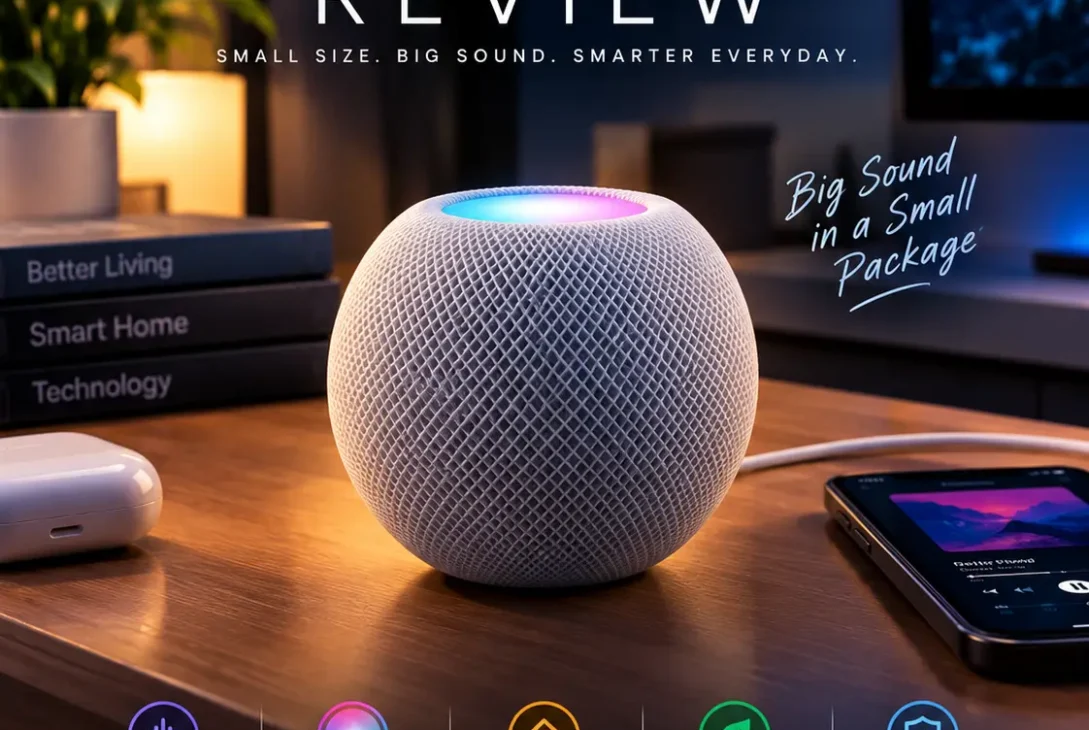
The HomePod mini review question is simple: can Apple’s small smart speaker deliver good sound, useful Siri features, and reliable smart-home control without costing as much as a full-sized speaker? The HomePod mini has been around since 2020, but its compact design, Apple ecosystem integration, and smart-home capabilities continue to make it an interesting option for iPhone users.
At just 3.3 inches tall, the speaker fits easily on a desk, bedside table, kitchen counter, or bookshelf. It offers 360-degree audio, voice control through Siri, multiroom playback, and support for compatible smart-home accessories. It can also recognise certain sounds, including smoke and carbon monoxide alarms, in supported configurations.
However, it isn’t perfect. Android users won’t get the same experience as iPhone owners, Siri has limitations compared with some competing assistants, and the speaker doesn’t include a built-in battery.
In this HomePod mini review, we’ll examine sound quality, design, features, smart-home compatibility, pricing, privacy, advantages, disadvantages, and whether it makes sense to buy one in 2026.
Table of Contents
- What Is the Apple HomePod mini?
- HomePod mini Design and Build Quality
- Sound Quality: How Good Is It?
- Siri and Voice Assistant Features
- Smart Home Features and Compatibility
- Connectivity and Apple Ecosystem
- HomePod mini Price and Availability
- Privacy and Security
- HomePod mini Pros and Cons
- HomePod mini vs Amazon Echo
- Is the HomePod mini Worth Buying in 2026?
- Frequently Asked Questions
- Final Verdict
- SEO Details
What Is the Apple HomePod mini?
The Apple HomePod mini is a compact smart speaker designed for music playback, voice assistance, and smart-home control. It combines a small speaker with microphones, wireless connectivity, and Apple’s Siri assistant.
Unlike a traditional Bluetooth speaker, it is designed to work primarily through Wi-Fi and Apple’s ecosystem. You can ask Siri to play music, set timers, create reminders, control compatible lights, check supported information, and interact with other Apple devices.
Apple introduced the original model in 2020. Its official specifications list a full-range driver, dual passive radiators, computational audio, four microphones, and a custom acoustic waveguide that produces a 360-degree sound field. <Cite refs={[“turn195833search0″,”turn195833search3”]}/>
The main appeal is convenience. Instead of opening an app every time you want to play a song or control a smart device, you can use your voice.
For iPhone owners, the HomePod mini review is particularly relevant because many of its most useful features depend on Apple’s software and services.
HomePod mini Design and Build Quality
The HomePod mini has a rounded, compact shape covered in acoustically transparent mesh fabric. Its understated appearance allows it to blend into different rooms without taking up much space.
Apple lists the dimensions as approximately 3.3 inches high and 3.9 inches wide, with a weight of 345 grams. That makes it easy to place on a bedside table, office desk, kitchen counter, or bookshelf. <Cite refs={[“turn195833search0”]}/>
Colours and Touch Controls
The current official specifications list several finishes, including White, Blue, Orange, Yellow, and Midnight. Colour availability can vary by country and retailer.
The illuminated touch surface on top provides simple controls:
- Tap to play or pause.
- Double-tap to skip forward.
- Triple-tap to skip backward.
- Touch and hold to activate Siri.
- Tap or hold the volume controls to adjust playback.
These controls are useful when you don’t want to speak a command or when the room is too noisy for voice recognition.
Is the Design Practical?
The small size is one of the speaker’s biggest advantages. You can put it almost anywhere near a suitable power outlet without dedicating an entire shelf to it.
However, the compact shape comes with one important limitation: the HomePod mini is not a portable, battery-powered speaker. It needs its power adapter to operate, so it isn’t intended for outdoor listening or taking music to places without an electrical outlet.
Sound Quality: How Good Is It?
Sound quality is the most important part of any smart-speaker purchase. For a device this small, the HomePod mini produces surprisingly full audio, particularly for casual listening in bedrooms, offices, and smaller living spaces.
Apple uses a full-range driver, dual passive radiators, and computational audio to help balance playback. Its acoustic waveguide distributes sound around the speaker, giving it a more consistent listening experience from different positions in a room. <Cite refs={[“turn195833search0″,”turn195833search1”]}/>
Bass and Music Playback
The passive radiators help the speaker produce more noticeable bass than its size might suggest. Pop, acoustic music, podcasts, and everyday playlists can sound enjoyable without needing a separate subwoofer.
However, don’t expect the deep, powerful bass of a large bookshelf speaker or a dedicated subwoofer. If you regularly listen to bass-heavy electronic music at high volumes, you may want a larger audio system.
Vocals and Clarity
Vocals are generally a strong use case for a compact speaker. Podcasts, spoken-word content, radio, and casual music playback benefit from its clear presentation.
That makes it suitable for background listening while working, cooking, studying, or relaxing.
Can It Fill a Large Room?
The speaker’s 360-degree design helps spread audio around a room, but physical size still matters. It can work well in a bedroom or modest living area, while a large open-plan space may benefit from a larger speaker or multiple units.
For a more immersive stereo setup, Apple allows users to pair two compatible HomePod speakers of the same model in the same room. Two HomePod mini units can create left and right audio channels, but you cannot use a mini and a full-size HomePod as a conventional stereo pair. <Cite refs={[“turn195833search0″,”turn195833search1”]}/>
Overall, sound is one of the strongest reasons to consider the device, provided you have realistic expectations about its size.
Siri and Voice Assistant Features
Siri is central to the HomePod mini experience. You can use voice commands to control music, set timers, create reminders, ask supported questions, and manage compatible smart-home devices.
For example, you can ask Siri to play a particular artist, set a cooking timer, add an item to a shopping list, or turn off a compatible light.
Music and Podcasts
The speaker supports Apple Music, Apple Podcasts, radio sources, and audio streamed from compatible Apple devices. Apple also supports certain third-party music services, although availability and functionality depend on the service and your region. <Cite refs={[“turn195833search1″,”turn195833search2”]}/>
If you already use Apple Music, voice-controlled playback is one of the most convenient features. You can request songs, artists, albums, playlists, and other supported content without touching your phone.
AirPlay is also useful when you want to play audio from a compatible iPhone, iPad, Mac, or Apple TV.
Voice Recognition and Personal Requests
The HomePod mini can recognise the voices of up to six family members for supported personalised experiences. Depending on settings, this can help Siri provide individual music preferences and access certain personal information through compatible Apple apps.
Personal Requests require appropriate setup and permissions. Families should review these settings carefully if they share a speaker.
Where Siri Falls Short
Siri is useful for common tasks, but it may not answer every complex question as effectively as a dedicated AI assistant or a smartphone-based chatbot.
It is best suited to everyday voice commands, playback, reminders, and smart-home actions. If your main priority is advanced conversational AI, research, or complicated multi-step requests, the HomePod mini may not be the right device on its own.
Smart Home Features and Compatibility
The HomePod mini is more than a speaker. It can also serve as a home hub for supported Apple Home and compatible Matter smart-home accessories.
This lets users control supported devices through Siri or Apple’s Home app. Depending on the accessories installed, you may be able to turn lights on and off, adjust a thermostat, check a supported sensor, or activate a predefined scene.
Temperature and Humidity Sensors
Apple lists temperature and humidity sensors among the device’s features. These can provide useful readings and support automations when configured with compatible software and accessories.
For example, a smart-home setup might use temperature information to trigger an automation. The actual result depends on your accessories, configuration, and the supported features available in your region.
Thread and Matter Support
The speaker includes Thread networking technology, which can help compatible smart-home devices communicate within a supported network. It also supports home-hub functionality for compatible Apple Home and Matter accessories. <Cite refs={[“turn195833search0″,”turn195833search1”]}/>
Before buying any smart-home product, check its compatibility label and the manufacturer’s requirements. Not every device works with every ecosystem, and some features may require a separate bridge or hub.
Sound Recognition
Apple also lists sound recognition for smoke and carbon monoxide alarms. In supported configurations, the speaker can notify you when it detects these sounds.
This feature should be treated as an additional alert, not a replacement for properly installed, maintained, certified smoke or carbon monoxide detectors.
For people already building an Apple smart home, these capabilities add considerable value beyond listening to music.
Connectivity and Apple Ecosystem
The HomePod mini is designed to work most naturally with Apple products. Setup requires a compatible iPhone, iPad, or iPod touch running supported software, along with Wi-Fi access. Apple’s technical specifications list Wi-Fi, Bluetooth 5.0, Thread, and an Ultra Wideband chip. <Cite refs={[“turn195833search0″,”turn195833search3”]}/>
Handoff and AirPlay
One convenient feature is audio handoff. You can bring a compatible iPhone close to the speaker to transfer supported audio between devices.
AirPlay also lets you send audio from compatible Apple devices to the speaker. If you have multiple compatible speakers, you can play audio in different rooms or group speakers for a more connected listening experience.
Does It Work With Android?
The experience is not designed around Android. You won’t get the same straightforward setup and native integration available to iPhone users.
If your household mostly uses Android phones, Google Nest or Amazon Echo devices may be easier to manage.
The HomePod mini review verdict therefore depends heavily on your existing devices. For Apple users, integration is a major advantage; for people outside the ecosystem, it can become a limitation.
HomePod mini Price and Availability
The HomePod mini’s price varies by country, retailer, discounts, and stock availability. Check Apple’s official store or an authorised retailer for the current local price before purchasing.
When comparing prices, remember that the original model was introduced in 2020. A discount can make it attractive, but it is worth comparing the price with other smart speakers and checking whether a newer model has officially been announced.
Rumours about a next-generation HomePod mini have circulated, but leaked information should not be treated as confirmed product specifications. Check Apple’s official product page for any announced successor before making a purchase. <Cite refs={[“turn195833search1″,”turn195833news52”]}/>
Is It Worth Buying at a Discount?
A lower price can make the speaker a compelling option for an iPhone user who wants music, Siri, and smart-home control in a small package.
However, don’t buy it solely because it is an Apple product. Compare its features with less expensive speakers, especially if you don’t use Apple Music, Apple Home, or AirPlay.
Also remember that some music services require their own subscriptions. The hardware price does not automatically include every streaming service or paid feature.
Privacy and Security
Smart speakers raise understandable questions about microphones and personal information. Apple’s design uses microphones to listen for the supported Siri activation phrase or touch activation.
Apple says requests are associated with a random identifier rather than directly linked to an Apple Account in the same way a conventional account record might be. Privacy behavior can depend on the request, feature, and settings, so review Apple’s current privacy documentation for details. <Cite refs={[“turn195833search1”]}/>
What Should You Check?
Before using the speaker, review Siri history and privacy controls, personal-request settings, and permissions for connected smart-home accessories.
You should also think about where the speaker is placed. A shared living room may be suitable for voice commands, while a private workspace might require more careful consideration.
No connected device should be treated as completely risk-free. Keep your Apple devices updated and use strong account security.
HomePod mini Pros and Cons
Pros
- Compact design fits on desks, shelves, and bedside tables.
- Impressive sound for a speaker of its size.
- 360-degree audio distribution.
- Convenient Siri voice commands.
- Works with AirPlay and compatible Apple devices.
- Supports multiroom audio and stereo pairing with a matching speaker.
- Includes temperature and humidity sensors.
- Supports Thread and compatible smart-home accessories.
- Offers sound recognition for supported smoke and carbon monoxide alarms.
Cons
- Requires continuous power and is not battery-powered.
- Best experience depends on using Apple’s ecosystem.
- Siri has limitations for complex questions.
- Bass and maximum output cannot match larger speakers.
- Some streaming services require separate subscriptions.
- Smart-home compatibility depends on the accessory and its requirements.
- Buyers should check for official product updates before paying full price for an older model.
HomePod mini vs Amazon Echo
The HomePod mini and Amazon Echo speakers serve similar purposes, but their strengths differ.
The HomePod mini is especially appealing to people who use iPhones, Apple Music, AirPlay, and Apple Home. It offers a compact design and easy integration with compatible Apple devices.
Amazon Echo speakers generally make more sense for users who prefer Alexa, Amazon services, or a broader range of Alexa-compatible smart-home products. Google Nest speakers may also be a good alternative for households that rely on Google services.
There is no single winner for everyone. Compare the exact models, current prices, music services, smart-home requirements, and voice-assistant features before choosing.
If your home is already built around Apple products, the HomePod mini has a clear ecosystem advantage. If your household uses Android and Alexa-compatible accessories, a competing speaker may offer better value.
Is the HomePod mini Worth Buying in 2026?
The HomePod mini can still be worth buying in 2026 if you want a compact smart speaker and understand its limitations.
It makes the most sense for iPhone users who regularly listen to music, use Siri, and want to control compatible smart-home devices. Its small size also makes it practical for bedrooms, kitchens, and workspaces where a large speaker would be unnecessary.
However, the age of the original model matters. If a successor is officially announced or available in your market, compare the new hardware and price before deciding. If the current model is heavily discounted, it may be a better value than waiting for an unconfirmed product.
For Android users, buyers who want portable battery-powered audio, or people seeking a highly advanced conversational AI assistant, other products may be a better fit.
Frequently Asked Questions
Is the HomePod mini worth buying?
Yes, particularly for iPhone users who want music playback, Siri, and smart-home control in a compact speaker. Its value depends on the local price and how much you use Apple’s ecosystem.
Does the HomePod mini have good sound quality?
It produces balanced, room-filling sound for its size. However, it cannot match the bass or output of larger speakers designed for bigger rooms.
Can the HomePod mini work without an iPhone?
Initial setup requires a compatible Apple device. After setup, many everyday functions can work independently, but management and some features still rely on Apple’s ecosystem and settings.
Does the HomePod mini support Spotify?
Audio from supported services can be streamed using compatible methods such as AirPlay. The exact experience depends on the service’s current support and region.
Can I use two HomePod mini speakers together?
Yes. Two HomePod mini speakers can be configured as a stereo pair in the same room. They can also participate in supported multiroom audio setups.
Does the HomePod mini work with Android phones?
It isn’t designed for native Android integration. Android users should compare Google Nest or Amazon Echo speakers if they want a more seamless experience.
Does the HomePod mini need Wi-Fi?
Yes, Wi-Fi internet access is part of Apple’s listed system requirements. Some playback methods and features may have different requirements, but it is not a conventional standalone Bluetooth speaker.
Does it have a battery?
No. The HomePod mini needs external power, so it isn’t intended for portable use without an outlet.
Is a new HomePod mini coming?
Reports and leaks may suggest future hardware, but they aren’t confirmation. Check Apple’s official announcements and product page for verified release information.
https://www.apple.com/homepod-mini/
Final Verdict
The Apple HomePod mini remains a capable compact smart speaker with good sound for its size, convenient Siri controls, and useful integration with Apple’s ecosystem. Its strongest features are not just music playback but also AirPlay, multiroom audio, voice commands, and smart-home support.
The biggest drawbacks are its dependence on external power, limited appeal for Android users, and Siri’s limitations for more complicated requests. Buyers should also compare current pricing and verify whether Apple has officially introduced a successor before purchasing.
Overall, the HomePod mini review verdict is positive for iPhone users who want a small speaker that can also control a compatible smart home. If you mainly want portable audio or advanced AI conversations, consider alternatives. If you already use Apple Music, Siri, and Apple Home, the HomePod mini can still be a useful addition to your home.