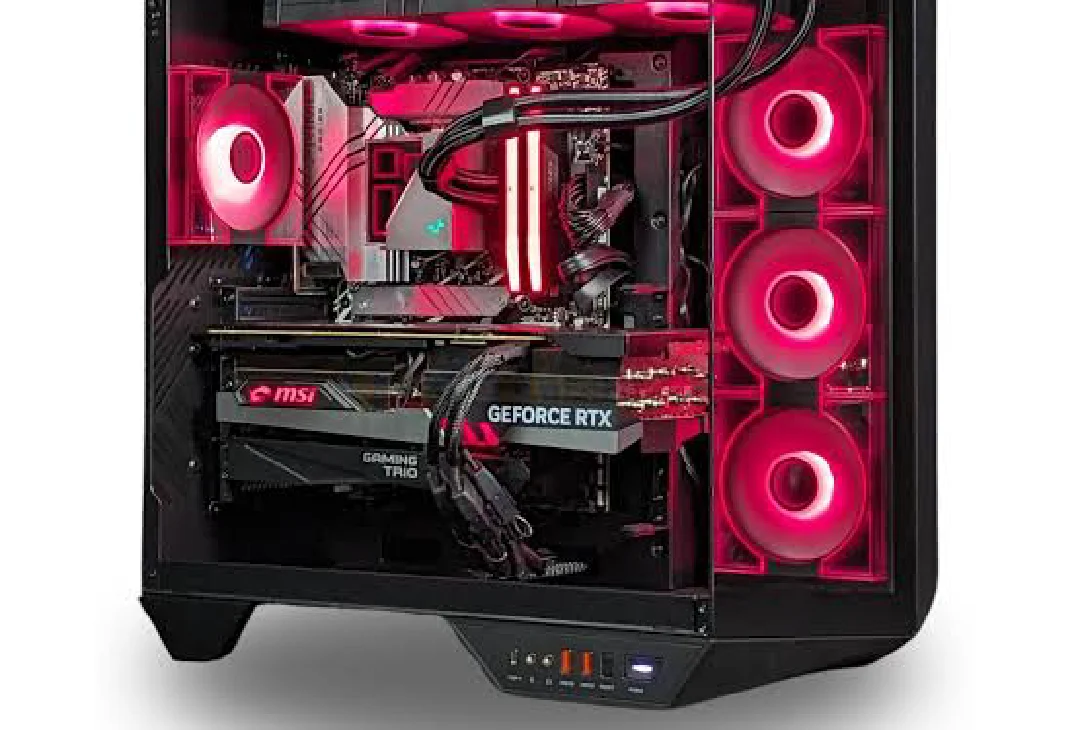
Gaming no longer requires spending thousands of dollars on premium hardware. Thanks to modern processors and graphics cards, a budget gaming PC can deliver excellent performance in popular games without breaking the bank. Whether you’re interested in competitive esports titles, open-world adventures, or casual gaming, choosing the right components allows you to enjoy smooth gameplay at an affordable price.
A well-balanced budget gaming PC focuses on performance where it matters most. Instead of paying for expensive hardware that many gamers never fully utilize, budget builds prioritize value, offering the best possible frame rates for every dollar spent. Today’s entry-level and mid-range components are far more capable than those from just a few years ago, making PC gaming more accessible than ever.
In this guide, you’ll learn everything about choosing the best budget gaming PC, including recommended hardware, performance expectations, upgrade paths, buying tips, and whether it’s better to build your own system or purchase a prebuilt gaming computer.
Table of Contents
- What Is a Budget Gaming PC?
- Why Choose a Budget Gaming PC?
- Essential Components
- Best Processor Options
- Choosing the Right Graphics Card
- RAM and Storage Recommendations
- Motherboard and Power Supply
- Cooling and PC Case
- Build vs Prebuilt
- Performance Expectations
- Comparison Table
- Buying Guide
- Pros and Cons
- Final Thoughts
What Is a Budget Gaming PC?
A budget gaming PC is a computer designed to provide solid gaming performance while keeping costs under control. Instead of using the most expensive processors and graphics cards, these systems focus on components that deliver the best balance of price and performance.
A budget gaming PC is capable of handling many popular games such as Fortnite, Valorant, Counter-Strike 2, Minecraft, Rocket League, Apex Legends, League of Legends, and GTA V at enjoyable frame rates.
Depending on your budget, many affordable gaming PCs can also play newer AAA titles at medium or high settings in 1080p resolution.
Why Choose a Budget Gaming PC?
Many people assume gaming PCs must be expensive, but that’s no longer true. A carefully selected budget gaming PC offers excellent gaming performance while leaving room for future upgrades.
One of the biggest advantages is flexibility. Unlike many gaming consoles, desktop PCs allow users to replace components individually as technology improves. You can upgrade the graphics card, install more RAM, or add larger SSD storage without replacing the entire computer.
Another benefit is versatility. Besides gaming, a budget gaming PC can also handle:
- School assignments
- Office work
- Web browsing
- Programming
- Streaming
- Photo editing
- Light video editing
- Content creation
For many users, a gaming PC becomes both an entertainment system and a productivity machine.
Essential Components of a Budget Gaming PC
Choosing balanced hardware is the key to building an efficient budget gaming PC. Spending too much on one component while ignoring others often creates performance bottlenecks.
The main components include:
- Processor (CPU)
- Graphics Card (GPU)
- Motherboard
- RAM
- SSD Storage
- Power Supply (PSU)
- PC Case
- Cooling System
Each part plays an important role in overall gaming performance.
Best Processor Options
The processor controls game logic, multitasking, and overall system responsiveness. A strong CPU ensures your budget gaming PC performs smoothly across both games and everyday applications.
Excellent processor choices include:
AMD Ryzen 5 Series
AMD Ryzen 5 processors provide outstanding value for gamers. They offer multiple cores, excellent multitasking capabilities, and strong gaming performance without requiring a premium budget.
These processors are particularly suitable for gamers who also stream or perform light content creation.
https://www.amd.com/
Intel Core i5 Series
Intel Core i5 processors continue to be among the most popular choices for affordable gaming systems. Modern Core i5 chips provide fast single-core performance, making them excellent for competitive games that rely heavily on CPU speed.
https://www.intel.com/
Both AMD Ryzen 5 and Intel Core i5 processors pair well with mid-range graphics cards and provide plenty of performance for 1080p gaming.
Choosing the Right Graphics Card
The graphics card has the greatest impact on gaming performance. Selecting the right GPU is one of the most important decisions when building a budget gaming PC.
Some of today’s strongest value-oriented graphics cards include entry-level and mid-range models from both NVIDIA and AMD.
A capable graphics card allows players to enjoy:
- Smooth 1080p gaming
- High frame rates
- Better visual quality
- Faster rendering
- Improved ray tracing support on supported models
When planning your budget, many builders allocate approximately 40–50% of the total system cost toward the graphics card because it directly influences gaming performance.
RAM and Storage Recommendations
Modern games require enough memory to run efficiently.
For most gamers, 16GB of DDR4 or DDR5 RAM provides an excellent balance between price and performance. While 8GB may still run some games, 16GB offers a much smoother experience for multitasking and newer game releases.
Storage is equally important. NVMe SSDs dramatically reduce loading times compared to traditional hard drives.
Recommended storage:
- 1TB NVMe SSD for games and Windows
- Additional SSD or HDD for extra storage if needed
Fast storage helps games load more quickly while improving the overall responsiveness of your budget gaming PC.
Motherboard and Power Supply
Many first-time builders focus only on the processor and graphics card, but selecting the right motherboard and power supply is just as important. A well-balanced budget gaming PC needs reliable components that support future upgrades while ensuring stable performance.
Choosing the Right Motherboard
The motherboard connects every component in your system. While expensive motherboards offer extra features, most budget gamers only need a board with good reliability and expansion options.
When selecting a motherboard, consider:
- CPU compatibility
- RAM support
- PCIe slots for future upgrades
- NVMe SSD support
- USB connectivity
- BIOS update support
For AMD processors, B650 or B550 motherboards are excellent value choices, while Intel users can consider B760 or B660 chipsets depending on their processor generation.
Power Supply (PSU)
Never cut corners on the power supply when building a budget gaming PC.
A high-quality PSU protects your hardware from voltage fluctuations and provides stable power during demanding gaming sessions.
For most affordable gaming builds, a 550W to 650W 80 Plus Bronze or Gold certified power supply offers the best balance between efficiency and future upgrade potential.
Buying a trusted PSU today can save you from costly hardware failures later.
Cooling and PC Case
Good airflow keeps temperatures under control and helps maintain consistent gaming performance.
Fortunately, a budget gaming PC doesn’t require expensive liquid cooling. Most modern processors include capable stock coolers, and many affordable aftermarket air coolers provide excellent thermal performance.
When choosing a PC case, look for:
- Mesh front panel
- Multiple fan mounting locations
- Cable management space
- GPU clearance
- Dust filters
Proper airflow improves component lifespan while reducing thermal throttling during long gaming sessions.
Build Your Own or Buy a Prebuilt Gaming PC?
One of the biggest questions buyers face is whether to build their own budget gaming PC or purchase a prebuilt system.
Building Your Own
Building a PC gives you complete control over every component.
Advantages include:
- Better price-to-performance ratio
- Higher-quality components
- Easier future upgrades
- Custom appearance
- Greater hardware knowledge
Although building may seem intimidating at first, modern PC assembly is easier than many beginners expect.
Buying a Prebuilt Gaming PC
Prebuilt gaming PCs are ideal for users who prefer convenience.
Benefits include:
- Ready to use immediately
- Professional assembly
- Manufacturer warranty
- Technical support
- Operating system pre-installed
While prebuilt systems sometimes cost slightly more, they save time and eliminate compatibility concerns.
Expected Gaming Performance
A properly configured budget gaming PC can deliver excellent gaming performance at 1080p resolution.
Performance varies depending on the graphics card and processor, but many modern systems comfortably achieve:
| Game | Expected Performance |
|---|---|
| Valorant | High settings with excellent frame rates |
| Counter-Strike 2 | High settings with smooth gameplay |
| Fortnite | Medium to High settings |
| Apex Legends | Medium to High settings |
| Rocket League | High settings |
| GTA V | Very High settings |
| Minecraft | High settings |
| League of Legends | Maximum settings |
For newer AAA games, medium or high graphics settings generally provide the best balance between image quality and frame rate.
Budget Gaming PC vs Gaming Laptop
Many buyers compare a budget gaming PC with a gaming laptop before making a purchase.
| Feature | Budget Gaming PC | Gaming Laptop |
|---|---|---|
| Gaming Performance | Excellent | Good |
| Upgradeability | Excellent | Limited |
| Cooling | Better | More Limited |
| Portability | No | Yes |
| Price-to-Performance | Better | Lower |
| Repairability | Easier | More Difficult |
| Future Upgrades | Simple | Often Limited |
| Lifespan | Longer with upgrades | Depends on hardware |
If portability isn’t a priority, a desktop gaming PC usually offers better long-term value.
Buying Guide
Before purchasing a budget gaming PC, think about how you’ll use it over the next few years.
Casual Gamers
If you mainly play esports titles like Valorant, CS2, Rocket League, or League of Legends, an entry-level graphics card paired with a Ryzen 5 or Core i5 processor will provide an excellent experience.
AAA Gamers
Players interested in modern blockbuster games should invest more heavily in the graphics card while still maintaining a balanced CPU.
Streamers
If you plan to stream while gaming, prioritize additional RAM and a multi-core processor to handle both gaming and broadcasting smoothly.
Students
Students who also game should look for systems with enough storage for coursework alongside games. A 1TB NVMe SSD is usually a practical starting point.
Future Upgrades
Choose a motherboard and power supply that leave room for future improvements. Upgrading the GPU or adding more memory later is much easier when the initial build is planned with expansion in mind.
Pros and Cons
Pros
- Excellent price-to-performance ratio.
- Easy to upgrade over time.
- Better gaming performance than most similarly priced laptops.
- Wide selection of components to fit different budgets.
- Supports modern games at 1080p with smooth frame rates.
- Suitable for gaming, school, work, and content creation.
- Faster loading times with NVMe SSD storage.
- Longer lifespan thanks to upgradeable hardware.
- Better cooling than most gaming laptops.
- Large community support for troubleshooting and upgrades.
Cons
- Not portable like a laptop.
- Requires a monitor, keyboard, and mouse if building from scratch.
- Building your own PC may be intimidating for beginners.
- High-end graphics settings may not be possible in every AAA game.
- Component prices can fluctuate depending on market demand.
Final Thoughts
A budget gaming PC proves that you don’t need an expensive setup to enjoy modern PC gaming. By selecting balanced components, you can build or buy a system that delivers excellent performance in today’s most popular games while leaving room for future upgrades.
Whether you’re a student, casual gamer, competitive esports player, or someone entering PC gaming for the first time, there are plenty of affordable hardware options that provide impressive value. A good processor, capable graphics card, sufficient RAM, and fast SSD storage work together to create a responsive gaming experience without exceeding your budget.
Before purchasing, consider the games you plan to play, your preferred graphics settings, and whether you’ll upgrade your system later. Investing in quality components such as a reliable power supply and a well-ventilated case will also improve long-term reliability.
If you’re looking for a computer that combines affordability, flexibility, and solid gaming performance, a budget gaming PC remains one of the smartest choices for gamers in 2026.
Frequently Asked Questions (FAQs)
1. What is the best budget gaming PC?
The best budget gaming PC is one that balances a modern Ryzen 5 or Intel Core i5 processor with a capable graphics card, 16GB of RAM, and a fast NVMe SSD to deliver smooth 1080p gaming.
2. How much RAM does a budget gaming PC need?
For most gamers, 16GB of RAM is the recommended amount. It provides enough memory for modern games, multitasking, and background applications without significantly increasing the overall cost.
3. Can a budget gaming PC run AAA games?
Yes. A well-configured budget gaming PC can run many modern AAA titles at 1080p using medium or high settings, depending on the graphics card and processor.
4. Is it cheaper to build or buy a budget gaming PC?
Building your own PC often provides better value because you can choose each component. However, prebuilt systems are a convenient option for users who prefer a ready-to-use computer with a manufacturer warranty.
5. How long will a budget gaming PC last?
With proper maintenance and occasional upgrades, a budget gaming PC can remain capable for several years. Upgrading the graphics card, adding more RAM, or installing additional storage can extend its lifespan even further.