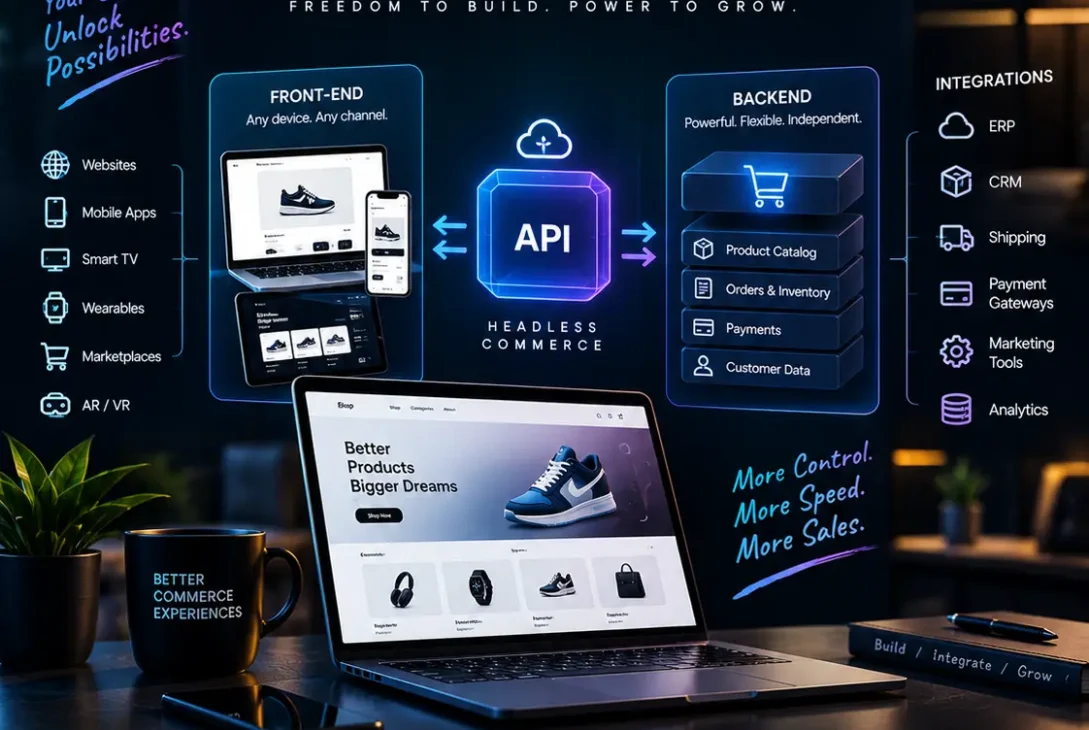
Headless commerce is changing how businesses build and manage online shopping experiences. Instead of connecting the customer-facing storefront directly to the systems that manage products, payments, and orders, this approach separates the front end from the back end and connects them through application programming interfaces (APIs).
For growing ecommerce brands in the USA and UK, this architecture offers greater freedom to design distinctive storefronts, integrate different technologies, and sell across websites, mobile apps, and other digital channels. Businesses can create tailored customer experiences without necessarily replacing their existing commerce platform.
However, headless commerce is not automatically the right choice for every online store. Although it can provide flexibility and support sophisticated digital experiences, it also introduces development costs, integration requirements, and ongoing maintenance responsibilities.
This guide explains how the architecture works, its main benefits and disadvantages, real-world examples, available platforms, and the factors businesses should consider before investing in it.
Table of Contents
- What Is Headless Commerce?
- How Headless Commerce Works
- Traditional Commerce vs. Headless Commerce
- 9 Powerful Benefits of Headless Commerce
- Challenges and Disadvantages
- Popular Headless Commerce Platforms
- How to Implement Headless Commerce
- Headless Commerce and SEO
- Who Should Use Headless Commerce?
- Frequently Asked Questions
- Final Verdict
What Is Headless Commerce?
Headless commerce is an ecommerce architecture that separates the front end of an online store from its back end.
The front end is the part customers see and interact with, including product pages, navigation menus, search boxes, shopping interfaces, and promotional content. The back end manages the underlying commerce operations, such as product information, inventory, pricing, customer accounts, carts, and orders.
In a traditional ecommerce platform, these components are often closely connected. A headless architecture allows them to operate more independently while communicating through APIs.
For example, a clothing retailer might use a custom-built website to display its products while relying on Shopify to manage inventory, checkout, and orders. The customer sees a branded shopping experience, while the commerce platform continues handling essential transactions.
This arrangement gives developers greater control over the presentation layer without requiring the business to build every commerce function from scratch.
Understanding the Front End and Back End
The two main components have different responsibilities.
Front end:
- Displays product images, descriptions, and prices.
- Controls website navigation and page layouts.
- Provides filters, search interfaces, and interactive features.
- Presents personalised recommendations and promotions.
- Adapts the shopping experience to different screen sizes.
Back end:
- Stores and manages product information.
- Tracks inventory and pricing.
- Processes orders and supports checkout.
- Manages customer accounts and business rules.
- Connects with payment, shipping, and other operational services.
APIs connect these systems so that information can move between them. The exact capabilities depend on the commerce platform and the APIs available.
Why Is It Called Headless?
The term refers to removing the traditional connection between the presentation layer, or the “head,” and the underlying commerce engine.
The commerce engine remains responsible for its core functions, but the business can build a separate interface using technologies suited to its needs.
This does not mean that the store has no website or user interface. It means the interface is developed and managed separately from the back-end commerce system.
How Headless Commerce Works
A headless store typically involves three elements: a front-end application, a commerce platform, and APIs that connect them.
1. The Customer Opens the Storefront
A customer visits the retailer’s website using a desktop browser or mobile device. The front end loads the appropriate page layout, product imagery, navigation, and content.
The presentation layer may be developed using technologies such as React, Next.js, or other supported web frameworks.
2. The Front End Requests Commerce Data
When the customer opens a product page, the front end requests relevant information through an API.
The request might include a product identifier or collection name. The commerce platform returns the information permitted by the API, such as product details, available variants, prices, and inventory-related data.
The front end then presents this information to the customer.
3. The Customer Adds a Product to the Cart
When a shopper selects a size and clicks the add-to-cart button, the front end sends a request to the appropriate commerce service.
The back end validates the request and updates the cart according to its business rules. The interface then displays the updated cart.
4. Checkout and Order Processing Take Place
When the customer is ready to purchase, the storefront directs them to a supported checkout experience or uses an available checkout integration.
The commerce platform or connected services handle the relevant transaction processes, depending on the implementation.
This separation allows the retailer to customise much of the shopping journey while retaining established commerce capabilities.
A Simple Headless Commerce Example
Imagine a UK skincare brand that sells products through a website, a mobile application, and interactive displays in selected retail locations.
Rather than creating separate product databases for every channel, the business can use a central commerce platform and connect each customer-facing interface through APIs.
Product details and prices can be managed centrally, while each channel offers an experience suited to its audience.
The website might emphasise editorial content, the mobile app might prioritise repeat purchases, and in-store displays might focus on product discovery. All three experiences can use the same underlying commerce services where the platform supports them.
Traditional Commerce vs. Headless Commerce
Traditional and headless architectures can both support successful ecommerce businesses. The main difference is how closely the storefront is connected to the commerce back end.
| Feature | Traditional Commerce | Headless Commerce |
|---|---|---|
| Front-end design | Often based on platform themes | Independently developed or managed |
| Customisation | Depends on platform capabilities | Greater control over the presentation layer |
| Development | Often simpler to launch | Usually requires additional technical work |
| Integrations | May rely on built-in apps and plugins | Often uses APIs and dedicated integrations |
| Maintenance | Can be managed within one platform | May require managing multiple systems |
| Multiple channels | Depends on available sales channels | Can support custom interfaces across channels |
| Initial cost | Often lower | Often higher |
| Technical expertise | May require limited coding | Usually requires stronger development skills |
Which Approach Is Easier to Manage?
A traditional platform is often easier for smaller businesses because themes, plugins, checkout, and product management may be available within one environment.
A headless setup can be more flexible, but the business becomes responsible for additional decisions about hosting, deployment, APIs, testing, and monitoring.
Neither architecture guarantees better performance or higher sales. Results depend on implementation quality, the chosen platform, the customer experience, and ongoing optimisation.
9 Powerful Benefits of Headless Commerce
1. Greater Design Freedom
One of the main advantages of headless commerce is the ability to build a storefront without being restricted to a platform’s standard presentation system.
Businesses can create distinctive product pages, interactive product demonstrations, custom navigation, and specialised buying experiences.
For example, a furniture retailer might build a product configurator that lets customers select materials, colours, and dimensions before adding an item to the cart.
A traditional platform may also support custom designs, but the available options depend on its themes, extension system, and development capabilities. Headless architecture offers another route when those capabilities are insufficient.
2. More Control Over Website Performance
Website performance affects usability, conversion opportunities, and search visibility. A custom front end allows developers to make deliberate choices about page rendering, caching, image delivery, and the amount of JavaScript loaded.
A carefully engineered storefront can reduce unnecessary code and improve the experience on mobile devices.
However, headless architecture does not automatically make a website faster. Poor API design, excessive client-side rendering, slow third-party services, or inefficient data requests can create new performance problems.
Businesses should measure actual page performance before and after implementation rather than assuming that a technology change will produce improvements.
3. Omnichannel Selling Opportunities
Customers increasingly interact with businesses through different digital touchpoints. These may include websites, mobile applications, in-store kiosks, and other connected experiences.
Headless commerce allows businesses to build different interfaces around shared commerce services.
A retailer could use a website for product discovery, an app for loyalty benefits, and a kiosk for assisted ordering. Where the platform provides suitable APIs, these experiences can use shared product information and commerce operations.
This can help businesses maintain consistent information across channels while adapting the interface to each environment.
4. Greater Personalisation
A flexible front end can support personalised product recommendations, targeted landing pages, and different shopping experiences for different customer groups.
For example, a returning customer might see recently viewed products, while a first-time visitor sees category guides and introductory offers.
Personalisation still requires reliable data, appropriate consent practices, and suitable integration with customer data or marketing systems. The architecture provides flexibility, but it does not create useful customer insights by itself.
5. More Flexible Technology Choices
Headless architecture allows businesses to select separate technologies for different responsibilities.
A retailer might use one service for ecommerce, another for content management, a dedicated search provider, and a separate analytics system. APIs connect the relevant components.
This flexibility can help a business keep an existing commerce platform while modernising its storefront.
The trade-off is that each additional system creates another integration to configure, secure, test, and maintain. Technology choices should be based on actual business requirements rather than the number of tools a company can connect.
6. Independent Front-End Development
When the front end and back end are separated, developers can often update the storefront without making corresponding changes to the commerce engine.
A marketing team could request a new campaign landing page or an improved product comparison interface while the underlying inventory and order-management systems remain unchanged.
Independent development can shorten the path from an idea to a release when the organisation has appropriate workflows and technical skills.
However, changes that affect API contracts, checkout behaviour, or shared data may still require coordinated updates.
7. Improved Content and Commerce Integration
Content plays an important role in many online shopping journeys. Buyers may need buying guides, product comparisons, tutorials, and educational articles before deciding what to purchase.
A business can connect a headless content management system (CMS) with its commerce platform so that editorial content and product data appear together.
For example, a technology retailer could publish a laptop buying guide that displays current product prices and available configurations alongside its recommendations.
A headless CMS and a headless commerce platform are different tools: the former manages content, while the latter provides commerce functionality. Connecting them allows each system to focus on its main responsibility.
8. Support for Business Growth
As a business expands into additional markets or channels, it may need new storefront experiences, languages, payment methods, or fulfilment integrations.
Headless architecture can provide a foundation for these changes without requiring every interface to use the same presentation system.
For example, a US retailer entering the UK market might create a localised storefront with appropriate currency, delivery information, and product messaging while continuing to use shared commerce services where supported.
Successful expansion still depends on platform capabilities, tax and compliance requirements, fulfilment operations, and the quality of integrations.
9. More Freedom to Experiment
Businesses often need to test different product page layouts, promotional messages, navigation structures, and checkout journeys.
A separately developed front end can make these experiments easier to organise when the team has suitable analytics, testing tools, and deployment processes.
A retailer might compare two product page designs to learn whether clearer shipping information or a different image layout improves purchase completion.
Testing should be based on meaningful measurements and sufficient data. A new architecture alone does not guarantee better conversion rates.
Challenges and Disadvantages of Headless Commerce
Although the benefits can be substantial, headless commerce introduces trade-offs that businesses should evaluate before committing.
Higher Initial Development Costs
A custom storefront requires design, development, integration, testing, and deployment work. Businesses may also need specialist developers or an external agency.
Costs vary according to the platform, complexity, number of channels, required integrations, and level of customisation. There is no single price that applies to every project.
A business should estimate both implementation expenses and recurring operating costs before making a decision.
More Complex Maintenance
A headless implementation can involve separate front-end and back-end systems, each with its own releases, dependencies, security requirements, and monitoring needs.
When an integration stops working, developers may need to investigate whether the problem originates in the storefront, API, commerce platform, or another connected service.
Clear documentation, automated tests, error monitoring, and ownership of each system help reduce this risk.
Dependence on API Quality
The front end relies on APIs to retrieve product data and perform commerce actions. If an API is slow, unavailable, restricted, or missing a required feature, the customer experience can suffer.
Businesses should review API documentation, authentication methods, rate limits, versioning policies, and available support before selecting a platform.
They should also plan for failures through appropriate timeouts, caching, error handling, and fallback experiences.
Greater Demand for Technical Skills
A standard hosted storefront may allow non-technical staff to manage many tasks using a visual editor.
A custom headless storefront generally requires developers who understand the chosen framework, API integration, deployment, and performance optimisation.
Marketing teams may also need workflows that allow them to update content without submitting every change to developers. The right CMS and editing tools can help, but they must be chosen carefully.
Potential SEO Problems
Search engines must be able to access and understand important pages, including product listings and product details.
If a custom storefront renders important content only after complicated client-side JavaScript execution, indexing and rendering may become less reliable. Incorrect canonical tags, missing metadata, broken redirects, and inconsistent URLs can also create SEO issues.
These are implementation risks rather than unavoidable disadvantages. Server-side rendering, static generation where appropriate, accurate metadata, and careful technical testing can help address them.
Vendor and Integration Risks
A business may become dependent on several providers for commerce, content, search, hosting, analytics, and payments.
Changing one component can require updates to other systems. Before committing, businesses should assess data portability, API availability, contract terms, support, and the cost of replacing a provider.
Popular Headless Commerce Platforms
The right platform depends on the business model, development resources, existing systems, and expected customer experience.
Shopify
Shopify supports traditional theme-based stores and headless implementations through its Storefront API and related development tools.
Its Hydrogen toolkit helps developers build custom storefronts, while Oxygen provides hosting for supported Hydrogen deployments. Other hosting arrangements are also possible.
Shopify can be relevant to retailers that want to customise the storefront while retaining Shopify’s commerce capabilities.
Official documentation: https://shopify.dev/docs/storefronts/headless/overview
Salesforce Commerce
Salesforce provides APIs and composable storefront technologies for businesses building custom commerce experiences.
It may be worth evaluating for larger organisations that already use Salesforce products or need integrations with enterprise customer and business systems.
Implementation complexity and licensing requirements should be assessed against the project’s needs.
Official guide: https://www.salesforce.com/commerce/headless/guide/
Adobe Commerce
Adobe Commerce offers extensibility and API capabilities that can support headless implementations.
It may suit businesses with complex catalogues, product relationships, or integration requirements, depending on their technical resources and chosen deployment model.
Businesses should compare the total cost of ownership and the level of specialist support required.
Official website: https://business.adobe.com/products/magento/magento-commerce.html
BigCommerce
BigCommerce provides APIs that can support custom storefronts and integrations with other systems.
It is another option for businesses seeking a hosted commerce back end alongside a separately developed front end.
Its APIs, checkout options, pricing, and integration requirements should be evaluated against the intended architecture.
Official website: https://www.bigcommerce.com/
How to Choose the Right Platform
Compare the following factors before making a selection:
- API coverage for products, customers, carts, and checkout.
- Total implementation and maintenance costs.
- Developer tools, documentation, and support.
- Content management and marketing workflows.
- Security, access control, and compliance requirements.
- International selling, currencies, and payment support.
- Hosting options, reliability, and performance monitoring.
- Ease of migrating data or changing providers later.
The platform with the most features is not necessarily the best fit. The goal is to find a solution that meets the business’s current needs without creating unnecessary complexity.
How to Implement Headless Commerce
A successful project starts with a clear business case rather than a decision to adopt a particular framework.
Step 1: Identify the Problem
Determine what the current store cannot do effectively. The problem might involve complex product configuration, an unusual customer journey, multiple customer-facing channels, or limitations in content publishing.
If the existing storefront already meets the business’s requirements, a full migration may not be justified.
Step 2: Define the Scope
List the features required for the first release. These might include product listings, search, product details, cart functionality, checkout, customer accounts, and order confirmation.
Separate essential features from future improvements. A limited initial scope can make the project easier to estimate, test, and manage.
Step 3: Select the Commerce Platform and Front-End Stack
Choose a commerce platform that supports the necessary operations through documented APIs. Then select a front-end framework and hosting environment that match the team’s capabilities.
Review how the systems handle authentication, errors, caching, and updates.
Step 4: Plan Integrations
Map how product information, inventory, pricing, content, payments, shipping, and customer data will move between systems.
Decide which system owns each type of data to avoid conflicting updates. Define how the store should behave if a service is temporarily unavailable.
Step 5: Build and Test the Storefront
Develop the essential shopping journey before adding advanced features.
Test mobile layouts, accessibility, navigation, product variants, cart updates, checkout, and error states. Verify that prices, stock information, and promotional rules remain consistent with the commerce back end.
Step 6: Check SEO and Performance
Test page rendering, metadata, structured data, canonical URLs, redirects, sitemap coverage, and internal links.
Measure important page-loading and responsiveness metrics on representative devices. Ensure that search engines can discover and interpret key product and category pages.
Step 7: Launch in Stages
Where practical, release the new storefront to a limited audience or selected section of the catalogue first.
Monitor errors, API response times, checkout completion, customer support requests, and conversion metrics. Fix critical issues before expanding the rollout.
Step 8: Improve Based on Evidence
After launch, review customer behaviour and operational performance.
Use the results to prioritise improvements rather than adding integrations or features simply because they are technically possible.
Headless Commerce and SEO
A custom storefront can support a strong SEO strategy, but search visibility depends on implementation rather than architecture alone.
Make Important Content Accessible
Product names, descriptions, category text, and essential links should be available in a form search engines can reliably render and understand.
Server-side rendering or static generation can help deliver meaningful HTML, depending on the framework and the requirements of the store.
Manage Metadata and Canonical URLs
Every indexable product and category page should have an appropriate title, meta description, and canonical URL where needed.
Avoid creating multiple indexable URLs for the same product without a clear reason. When URLs change during migration, implement relevant redirects and update internal links.
Optimise Page Performance
Compress images, serve appropriately sized assets, minimise unnecessary JavaScript, and cache content where appropriate.
Measure Core Web Vitals and investigate the causes of poor results. A headless setup can provide performance control, but that control needs to be used effectively.
Implement Structured Data Carefully
Relevant product structured data can help search engines understand product details, such as price and availability, when the information meets their requirements.
The markup must accurately reflect the visible page content and follow current search engine guidelines. Structured data does not guarantee rich results or higher rankings.
Monitor Search Performance After Migration
Use Google Search Console to monitor indexing, search queries, clicks, impressions, and page-level issues.
Compare performance before and after the migration, taking seasonality and other changes into account. Investigate unusual drops promptly rather than assuming that the new architecture is responsible for every change.
Who Should Use Headless Commerce?
Headless commerce is most useful when a business has a clear need for a custom customer experience and the resources to support it.
It may suit:
- Established retailers with complex storefront requirements.
- Brands selling across multiple digital channels.
- Businesses with existing commerce systems that need a new front end.
- Retailers investing heavily in content-led shopping experiences.
- Organisations with developers or a reliable technical partner.
- Companies that need specialised product configuration or interactive features.
It may be unnecessary for a small business that needs a straightforward online store, standard product pages, and a reliable checkout.
For those businesses, a conventional Shopify theme, a WooCommerce store, or another established ecommerce solution may be easier and more economical to manage.
Before deciding, compare the expected business benefits with the cost of building and maintaining a separate storefront. A practical pilot can help validate whether the additional flexibility solves a real problem.
Frequently Asked Questions
1. What is headless commerce in simple terms?
Headless commerce separates the customer-facing storefront from the back-end systems that manage products, carts, and orders. APIs connect the two, allowing businesses to customise the shopping experience while retaining supported commerce services.
2. How does headless commerce work?
The storefront requests product and commerce data through APIs. The back end processes those requests and returns the appropriate information. When customers add products to carts or begin checkout, the front end communicates with the relevant commerce services.
3. Is Shopify a headless commerce platform?
Yes. Shopify supports headless commerce through APIs and tools such as Hydrogen. Businesses can build custom storefronts while using Shopify for supported commerce functions, including product management and checkout.
4. What is the difference between headless and traditional ecommerce?
Traditional ecommerce commonly connects the storefront and back end within an integrated platform. A headless approach separates those layers and connects them through APIs. The latter offers more presentation flexibility but generally requires additional technical work.
5. Is headless commerce better for SEO?
Not automatically. It can support fast, well-structured storefronts, but poor rendering, missing metadata, incorrect canonical tags, or broken redirects can harm search visibility. Technical implementation and ongoing monitoring matter more than the architecture label alone.
6. Does headless commerce improve website speed?
It can, when developers optimise rendering, caching, images, and API requests. However, a poorly implemented headless site may be slower than a well-optimised traditional store. Performance should be measured rather than assumed.
7. How much does headless commerce cost?
Costs depend on the platform, development scope, integrations, hosting, and ongoing support. A relatively simple storefront and a complex enterprise implementation can have very different budgets. Request a detailed estimate that includes maintenance and future upgrades.
8. What is the difference between headless commerce and composable commerce?
Headless commerce separates the presentation layer from the commerce back end. Composable commerce takes a broader modular approach in which businesses select and combine specialised services for different functions. A headless architecture can be part of a composable system.
9. Can a small business use headless commerce?
Yes, but it may not be economical if a standard storefront already meets the business’s needs. A small business should consider headless architecture when a specific customer experience or integration requirement justifies the added development and maintenance.
10. Which headless commerce platform should I choose?
Compare platforms based on API capabilities, checkout requirements, integrations, developer expertise, operating costs, and future growth plans. Shopify, Salesforce, Adobe Commerce, and BigCommerce are options worth evaluating, but the best fit depends on your requirements.
Final Verdict
Headless commerce gives businesses greater control over the customer-facing shopping experience by separating the storefront from the systems that manage products, inventory, carts, and orders. It can support distinctive designs, multiple sales channels, flexible integrations, and carefully optimised website performance.
However, greater flexibility comes with additional responsibilities. Development, testing, security, API management, and maintenance require time, expertise, and budget. A custom storefront will not automatically improve conversions, website speed, or search rankings.
For established retailers with complex requirements, headless architecture can be a practical way to modernise the shopping experience while retaining existing commerce capabilities. For smaller businesses with straightforward needs, a traditional ecommerce platform may provide better value and a simpler route to launch.
The most sensible decision is to identify a measurable business problem, compare the available options, and calculate the total cost of ownership before committing. Choose headless commerce when its flexibility solves a genuine problem—not simply because it is a newer technology.