If you’ve ever created a website or looked into website development, you have probably come across the term CMS. But what does it actually mean, and why do so many websites use one?
The CMS meaning is Content Management System. A CMS is software that helps people create, organize, edit, publish, and manage digital content without having to manually build every page from scratch with code.
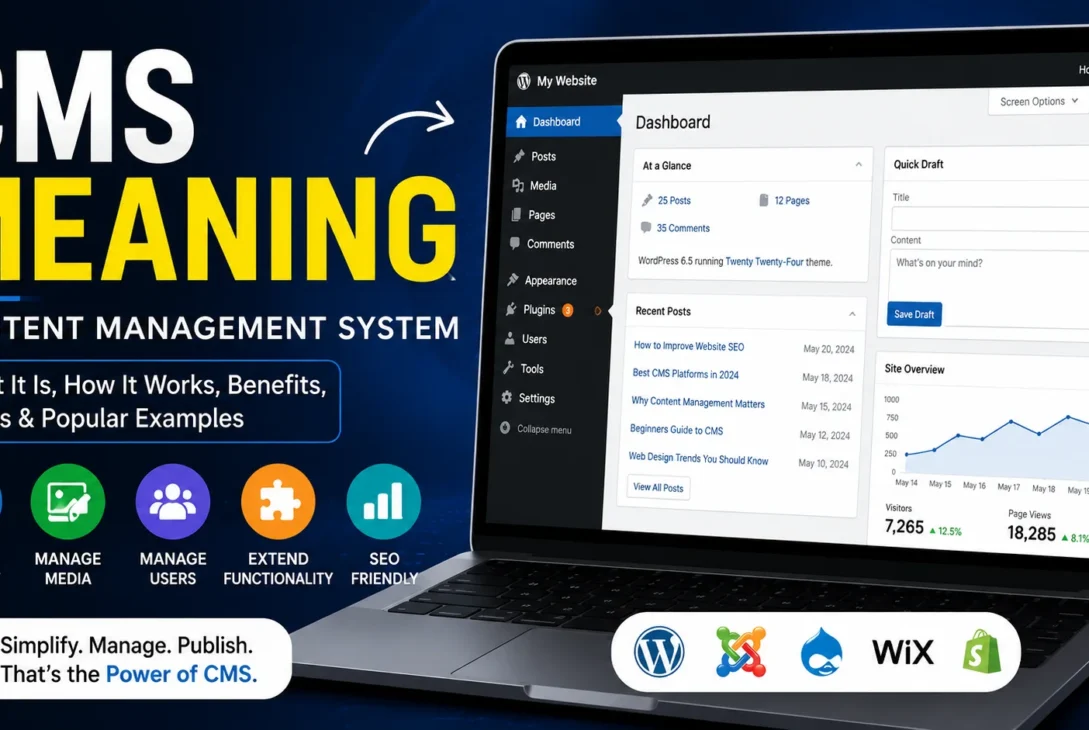
Instead of editing individual HTML files whenever you want to publish a new article, a CMS can provide an administration area where you can write content, upload images, create pages, manage users, and control other parts of a website.
This makes website management much easier for individuals, businesses, bloggers, publishers, and organizations.
What Is a CMS?
A Content Management System is a software platform used to manage digital content, most commonly website content.
The simplest way to understand a CMS is to think of it as the control center of a website.
A typical CMS can let you:
- Create web pages
- Publish blog posts
- Upload images and files
- Edit existing content
- Organize content into categories
- Manage navigation
- Add users and permissions
- Install extensions or plugins
- Change website designs
- Manage basic website settings
Without a CMS, website owners may need to edit files manually or rely heavily on a developer for routine content updates.
With a CMS, many everyday tasks can be completed through a visual dashboard.
https://wordpress.org/documentation/article/wordpress-glossary
CMS Meaning in Simple Words
In simple terms, the CMS meaning is software that helps you manage website content.
Imagine you own a news website.
Every day, you want to publish several articles.
Without a CMS, you could need to create or edit website files manually, add images, format text, update navigation, and upload everything to your server.
With a CMS, you can usually log into an administration dashboard, create a new post, add your content, upload images, and publish it.
The CMS handles many technical details in the background.
That is one of the main reasons Content Management Systems became so popular.
How Does a CMS Work?
A CMS generally separates the content you create from many of the technical components used to display that content.
When you write a blog post, the content is stored in a database or another structured storage system.
The website’s templates, themes, or front-end components determine how that information appears to visitors.
This separation makes updating content easier.
For example, you can publish a new article without manually creating a new HTML page every time.
The CMS can use an existing template and automatically display your article in the appropriate layout.
The exact architecture differs between platforms, but the basic concept remains similar.
The Main Parts of a CMS
Most CMS platforms contain several important components.
Content Management
This is the core function.
Users can create, edit, organize, and publish content.
Depending on the platform, content can include articles, pages, products, images, videos, documents, and other digital information.
Database
A database stores structured website information.
This can include content, user accounts, settings, categories, comments, and other data.
The database allows the CMS to retrieve information when a visitor opens a page.
Administration Dashboard
The dashboard is where website owners and administrators manage the website.
It may include sections for posts, pages, media, users, settings, themes, plugins, analytics, and other tools.
A well-designed dashboard allows non-developers to perform many routine tasks.
Templates or Themes
Themes and templates control how content is presented to visitors.
They can determine elements such as:
- Fonts
- Colors
- Page layouts
- Navigation
- Buttons
- Headers
- Footers
- Blog layouts
The exact terminology varies between platforms.
Plugins and Extensions
Many CMS platforms support plugins, extensions, modules, or apps.
These can add functionality without requiring developers to build every feature from scratch.
For example, a plugin might add:
- Contact forms
- SEO tools
- E-commerce features
- Security features
- Caching
- Backups
- Analytics
- Membership functionality
The availability and installation process depends on the CMS.
1. CMS Makes Website Management Easier
One of the biggest advantages of a CMS is convenience.
Website owners don’t need to understand every aspect of HTML, CSS, JavaScript, databases, and server configuration to publish basic content.
Someone running a small business website, for example, can log into the dashboard and update a service page without asking a developer to modify the page manually.
This can save time and reduce development costs for routine content management.
However, technical knowledge can still be valuable when a website requires advanced customization, troubleshooting, performance optimization, or security work.
2. CMS Supports Multiple Users
A CMS can allow multiple people to work on the same website.
For example, a company might have:
- Writers creating articles
- Editors reviewing content
- Designers managing layouts
- Administrators managing settings
- Developers handling technical changes
User roles and permissions can restrict what each person is allowed to do.
This becomes particularly important for larger websites where many people are involved in publishing content.
Instead of giving every employee complete administrative access, an organization can assign appropriate permissions based on responsibilities.
3. CMS Helps Organize Content
A growing website can quickly become difficult to manage.
Imagine a blog with thousands of articles.
Finding, categorizing, updating, and displaying those articles manually would be difficult.
A CMS can provide organizational tools such as categories, tags, taxonomies, search, menus, and content relationships.
This makes it easier for both administrators and visitors to navigate large amounts of information.
Popular CMS Examples
There are many Content Management Systems available, and they are designed for different purposes.
WordPress
WordPress is one of the best-known CMS platforms.
It can be used for blogs, business websites, news sites, portfolios, online stores, and many other types of websites.
Its large ecosystem of themes and plugins allows users to extend functionality significantly.
Joomla
Joomla is another open-source CMS that has been used for websites ranging from small projects to larger organizations.
It provides content management features and supports extensions for additional functionality.
Drupal
Drupal is a flexible CMS often associated with larger and more technically complex websites.
It provides powerful content modeling, user management, and customization capabilities.
Shopify
Shopify is primarily an e-commerce platform, but it includes CMS functionality for managing store content, pages, products, blogs, and other information.
It is particularly focused on online businesses and selling products.
Wix
Wix combines website building and content management functionality with a visual editing environment.
It is designed to make website creation accessible to users who may not have extensive development experience.
CMS vs Website Builder
The terms CMS and website builder are sometimes used interchangeably, but they aren’t exactly the same.
A CMS primarily focuses on managing and organizing content.
A website builder generally emphasizes visual website creation and ease of design.
Some modern platforms combine both approaches.
For example, a platform can provide a visual drag-and-drop editor while also offering a complete content management system.
The distinction is therefore becoming less rigid as website platforms continue to evolve.
CMS vs HTML
HTML is a markup language used to structure web pages.
A CMS is software used to manage content and often generate or serve web pages using templates and stored information.
You can build a website directly with HTML without using a CMS.
However, manually managing hundreds or thousands of HTML pages can become difficult.
A CMS provides tools that automate much of the repetitive work.
CMS vs Hosting
Web hosting and a CMS serve completely different purposes.
Hosting provides the server environment where website files and data can be stored and delivered to visitors.
A CMS provides tools for creating and managing website content.
You can think of hosting as the place where the website operates, while the CMS is the software used to manage much of what appears on that website.
Some hosted platforms combine hosting and CMS functionality into a single service, which can make the distinction less obvious to beginners.
Why Businesses Use a CMS
Businesses often need to update their websites regularly.
They may publish:
- Company news
- Blog posts
- Product information
- Service pages
- Case studies
- Press releases
- Job listings
- Documentation
A CMS allows employees to manage much of this content without modifying website code every time.
This can make the website more flexible and reduce dependence on developers for simple updates.
Is a CMS Good for SEO?
A CMS can make SEO easier, but it doesn’t automatically make a website rank well.
Many CMS platforms provide features or extensions that help with search-engine optimization.
Depending on the platform, you may be able to control:
- Page titles
- Meta descriptions
- URLs
- Headings
- Image information
- Internal links
- Sitemaps
- Structured data
However, good SEO still requires useful content, technical optimization, strong site structure, performance, and other factors.
A CMS is a tool, not a guarantee of search rankings.
Benefits of Using a CMS
A CMS can provide several practical advantages.
Easier Publishing
Content can be created and published through an administrative interface.
Faster Updates
Existing pages can often be edited without changing the underlying website manually.
Team Collaboration
Multiple users can work on content with different permissions.
Extensibility
Plugins, extensions, and integrations can add functionality.
Content Organization
Categories, tags, search, and other systems help manage large websites.
Consistent Design
Templates can help maintain a consistent appearance across pages.
Who Should Use a CMS?
A CMS can be useful for almost anyone who needs to manage website content regularly.
Bloggers can use one to publish articles.
Businesses can manage company information.
Online stores can manage products and content.
Publishers can organize large libraries of articles.
Organizations can maintain documentation and resources.
Even developers can benefit because a CMS can eliminate repetitive content-management work.
The best choice depends on the project’s requirements, budget, technical skills, scalability needs, and desired level of control.
Final Thoughts on CMS
Understanding the CMS meaning is important if you’re planning to create or manage a website.
A Content Management System provides a practical way to create, organize, edit, and publish digital content without manually managing every website file.
From WordPress and Drupal to Shopify and other platforms, different CMS solutions serve different audiences and use cases.
The right platform depends on what you want to build.
For a simple blog, an easy-to-use CMS may be enough.
For an online store, e-commerce functionality may be more important.
For a complex organization, advanced content modeling and user permissions may matter more.
The key is to choose a system that matches your actual needs rather than selecting a platform simply because it is popular.
Different Types of CMS
Understanding the CMS meaning becomes easier when you look at the different types of systems available.
Not every CMS is designed for the same purpose. Some focus on traditional websites, while others are built for online stores, enterprise publishing, or delivering content to multiple applications.
Traditional CMS
A traditional CMS manages both the content and the way that content is presented on a website.
WordPress is a common example.
You create content inside the administration area, select a theme or template, and the CMS displays that content to visitors.
This approach is relatively simple and works well for blogs, company websites, magazines, and many other projects.
Headless CMS
A headless CMS separates content management from the website or application that displays the content.
Instead of directly controlling the front end, the CMS stores content and makes it available through APIs.
Developers can then use that content in websites, mobile applications, digital displays, or other platforms.
This approach provides greater flexibility but can require more technical knowledge.
A headless system can be particularly useful for organizations that want the same content to appear across multiple digital experiences.
Open-Source CMS
An open-source CMS provides access to its source code and can often be modified or extended by developers.
WordPress, Joomla, and Drupal are well-known examples.
Open-source software can provide significant flexibility, but website owners are often responsible for managing updates, security, hosting, backups, and extensions depending on the platform and hosting arrangement.
SaaS CMS
A SaaS CMS is delivered as an online service.
The provider generally manages much of the underlying infrastructure, while the customer uses the platform through a web interface.
This can simplify setup because users don’t necessarily need to manage servers themselves.
The trade-off is that users may have less control over the underlying infrastructure compared with a self-hosted solution.
What Features Should a Good CMS Have?
When evaluating a platform, don’t focus only on the dashboard design.
A good CMS should provide the functionality required by your particular website.
Easy Content Editing
The editing experience should make it simple to create and update content.
If writers and editors find the interface confusing, publishing can become unnecessarily slow.
Media Management
Websites frequently use images, videos, documents, and other media.
A useful media library can make these assets easier to upload, organize, search, and reuse.
User Roles
A CMS should provide appropriate access controls when multiple people manage the website.
An author may only need permission to create articles, while an administrator may need access to settings and users.
SEO Features
A strong CMS can make it easier to manage important SEO elements.
However, SEO should not be the only factor used to choose a platform.
Performance
Website performance depends on many components, including hosting, themes, plugins, images, databases, caching, and code.
A CMS that supports good performance practices can make optimization easier.
Security
Security should be considered from the beginning.
A CMS should be regularly updated and supported by a responsible development ecosystem.
Extensions and plugins should also come from trustworthy sources.
How Much Does a CMS Cost?
The cost of a CMS can vary significantly.
Some platforms are open source and available without a software license fee.
That doesn’t necessarily mean running a website is free.
You may still need to pay for:
- Web hosting
- Domain registration
- Premium themes
- Plugins or extensions
- Developer services
- Maintenance
- Backups
- Security services
Hosted platforms may combine software, hosting, support, and other services into a monthly subscription.
The total cost should therefore be evaluated based on the complete website setup rather than only the software price.
Free CMS vs Paid CMS
A free CMS can be an excellent option, especially for bloggers, small businesses, and developers who want flexibility.
However, free software may still involve additional operating costs.
Paid platforms can provide managed hosting, customer support, premium functionality, or specialized features.
Neither approach is automatically better.
The right choice depends on how much control you need and how much technical responsibility you are willing to manage.
CMS Security
Security is one of the most important aspects of website management.
A CMS can contain valuable information, user accounts, business data, and administrative controls.
A compromised administrator account could give an attacker significant control over a website.
For this reason, website owners should follow basic security practices.
Use strong passwords.
Enable multi-factor authentication when available.
Keep the CMS updated.
Remove unused plugins and extensions.
Use reputable themes and extensions.
Maintain reliable backups.
Limit administrative permissions.
Monitor the website for unusual activity.
Security isn’t a single feature that you switch on once. It requires ongoing maintenance.
CMS Updates
Software updates can add features, improve compatibility, and fix security vulnerabilities.
However, updates should be handled carefully.
Before updating a production website, maintain a reliable backup.
For websites with many plugins or custom modifications, test important updates when practical.
A compatibility problem between an updated CMS and an old extension can sometimes cause unexpected behavior.
This is one reason professional websites often have maintenance processes rather than updating everything without checking.
CMS Plugins and Extensions
Plugins and extensions are among the biggest advantages of many CMS platforms.
They allow users to add functionality without developing everything from scratch.
For example, an extension can transform a basic website into an online store.
Another can add advanced forms, SEO controls, analytics, membership features, or security tools.
However, installing too many extensions can create problems.
Each additional component can introduce potential compatibility issues, performance overhead, or security risks.
Quality is more important than quantity.
Only install extensions that provide a genuine benefit to the website.
CMS Themes and Templates
Themes control the visual presentation of many traditional CMS websites.
A theme can determine the overall layout, typography, colors, navigation, and other design elements.
Changing a theme can significantly alter the appearance of a website without requiring all content to be recreated.
However, themes should also be evaluated for performance, accessibility, responsiveness, support, and update frequency.
A visually impressive theme that loads slowly can create a poor user experience.
CMS for E-Commerce
An e-commerce website has requirements that a basic blog may not need.
An online store may require:
- Product management
- Shopping carts
- Payment processing
- Customer accounts
- Order management
- Inventory
- Shipping
- Tax configuration
- Discounts
- Product categories
Some CMS platforms can support e-commerce through extensions, while others are designed specifically around online stores.
The best choice depends on the size and complexity of the business.
CMS for Blogging
Blogging is one of the simplest use cases for a CMS.
A blogger typically needs an easy editor, media management, categories, tags, search, comments or community features, and SEO controls.
A CMS can make it possible to focus on writing rather than manually constructing individual web pages.
For a content-heavy website, organization becomes increasingly important as the number of articles grows.
CMS for Large Websites
Large websites may have thousands or millions of pieces of content.
At that scale, the CMS meaning extends beyond simply having a page editor.
Organizations may need advanced permissions, content workflows, multiple languages, structured content, search, caching, APIs, analytics, and integrations with other systems.
Enterprise websites may therefore use more sophisticated platforms than a small personal blog.
CMS and Website Performance
The CMS itself is only one part of performance.
A website can be slow because of poorly optimized images, excessive plugins, inefficient code, weak hosting, database problems, third-party scripts, or other factors.
Performance optimization can include:
- Image compression
- Caching
- Content delivery networks
- Database optimization
- Efficient themes
- Lightweight plugins
- Minified assets
- Fast hosting
Choosing a CMS that supports these practices can make long-term optimization easier.
How to Choose the Right CMS
If you’re trying to understand the CMS meaning because you’re preparing to build a website, start with your actual requirements.
Ask yourself:
What type of website am I building?
A blog, business website, online store, membership platform, and enterprise portal can have very different needs.
Who will manage the content?
If non-technical users will publish content, an easy administration interface may be especially important.
How much customization do I need?
Developers may prefer a platform with extensive APIs, extensions, and source-code access.
What is my budget?
Consider the total cost of hosting, maintenance, extensions, development, and support.
How large could the website become?
A platform that works perfectly for a small site may not be ideal when the website grows significantly.
Common CMS Mistakes
One common mistake is choosing a platform solely because it is popular.
Popularity doesn’t guarantee that a system fits your project.
Another mistake is installing too many plugins.
More functionality isn’t always better.
Some website owners also ignore updates until something breaks.
Regular maintenance is much easier than recovering from a serious security or compatibility problem.
Finally, don’t choose a CMS without considering who will actually manage the website.
A technically powerful platform can become frustrating if the people responsible for publishing content cannot use it comfortably.
Is a CMS Necessary for Every Website?
No.
A small static website may not need a CMS at all.
If a site contains only a few pages and rarely changes, manually maintained files can sometimes be perfectly reasonable.
A CMS becomes increasingly useful when content changes frequently or multiple people need to manage it.
The more content a website has, the more valuable structured content management becomes.
The Future of CMS Platforms
The CMS meaning is evolving as websites become more complex.
Modern platforms are increasingly connected to APIs, artificial intelligence, mobile applications, automation tools, and multiple publishing channels.
Content is no longer limited to a single website.
A business may want the same product information to appear on its website, mobile application, customer-support system, and other digital experiences.
This is one reason headless and API-driven approaches have become more important.
At the same time, traditional CMS platforms remain popular because they provide a convenient combination of content management, design, publishing, and administration.
The best approach depends on the project.
Why CMS Knowledge Matters
Understanding the CMS meaning is useful even if you aren’t a developer.
If you own a business website, manage a blog, work in marketing, or plan to launch an online store, knowing what a CMS does helps you make better technology decisions.
You can better understand the difference between hosting, themes, plugins, website builders, and content management software.
More importantly, you can choose a platform based on your actual requirements instead of simply following recommendations without understanding them.
Frequently Asked Questions About CMS Meaning
What is the CMS meaning?
The CMS meaning is Content Management System. It refers to software that helps users create, edit, organize, and publish website content without manually managing every website file.
What does CMS stand for?
CMS stands for Content Management System. Understanding the CMS meaning helps explain how modern websites manage pages, articles, images, products, and other digital content.
What is a CMS used for?
The main purpose of a CMS is managing digital content. The CMS meaning is closely connected to creating, editing, organizing, and publishing content through an administration interface.
Is WordPress a CMS?
Yes. WordPress is one of the most widely used CMS platforms. If you’re learning the CMS meaning, WordPress is a useful example because it provides tools for publishing and managing website content.
Is a CMS the same as a website?
No. The CMS meaning describes the software used to manage content, while a website is the complete online experience visitors access.
Is a CMS the same as web hosting?
No. Hosting provides the server environment for a website, while a CMS provides tools for managing content. This distinction is an important part of understanding the CMS meaning.
Do I need coding knowledge to use a CMS?
Not necessarily. Many CMS platforms are designed so users can create and manage content without writing code. However, coding knowledge becomes useful for advanced customization.
Is a CMS free?
Some CMS platforms are available as open-source software, but running a website can still involve costs for hosting, domains, plugins, themes, maintenance, and development.
What is a headless CMS?
A headless CMS separates content management from the front end that displays the content. Instead of controlling one specific website presentation, content can be delivered through APIs to different applications and platforms.
Which CMS should I choose?
There is no single best option for every website. Your choice should depend on the type of website, required features, budget, technical skills, expected growth, security requirements, and content workflow.
CMS Meaning: Final Verdict
The simplest CMS meaning is software that makes website content easier to manage.
A Content Management System allows users to create pages, publish articles, upload media, organize information, manage users, and extend website functionality without manually editing every file.
For beginners, the CMS meaning can initially seem technical, but the basic concept is straightforward: a CMS provides the tools needed to manage digital content.
Traditional platforms such as WordPress remain popular because they combine content management with themes, plugins, and publishing tools.
Headless CMS platforms take a different approach by separating content from presentation and delivering information through APIs.
E-commerce platforms can also provide CMS functionality while adding specialized tools for products, orders, payments, and customers.
The right choice depends on what you’re building.
If you need a simple blog, an easy-to-use platform may be ideal. If you’re creating a large business website, advanced permissions and integrations may matter more. If you’re building a digital product that needs content across websites and applications, a headless approach may be worth considering.
Understanding the CMS meaning also helps you make better decisions about hosting, themes, plugins, security, SEO, and website maintenance.
Ultimately, a CMS is not just a page editor. It is the system that can organize the content and publishing workflow behind a modern website.
Key Takeaways
- CMS meaning is Content Management System.
- A CMS helps create and manage digital content.
- WordPress is a popular example of a CMS.
- CMS platforms can support pages, posts, media, users, and other content.
- Some CMS platforms support plugins and extensions.
- Headless CMS platforms separate content from presentation.
- CMS platforms can support SEO and structured content workflows.
- Hosting and a CMS are different things.
- Not every website requires a CMS.
- The best CMS depends on the website’s specific requirements.