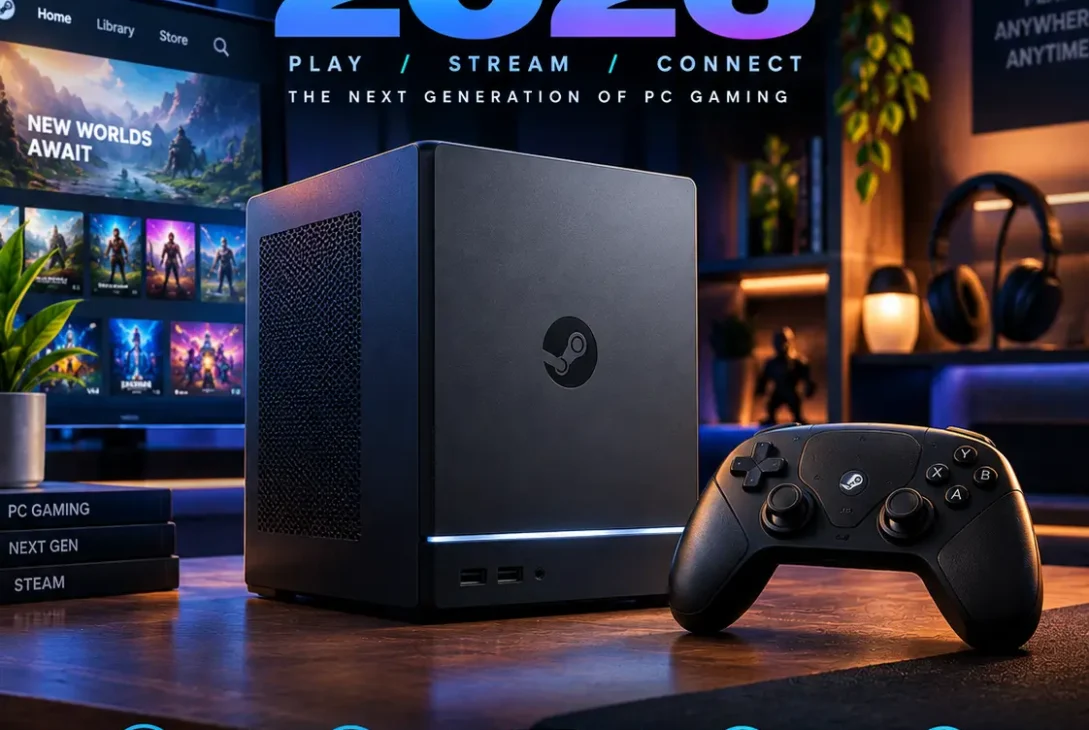
The Valve Steam Machine 2026 is finally a real gaming PC for the living room after years of speculation surrounding Valve’s return to the Steam Machine concept. Unlike the original Steam Machines released by third-party manufacturers in the mid-2010s, this new system is designed and sold directly around Valve’s SteamOS ecosystem.
The compact gaming PC combines a semi-custom AMD Zen 4 processor, a dedicated RDNA 3 graphics processor, 16GB of DDR5 memory, up to 2TB of storage, and SteamOS. Valve has designed the machine to sit underneath a television or monitor while providing access to a large Steam library through a console-like interface.
The biggest surprise surrounding the Valve Steam Machine 2026 is its pricing. Valve originally discussed a much lower target for the 512GB model, but rising memory and storage costs changed the final price considerably. The machine now starts at $1,049 for 512GB, while the 2TB version costs $1,349 before adding the optional Steam Controller.
That makes this product different from the original idea of an inexpensive SteamOS console.
So what exactly does the new machine offer, and how does it compare with a conventional gaming PC, Steam Deck, and traditional console?
Table of Contents
- What Is the Valve Steam Machine 2026?
- Valve Steam Machine 2026 Release and Availability
- Valve Steam Machine 2026 Price
- Valve Steam Machine 2026 Specifications
- Design and Build
- CPU Performance
- GPU and Gaming Performance
- RAM and Storage
- SteamOS
- Game Compatibility
- Graphics and Resolution
- Cooling and Noise
- Ports and Connectivity
- Steam Controller Support
- Upgrade Options
- Valve Steam Machine 2026 vs Steam Deck
- Valve Steam Machine 2026 vs Gaming PC
- Who Is the Steam Machine For?
- Frequently Asked Questions
- Final Verdict
- SEO Details
What Is the Valve Steam Machine 2026?
The Valve Steam Machine 2026 is a compact desktop gaming PC designed primarily for living-room gaming.
It runs SteamOS rather than Windows and connects to a television or monitor just like a traditional console.
However, it remains a PC underneath.
That means users get access to the Steam ecosystem while retaining many of the characteristics associated with desktop computers.
Valve’s SteamOS is based on Linux and provides a controller-friendly interface designed around Steam games. Valve says SteamOS provides access to the Steam library while retaining the flexibility of a PC, including access to desktop mode and additional software.
The machine is therefore positioned somewhere between a conventional console and a small-form-factor gaming computer.
Valve Steam Machine 2026 Release and Availability
Valve originally announced the new Steam Machine in November 2025 alongside the Steam Controller and Steam Frame.
The company initially planned the hardware for 2026 but faced significant uncertainty around memory and storage costs.
In early 2026, Valve said the ongoing component shortages had made pricing and availability difficult to finalize. The company had previously estimated that a 512GB model could land around the $500–$600 range, but that estimate became unrealistic as component costs increased.
Valve ultimately opened reservations in June 2026.
Because launch quantities were limited, Valve used a randomized reservation process rather than a traditional first-come-first-served queue. The company said component shortages had affected how many units it could produce.
Valve Steam Machine 2026 Price
Price is one of the most important aspects of this system.
The current configurations are:
| Model | Storage | Price |
|---|---|---|
| Base | 512GB | $1,049 |
| Base + Steam Controller | 512GB | $1,128 |
| Higher Storage | 2TB | $1,349 |
| 2TB + Steam Controller | 2TB | $1,428 |
PC Gamer reports the same US pricing, while regional pricing varies considerably.
The optional Steam Controller adds $79 when bundled with the machine, while purchasing the controller separately costs more.
The 2TB configuration also includes additional magnetic faceplates.
Why Is It More Expensive Than Expected?
Valve has attributed the higher pricing largely to the changing cost and availability of components, particularly RAM and storage.
The company originally planned the product around a different component-price environment.
As memory and storage costs increased, Valve said its original pricing target was no longer viable.
This is important because early expectations around the system were based on a much lower price.
The final product is therefore better understood as a compact gaming PC rather than a low-cost console.
Valve Steam Machine 2026 Specifications
The hardware is built around a semi-custom AMD platform.
Key specifications include:
- CPU: AMD Zen 4, 6 cores / 12 threads
- Maximum CPU clock: Up to 4.8GHz
- GPU: Semi-custom AMD RDNA 3
- GPU compute units: 28
- GPU clock: Up to 2.45GHz sustained
- Dedicated VRAM: 8GB GDDR6
- System RAM: 16GB DDR5
- Storage: 512GB or 2TB
- Operating system: SteamOS
- Wireless: Wi-Fi 6E
- Bluetooth: Bluetooth 5.x
- Video output: HDMI 2.0 and DisplayPort 1.4
- Ethernet: Gigabit Ethernet
- MicroSD: Supported
- Cooling: Single 120mm fan
PC Gamer’s testing lists the machine at approximately 15.2 × 15.6 × 16.2cm and around 2.6kg.
Design and Build
The machine uses a compact cube-shaped design.
Its relatively small footprint makes it easy to place inside a TV cabinet, entertainment center, or on a desk.
The design is intentionally understated.
Instead of looking like a traditional gaming desktop with a large tower and multiple visible fans, it resembles a small console or set-top box.
Valve also provides customizable faceplates.
The standard system uses a black exterior, while some configurations include additional faceplate options.
The compact dimensions are particularly impressive considering that the machine contains a discrete GPU with dedicated VRAM.
CPU Performance
The system uses a semi-custom AMD Zen 4 processor with six cores and twelve threads.
The CPU can reach up to 4.8GHz according to PC Gamer’s published specifications.
Six cores may sound modest compared with modern high-end desktop processors, but the machine is designed around gaming rather than workstation workloads.
For gaming, the processor should be capable of handling:
- Game logic
- NPC calculations
- Physics
- Background tasks
- Streaming
- General desktop applications
However, users should not expect the same CPU performance as a high-end desktop gaming PC equipped with a modern 12-core or 16-core processor.
The processor is designed to balance performance, heat, power consumption, and compact size.
GPU and Gaming Performance
Graphics performance is arguably the most important hardware aspect.
The system uses a semi-custom AMD RDNA 3 GPU with 28 compute units, a sustained maximum clock of approximately 2.45GHz, and 8GB of dedicated GDDR6 VRAM.
Valve has described the overall system as offering several times the performance of the original Steam Deck.
However, it is important to understand that this is not a high-end desktop GPU.
The graphics processor is designed for compact systems and living-room gaming.
That means users may need to adjust:
- Resolution
- Texture quality
- Shadow quality
- Ray tracing
- Upscaling
- Frame-rate targets
In demanding modern games, using an upscaler and sensible graphics settings can be important for maintaining smooth performance.
RAM and Storage
The system includes 16GB of DDR5 RAM.
Unlike many compact devices, the memory is replaceable, although accessing it is more complicated than upgrading a conventional desktop PC.
Storage is available in two configurations:
- 512GB
- 2TB
The system uses an NVMe SSD.
Valve also supports microSD expansion, giving users another way to store games without immediately opening the machine.
The 512GB version may become restrictive for users with large game libraries.
Modern PC games can easily consume 50GB, 100GB, or even more after updates and downloadable content.
The 2TB model therefore provides considerably more flexibility for users who plan to install many games.
SteamOS
SteamOS is one of the most important parts of the experience.
Rather than loading directly into a traditional Windows desktop, the machine provides a Steam-focused interface designed around gaming.
The interface will feel familiar to Steam Deck owners.
SteamOS supports:
- Steam Library
- Steam Cloud
- Steam Chat
- Game recording
- Controller configuration
- Desktop mode
- Proton compatibility
- Game updates
- Performance settings
Valve says SteamOS supports tens of thousands of Steam games, with the Proton compatibility layer allowing many Windows games to run on Linux.
This is a major advantage for users who want a console-style experience without giving up access to PC gaming.
Game Compatibility
Game compatibility is more complicated than simply asking whether a title is available on Steam.
Most major games work through SteamOS and Proton, but some titles can encounter issues.
Potential problems can involve:
- Anti-cheat systems
- Launchers
- DRM
- Unsupported codecs
- Specific Windows dependencies
- Game-specific bugs
Valve has expanded its Verified system so users can understand how games are expected to perform on new Steam hardware.
The company is also developing ratings specifically for Steam Machine hardware, allowing players to identify games that have been tested for the system.
This makes compatibility information particularly important for anyone buying the machine primarily for a specific game.
Graphics and Resolution
The system is designed for living-room gaming, but that does not mean every title will run at native 4K with maximum graphics settings.
Performance depends heavily on the game.
For less demanding titles, higher resolutions can be practical.
For demanding AAA games, users may need to rely on:
- 1080p rendering
- 1440p rendering
- Upscaling
- Dynamic resolution
- Reduced graphics settings
- Performance-oriented presets
Modern technologies such as AMD’s upscaling solutions can help improve perceived image quality while reducing the rendering workload.
Ray tracing is supported by the underlying architecture, but demanding ray-traced effects can have a significant performance cost.
https://store.steampowered.com/hardware/vr
Cooling and Noise
Compact gaming PCs can struggle with heat, but Valve designed the enclosure around a relatively large cooling system.
The system uses a single 120mm fan combined with a substantial internal heatsink.
PC Gamer’s review describes the machine as running relatively cool and quiet under typical use.
The larger enclosure compared with a Steam Deck provides more room for cooling hardware.
This matters during long gaming sessions because sustained performance depends partly on keeping the processor and graphics processor within their thermal limits.
Ports and Connectivity
The system provides a practical selection of ports for a living-room gaming setup.
Connectivity includes:
- HDMI 2.0
- DisplayPort 1.4
- USB Type-C
- USB Type-A
- Gigabit Ethernet
- Wi-Fi 6E
- Bluetooth
- MicroSD
The rear ports are particularly useful for permanent connections to a television, Ethernet network, keyboard, mouse, or other accessories.
Wi-Fi 6E also provides access to the 6GHz wireless band when paired with a compatible router.
For competitive online gaming, Ethernet remains useful where practical because it can provide a stable wired connection.
Steam Controller Support
Valve designed the system alongside the new Steam Controller.
The machine includes a dedicated 2.4GHz wireless adapter for Steam Controller connectivity.
Valve’s hardware ecosystem is designed so its different devices can work together, including Steam Deck, Steam Machine, and Steam Frame.
The controller is optional, however.
Users can also connect compatible third-party controllers, keyboards, mice, and other PC accessories.
That flexibility is one of the differences between this system and a traditional closed console.
Upgrade Options
One advantage of the machine being a PC is that some components can be upgraded.
The most accessible upgrade is storage.
The system includes an M.2 slot and supports both the included storage configurations and compatible replacement drives.
MicroSD expansion is also available.
RAM can be replaced as well, although Valve has indicated that memory replacement is more involved than storage replacement.
The ability to upgrade storage is particularly useful because modern game installations are becoming increasingly large.
Valve Steam Machine 2026 vs Steam Deck
The Valve Steam Machine 2026 and Steam Deck share the same basic software philosophy, but they serve completely different purposes.
Steam Deck is designed primarily as a portable gaming PC.
The new machine is designed for stationary living-room gaming.
| Feature | Steam Machine | Steam Deck |
|---|---|---|
| Form factor | Compact desktop | Handheld |
| CPU | Zen 4, 6-core | Custom AMD APU |
| GPU | RDNA 3, 28 CU | Integrated RDNA 2 |
| Dedicated VRAM | 8GB GDDR6 | Shared system memory |
| System RAM | 16GB DDR5 | 16GB LPDDR5 |
| Storage | 512GB / 2TB | Multiple configurations |
| OS | SteamOS | SteamOS |
| Main use | TV/monitor gaming | Portable gaming |
The desktop system has a much more powerful graphics setup because it uses a dedicated GPU with separate VRAM.
That makes it better suited to higher-resolution gaming.
The Steam Deck, however, has the major advantage of portability.
Valve Steam Machine 2026 vs Gaming PC
A conventional gaming PC provides more flexibility.
Users can select their own:
- CPU
- GPU
- RAM
- SSD
- Motherboard
- Power supply
- Case
- Cooling system
The compact Valve system sacrifices some of that flexibility in exchange for a simpler experience.
Its advantages include:
- Small footprint
- Preconfigured hardware
- SteamOS
- Console-style interface
- Living-room design
- Integrated Steam ecosystem
- Controller-friendly experience
A traditional PC offers broader hardware choices and easier upgrades.
The choice therefore depends heavily on whether the user values convenience and compact design or maximum customization.
Who Is the Steam Machine For?
The system is aimed primarily at users who want PC gaming in a console-like form.
It can make sense for someone who:
- Already owns a large Steam library
- Wants to play PC games on a TV
- Prefers SteamOS over Windows
- Wants a compact gaming computer
- Doesn’t want to build a PC
- Wants access to PC graphics settings
- Uses a controller for most games
It may be less suitable for users who want the highest possible performance per dollar, extensive hardware customization, or workstation-level CPU performance.
Frequently Asked Questions
What is the Valve Steam Machine 2026?
The Valve Steam Machine 2026 is a compact SteamOS gaming PC designed for living-room gaming. It uses a custom AMD CPU and RDNA 3 GPU and provides direct access to the Steam ecosystem.
How much does the Valve Steam Machine cost?
The 512GB model starts at $1,049, while the 2TB version costs $1,349. Models bundled with the Steam Controller cost $1,128 and $1,428 respectively.
What GPU does the Steam Machine use?
It uses a semi-custom AMD RDNA 3 graphics processor with 28 compute units, up to approximately 2.45GHz sustained clock speed, and 8GB of dedicated GDDR6 VRAM.
How much RAM does it have?
The machine includes 16GB of DDR5 system memory.
Can you upgrade the Steam Machine?
Yes. Storage can be replaced, and the system supports microSD expansion. The DDR5 memory is also replaceable, although accessing it is more involved.
Does the Steam Machine run Windows?
It ships with SteamOS rather than Windows. SteamOS is Valve’s Linux-based gaming operating system.
Can it play Windows games?
Many Windows games can run through Valve’s Proton compatibility layer, although compatibility varies between titles.
Does it support 4K gaming?
The hardware can output to high-resolution displays, but actual game performance at 4K depends on the title and graphics settings. Demanding games may require upscaling or reduced settings.
Does the Steam Machine include a controller?
The controller is optional. Valve sells configurations with and without the Steam Controller.
Is the Steam Machine portable?
It is compact enough to move relatively easily, but it is a desktop gaming PC rather than a handheld. It requires external power and a display.
Can you connect a keyboard and mouse?
Yes. The system includes USB ports and supports standard PC peripherals.
Does it have Wi-Fi?
Yes. The machine supports Wi-Fi 6E.
Does it support Steam Deck games?
Many games that work on Steam Deck can also work on the desktop system because both use SteamOS and Proton. However, compatibility should still be checked for individual titles.
Final Verdict
The Valve Steam Machine 2026 represents a different approach to PC gaming.
Instead of asking users to build a desktop, install Windows, configure drivers, and connect a large gaming tower to their television, Valve has created a compact system centered around SteamOS.
Its hardware is considerably more powerful than Steam Deck’s, particularly because of the dedicated RDNA 3 GPU and 8GB of GDDR6 VRAM.
The 16GB DDR5 memory, 512GB or 2TB SSD options, microSD support, and upgradeable components also give the system useful flexibility.
However, the final pricing is an important part of the story. At $1,049 for the entry-level configuration, the machine is no longer positioned as an inexpensive alternative to every conventional gaming PC. Valve itself said memory and storage cost increases made its original pricing target impossible.
Its main appeal is therefore the combination of SteamOS, compact hardware, living-room usability, PC game access, and Valve’s integrated ecosystem.
For someone who already has a large Steam library and wants a console-like PC gaming experience, the hardware provides a straightforward route to that setup.
For enthusiasts who prioritize maximum performance, custom hardware, or the ability to choose every component themselves, a conventional desktop remains a different type of proposition.