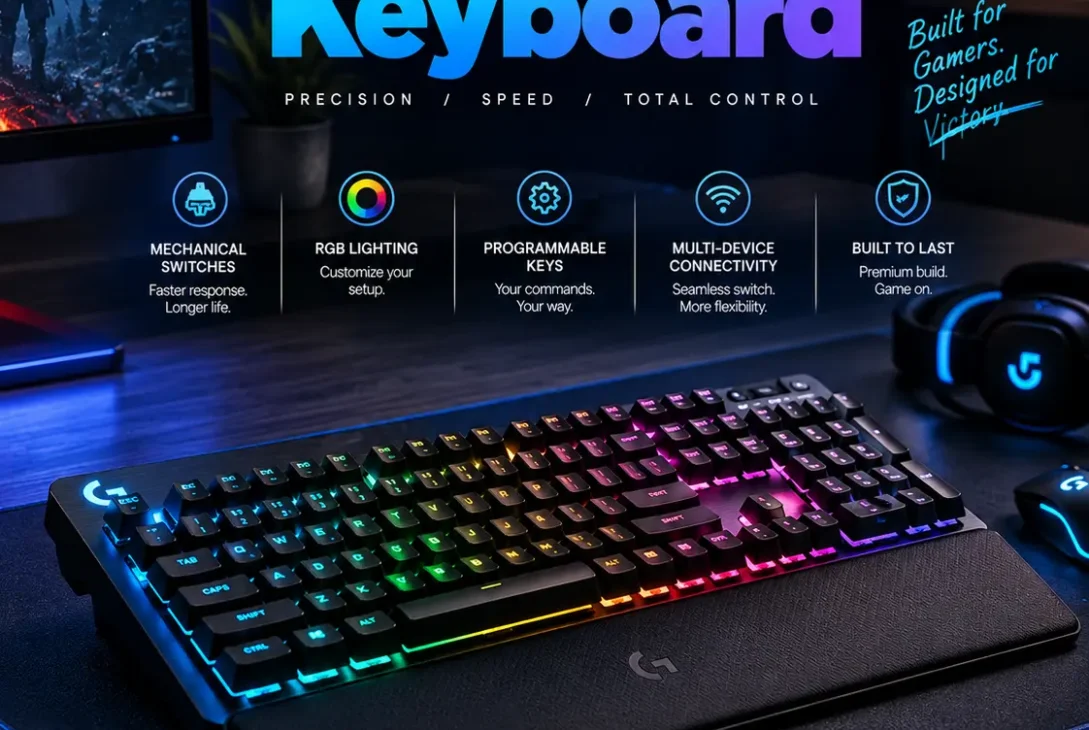
Choosing the right Logitech gaming keyboard can make a noticeable difference to your gaming setup. Whether you prefer a low-profile wireless keyboard, a compact 60% layout, a traditional mechanical design, or a more affordable RGB option, Logitech G has a broad range of keyboards aimed at different types of players.
The current Logitech G lineup includes wireless and wired models, mechanical and optical designs, full-size and compact layouts, and keyboards built for competitive gaming or everyday use. Logitech’s current catalog includes products such as the G915 X LIGHTSPEED, G515 LIGHTSPEED TKL, PRO X TKL, PRO X 60, G512 X, G413, and G213.
A Logitech gaming keyboard can also be a practical choice for users who want one keyboard for gaming, work, browsing, and general productivity. The best model depends on your preferred switch type, keyboard size, connectivity, budget, and the games you play.
This guide explains the major Logitech gaming keyboard options, important features to compare, wireless performance, mechanical switches, RGB lighting, layouts, software, and what to consider before buying one in 2026.
Table of Contents
- What Is a Logitech Gaming Keyboard?
- Why Choose a Logitech Gaming Keyboard?
- Best Logitech Gaming Keyboard Features
- Logitech Gaming Keyboard Types
- Logitech G915 X Series
- Logitech G515 Series
- Logitech PRO Series
- Logitech G512 Series
- Logitech G213 and G413 Series
- Wireless vs Wired Logitech Keyboards
- Mechanical vs Optical and Analog Switches
- RGB Lighting and LIGHTSYNC
- Logitech G HUB Software
- How to Choose the Right Logitech Gaming Keyboard
- Common Buying Mistakes
- Frequently Asked Questions
- Final Verdict
- SEO Details
What Is a Logitech Gaming Keyboard?
A Logitech gaming keyboard is a keyboard designed specifically for gaming and sold under Logitech’s G gaming brand.
Unlike basic office keyboards, gaming models can include features such as:
- Mechanical switches
- Optical switches
- Analog switches
- RGB lighting
- Programmable controls
- Wireless connectivity
- Low-profile keycaps
- Compact layouts
- Anti-ghosting
- Gaming profiles
- Dedicated media controls
Logitech G currently offers keyboards across several categories, including full-size, TKL, 75%, 60%, and other layouts. Its official catalog also allows users to filter keyboards by connectivity, switch type, features, and keyboard size.
That variety means there isn’t one keyboard that is automatically best for everyone.
A competitive FPS player may want a compact keyboard with fast switches, while someone who spends equal time gaming and working may prefer a full-size model with a number pad.
Why Choose a Logitech Gaming Keyboard?
There are several reasons gamers consider Logitech G keyboards.
Wide Range of Designs
Logitech offers keyboards at different price points and with different feature sets.
The lineup includes relatively affordable wired keyboards as well as premium wireless and advanced analog models.
https://www.logitechg.com/en-us/shop/c/gaming-keyboards
Wireless Options
For gamers who dislike cable clutter, Logitech’s LIGHTSPEED wireless technology is available on several models.
Logitech describes LIGHTSPEED as a wireless gaming technology designed for responsive performance, with its gaming peripherals promoted around low-latency wireless connectivity.
Multiple Switch Technologies
Depending on the model, users can choose from mechanical, optical, low-profile, or analog switch designs.
This gives gamers more control over the feel and response of their keyboard.
Gaming Software
Logitech G HUB allows users to configure supported gaming peripherals, including lighting, profiles, macros, and other settings.
That can be useful if you play different games that require different keyboard configurations.
Best Logitech Gaming Keyboard Features
Before buying a Logitech gaming keyboard, it helps to understand the features that actually matter during gaming.
1. Switch Type
The switch is one of the most important parts of a mechanical keyboard.
Different switches can produce different:
- Actuation feels
- Travel distances
- Sound levels
- Response characteristics
- Typing experiences
Some Logitech keyboards use traditional mechanical switches, while newer models also include optical or analog technologies.
Competitive gamers may prioritize fast actuation, while people who also type extensively may prefer a more balanced tactile experience.
2. Keyboard Layout
Keyboard size has a major effect on your desk space.
Common layouts include:
Full-size: Includes the number pad and usually provides the most complete set of keys.
TKL: Removes the number pad while retaining the main navigation and function-key areas.
75%: Compresses the layout further while retaining many important keys.
60%: Removes function-row and navigation keys to create a very compact design.
A smaller keyboard can provide more room for mouse movement, which is especially useful for low-sensitivity FPS players.
3. Wireless Connectivity
A wireless Logitech gaming keyboard can make a gaming desk cleaner and easier to manage.
However, wireless keyboards should be evaluated based on more than whether they connect without a cable.
Look at:
- Wireless technology
- Battery life
- Charging method
- Connection stability
- Wired fallback
- Compatibility
Logitech’s LIGHTSPEED technology is available on multiple gaming keyboards and is designed specifically around responsive wireless gaming.
4. RGB Lighting
RGB lighting is not essential for gaming performance, but it can significantly change the appearance of a setup.
Logitech’s LIGHTSYNC system allows supported products to customize lighting and synchronize effects with compatible games and content.
The amount of customization depends on the specific keyboard.
5. Programmable Controls
Some users benefit from programmable keys or macros.
These can be useful for:
- Streaming
- Productivity
- MMO games
- Editing
- Repetitive tasks
However, competitive games can have rules regarding macros and automation, so players should always follow the rules of the games they play.
Logitech G915 X Series
The G915 X family is positioned toward users who want a premium low-profile gaming keyboard.
The current lineup includes the G915 X LIGHTSPEED wireless model, G915 X LIGHTSPEED TKL, and G915 X wired version. Logitech lists these as low-profile gaming keyboards.
The G915 X approach is particularly attractive if you want:
- Low-profile keys
- Premium design
- Wireless connectivity
- RGB lighting
- A slim appearance
- Gaming and productivity flexibility
Who Should Buy It?
A G915 X-style Logitech gaming keyboard makes sense for gamers who want a premium desk setup and don’t mind spending more for a combination of design, wireless connectivity, and low-profile hardware.
It may be overkill for someone who simply needs an affordable gaming keyboard.
Logitech G515 Series
The G515 family is another important part of Logitech’s current low-profile lineup.
The G515 is available in wired and LIGHTSPEED wireless versions, while the G515 RAPID adds analog functionality to the range.
A G515 can be appealing to players who want:
- Low-profile keys
- TKL layout
- Wireless freedom
- Compact desk footprint
- Modern gaming features
The G515 LIGHTSPEED TKL is especially interesting for gamers who want wireless connectivity without moving to a full-size keyboard.
Logitech PRO Series
The PRO family focuses heavily on competitive gaming.
Current Logitech G listings include models such as the PRO X TKL Wireless, PRO X 60 Wireless, PRO Wired, and PRO X TKL RAPID.
The PRO X 60 Wireless uses a compact 60% layout and optical switches, making it particularly relevant for gamers who want a small footprint.
The PRO X TKL models are more traditional and retain additional keys that competitive players may prefer.
Who Is the PRO Series For?
A PRO-series Logitech gaming keyboard is a strong option for players who prioritize competitive performance and customization.
However, a compact 60% keyboard isn’t ideal for everyone.
If you frequently use navigation keys, function keys, or a number pad, a larger layout may be more convenient.
Logitech G512 Series
The G512 remains an option for users who prefer a more traditional mechanical gaming keyboard.
The current Logitech catalog includes G512 wired mechanical keyboards as well as newer G512 X models with analog and mechanical technologies.
The G512 approach is appealing if you want:
- A conventional layout
- Mechanical switches
- Wired reliability
- RGB lighting on supported versions
- A more traditional gaming-keyboard design
A wired keyboard also eliminates the need to think about battery charging.
Logitech G213 and G413 Series
Gamers who don’t need premium wireless features have more affordable choices.
The G213 is a gaming keyboard with RGB lighting and Logitech’s Mech-Dome key technology. Logitech’s product information describes its Mech-Dome keys as full-height keys designed to provide a tactile response similar to a mechanical keyboard.
The G413 family offers mechanical options and is another choice for buyers who want a simpler gaming setup.
These keyboards can make sense for:
- First-time gaming PC owners
- Students
- Budget-conscious gamers
- Secondary gaming setups
- Users who prefer wired connections
Wireless vs Wired Logitech Keyboards
One of the biggest decisions when choosing a Logitech gaming keyboard is whether to go wireless.
Advantages of Wireless
Wireless keyboards provide:
- Cleaner desk setups
- Fewer cables
- Easier repositioning
- More flexibility
Modern gaming wireless technology has also become considerably more capable than older wireless keyboard implementations.
Advantages of Wired
Wired keyboards provide:
- No battery charging
- Simple setup
- Consistent wired connection
- Usually lower cost
For a stationary gaming PC, wired can still be the most practical choice.
Which Is Better?
There isn’t a universal answer.
Choose wireless if desk cleanliness and flexibility matter to you.
Choose wired if you want simplicity, lower cost, and never want to think about battery levels.
Mechanical vs Optical and Analog Switches
Switch technology deserves careful consideration when buying a Logitech gaming keyboard.
Mechanical Switches
Mechanical switches use individual mechanisms under the keys.
They are popular because they can provide:
- Consistent key feel
- Distinct actuation
- Long-term durability
- Different switch characteristics
Optical Switches
Optical switches use light-based detection to register key presses.
The Logitech PRO X 60 Wireless is one current example of a keyboard using optical switches.
Analog Switches
Analog switches can detect more than a simple pressed-or-not-pressed state on supported implementations.
This can provide additional control in certain games, particularly where gradual movement or variable input is useful.
Current Logitech G products such as the G512 X and PRO X TKL RAPID include analog technologies.
RGB Lighting and LIGHTSYNC
RGB lighting is one of the most visible features of a modern Logitech gaming keyboard.
Logitech’s LIGHTSYNC ecosystem allows supported gaming devices to use customizable lighting effects.
Depending on the model and software configuration, users can customize:
- Colors
- Lighting effects
- Brightness
- Game profiles
- Synchronization
RGB does not directly make you a better gamer, but it can make a setup more personalized.
For many PC gamers, matching keyboard lighting with a mouse, headset, and other peripherals is part of the overall desk experience.
Logitech G HUB Software
Software is another important part of the Logitech G ecosystem.
Logitech G HUB allows supported peripherals to be configured and customized.
Depending on the device, users may be able to manage:
- RGB lighting
- Profiles
- Key assignments
- Macros
- Device settings
- Game-specific configurations
This can be particularly useful if you switch between several games.
For example, an MMO setup may require different key assignments from an FPS setup.
Instead of manually changing settings every time, profiles can make the transition easier.
How to Choose the Right Logitech Gaming Keyboard
When choosing a Logitech gaming keyboard, start with your gaming habits rather than the product’s marketing features.
Choose Your Size
Ask yourself whether you need a number pad.
If not, TKL or smaller layouts can save considerable desk space.
If you want the smallest possible keyboard, consider 60%.
Decide on Wired or Wireless
If you frequently move your keyboard or want a clean setup, wireless can be worth the extra cost.
If your keyboard stays on the same desk permanently, wired may be enough.
Choose Your Switch
Think about how you want the keys to feel.
Do you want:
- Tactile feedback?
- A quieter experience?
- Low-profile keys?
- Fast actuation?
- Analog input?
Try switches in person if possible.
Consider Your Games
FPS players may value compact layouts and fast-feeling switches.
MMO players may prefer additional keys.
Strategy gamers may appreciate a traditional layout.
Casual gamers can prioritize comfort, typing experience, and price.
Set a Budget
Logitech’s current keyboard range covers both relatively affordable models and premium keyboards. For example, Logitech’s US store currently lists models ranging from the G213 and G413 TKL SE through premium G915 X and PRO models.
There’s little reason to spend hundreds of dollars if you won’t use the advanced features.
Common Buying Mistakes
Buying Based Only on RGB
RGB looks impressive, but it shouldn’t be the main reason you choose a keyboard.
Switches, layout, comfort, and connectivity matter more.
Choosing the Wrong Size
A 60% keyboard may look attractive but can become frustrating if you frequently use function or navigation keys.
Ignoring Switch Feel
Switches dramatically affect the typing and gaming experience.
Paying for Features You Don’t Need
Premium wireless, analog switches, and advanced lighting can increase the price.
Only pay for features you’ll actually use.
Forgetting Desk Space
A full-size keyboard combined with a large mouse and low-sensitivity FPS settings can make a desk feel cramped.
A TKL or 75% layout may be a better fit.
Frequently Asked Questions
Is Logitech good for gaming keyboards?
Yes. Logitech G offers a broad range of gaming keyboards covering mechanical, optical, analog, wired, wireless, full-size, TKL, 75%, and compact designs.
What is the best Logitech gaming keyboard?
The best Logitech gaming keyboard depends on your needs. Premium users may prefer the G915 X, competitive players may prefer a PRO model, while budget buyers can consider the G213 or G413 families.
Is a Logitech gaming keyboard good for FPS games?
Yes. Compact TKL and 60% Logitech G keyboards can provide additional mouse space, which can be useful for FPS players using low sensitivity.
Are Logitech gaming keyboards wireless?
Some are. Logitech offers multiple LIGHTSPEED wireless gaming keyboards, including the G915 X and G515 LIGHTSPEED families.
Are Logitech gaming keyboards mechanical?
Many are, but not all. Logitech offers mechanical, optical, analog, and other switch technologies depending on the model.
Does Logitech make 60% gaming keyboards?
Yes. The PRO X 60 Wireless is a current 60% Logitech G gaming keyboard with optical switches.
Does Logitech make TKL keyboards?
Yes. Logitech currently offers several TKL options, including G515 TKL, G915 X TKL, and PRO X TKL models.
Do Logitech gaming keyboards work on Mac?
Compatibility depends on the specific model and software features. Check the individual product specifications before buying if you plan to use it primarily with macOS.
Does Logitech have RGB gaming keyboards?
Yes. Several Logitech G keyboards support RGB lighting and LIGHTSYNC customization.
Is a wireless Logitech keyboard good for competitive gaming?
Modern Logitech LIGHTSPEED keyboards are designed for responsive wireless gaming. However, competitive players should choose based on the specific model’s switches, layout, and features rather than wireless capability alone.
Should I buy a Logitech gaming keyboard for work too?
Yes. Many gaming keyboards can work perfectly well for everyday typing, especially TKL, 75%, and full-size models.
Are Logitech gaming keyboards expensive?
Prices vary considerably. Logitech offers affordable wired keyboards as well as premium wireless and advanced gaming models.
Final Verdict
A Logitech gaming keyboard can be a strong choice if you want a combination of gaming-focused features, multiple layout options, wired and wireless connectivity, and customizable software.
The biggest advantage of the Logitech G lineup is variety. The G915 X targets premium low-profile users, the G515 provides compact low-profile options, the PRO family focuses heavily on competitive gaming, while the G213 and G413 families provide simpler and more affordable choices.
Before buying, focus on the features that will actually affect your experience.
Choose the right layout first. Then consider switch technology, wired or wireless connectivity, RGB, software support, and your budget.
For competitive FPS gaming, a compact TKL or 60% keyboard may be more practical. For general gaming and productivity, a larger layout may be easier to live with. And if you want a clean desk without sacrificing gaming responsiveness, a LIGHTSPEED wireless model can be especially attractive.
Ultimately, the best Logitech gaming keyboard isn’t necessarily the most expensive one. It’s the model that matches your games, desk space, typing preferences, and budget.