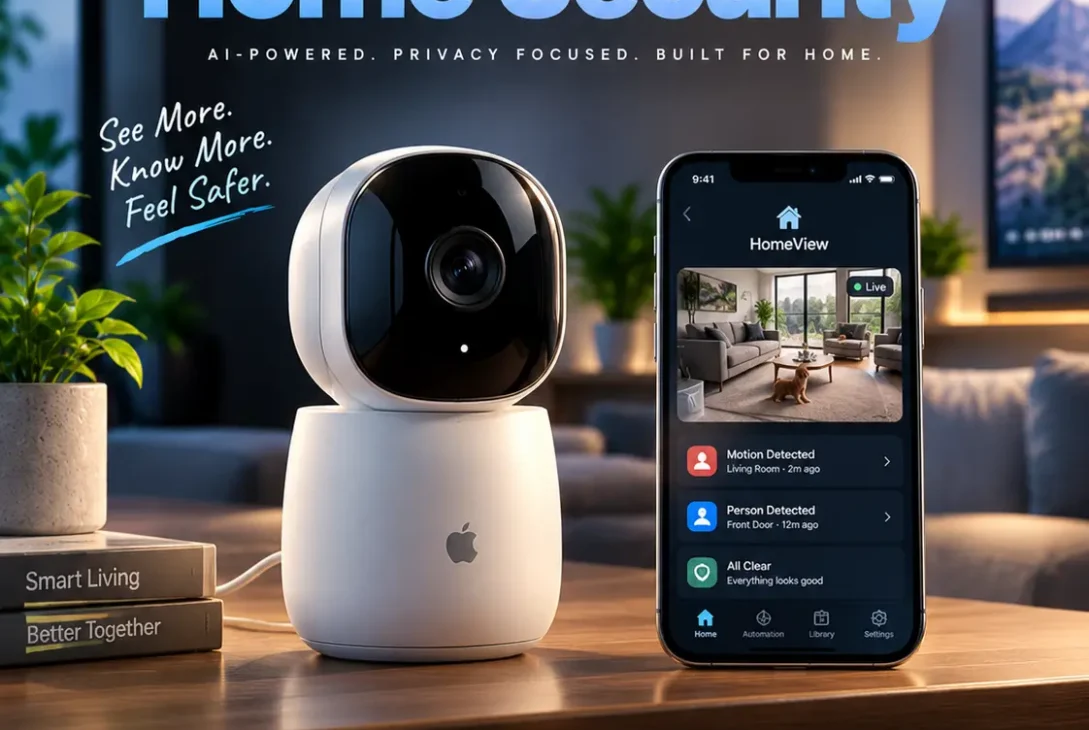
Apple is entering the smart home market with a new device designed to bring entertainment, communication, artificial intelligence, and home automation together. Apple HomeView is an interactive smart home hub featuring a 7-inch Liquid Retina display, a redesigned Siri experience, FaceTime support, and controls for compatible smart home accessories. Instead of relying entirely on an iPhone or voice assistant, households can use one central screen to manage everyday activities.
Announced on October 13, 2026, Apple HomeView is designed for shared household spaces while offering a personalized experience for individual family members. It can display calendars, play music, show camera feeds, answer questions, and control connected devices. Apple is also offering tabletop and wall-mounted versions, giving buyers more flexibility when choosing where to install it.
The device arrives as Apple expands its smart home ecosystem and competes with products such as Amazon Echo Show and Google Nest Hub. But what makes this new product different, how much does it cost, and is it worth considering?
This guide explains the features, specifications, expected availability, privacy protections, and potential advantages and disadvantages of Apple’s new smart home hub.
Table of Contents
- What Is Apple HomeView?
- Apple HomeView Design and Display
- Key Features and Specifications
- Siri AI and Apple Intelligence
- Smart Home Control and Automation
- FaceTime, Messages, and Entertainment
- Personalized Experiences for Families
- Privacy and Security
- Apple HomeView Price and Release Date
- Apple HomeView vs Amazon Echo Show and Google Nest Hub
- Who Should Buy Apple HomeView?
- Pros and Cons
- Frequently Asked Questions
- Final Verdict
What Is Apple HomeView?
Apple HomeView is a smart home control center that combines a touchscreen display, speaker system, voice assistant, and connected-home management features in one device. It is designed to stay in a central location, such as a kitchen counter, bedroom, or hallway, where different household members can interact with it.
Unlike a traditional smart speaker, which primarily responds to voice commands, this device provides a visual interface. Users can see information, interact with widgets, view compatible security cameras, and access selected Apple apps without always picking up their phones.
Apple has built the experience around Apple Intelligence and its new Siri AI system. This means the assistant is intended to handle more conversational requests and provide more useful responses than a basic voice-command interface.
One of the most interesting aspects of Apple HomeView is its ability to recognize different household members. Apple says the device can identify up to six people using facial recognition and provide each person with a personalized home screen. This makes it more suitable for families who share a living space but want to keep personal information separate.
The device is also designed to work with Apple’s existing ecosystem. It can connect with compatible smart home accessories, HomePod speakers, Apple devices, and Matter-supported products.
In simple terms, Apple HomeView is intended to become a central screen for managing a connected home while providing everyday entertainment and communication features.
Apple HomeView Design and Display
Apple has given its new home hub a design that fits into different areas of a modern home. The tabletop model features an aluminum body, a speaker base, and a display connected through a stainless steel hinge.
The hinge allows users to adjust the screen angle for comfortable viewing. This is particularly useful when placing the device on a kitchen counter, bedside table, or desk.
7-Inch Liquid Retina Display
The device features a 7-inch Liquid Retina display. It is designed to show widgets, photos, notifications, smart home controls, and other information clearly.
Apple has also included adaptive display technologies such as True Tone and automatic brightness adjustment. According to Apple, brightness can reach 500 nits and reduce to as little as 0.3 nits. This allows the screen to remain visible during the day while becoming much dimmer at night.
Another useful feature is its distance-aware interface. When someone is farther away, the screen can display simpler information that is easier to read across a room. As the person approaches, it can show more detailed content.
Tabletop and Wall-Mounted Versions
Apple HomeView comes in two main designs.
The tabletop version is intended for counters, desks, and bedside tables. Its speaker base provides audio while the adjustable display makes it easier to position the screen.
The wall-mounted version is designed for areas where a countertop device may not be practical. It can be installed in places such as hallways and entryways, providing quick access to smart home controls.
The tabletop model is available in silver, starlight, rose pink, and space gray. The wall-mounted version has a more limited selection of finishes.
Key Features and Specifications
Apple has introduced several features that make this device more than a conventional smart display. Its hardware, software, and connected-home capabilities are designed to work together.
Here is an overview of the main specifications and announced features.
| Feature | Apple HomeView details |
|---|---|
| Display | 7-inch Liquid Retina |
| Processor | Apple A18 |
| Voice assistant | Siri AI |
| Smart home | Apple Home and compatible Matter accessories |
| User recognition | Up to six people |
| Video calls | FaceTime with Center Stage |
| Audio | Integrated speaker system |
| Placement | Tabletop and wall-mounted |
| Display technology | True Tone and adaptive brightness |
| Connectivity | Smart home ecosystem connectivity |
| Colours | Silver, starlight, rose pink, space gray |
| Launch availability | November 13, 2026 |
The A18 chip provides the processing foundation for the device and its Apple Intelligence features. However, buyers should not assume that every iPhone application or third-party app will be available. Apple has designed this product around a selected set of experiences rather than presenting it as a full tablet replacement.
For official specifications and feature information, visit the Apple Newsroom announcement.
Siri AI and Apple Intelligence
Siri AI is one of the most important parts of the new device. Apple is positioning its updated assistant as a more capable and conversational system that can understand questions and respond with useful information.
Traditional smart assistants often depend on short commands. Users might ask them to turn on a light, set a timer, or play a particular song. The new Siri experience is intended to support more natural conversations and a wider range of requests.
For example, someone preparing dinner could ask Siri for a recipe, request ingredient suggestions, and then follow step-by-step instructions on the display. They could also set timers using voice commands without repeatedly touching the screen.
Personal Context and Onscreen Awareness
Apple says Siri AI can use personal context from an Apple Intelligence-enabled device when the required setup and permissions are available.
This could help with requests involving information from supported apps. For example, a user might ask about an upcoming appointment or look for a detail in a message.
The assistant also supports onscreen awareness, allowing it to provide more relevant help based on what is being displayed.
These features could make Apple HomeView more useful throughout the day. Instead of treating every request as an isolated voice command, the assistant aims to understand more of the user’s context.
However, the full experience depends on supported software, device compatibility, language availability, and Apple’s privacy requirements.
Smart Home Control and Automation
A major reason to consider this product is its role as a smart home dashboard. Users can control compatible accessories through the touchscreen or Siri AI.
Supported tasks include:
- Turning smart lights on or off.
- Adjusting compatible thermostats.
- Locking supported smart locks.
- Controlling compatible blinds.
- Viewing connected security camera feeds.
- Managing selected home accessories.
- Creating and using smart home automations.
For example, a user could create a routine that turns off selected lights and adjusts the thermostat before bedtime. They could also check a camera feed from the hallway instead of opening a separate application on their phone.
Camera Monitoring
Apple HomeView can display up to nine compatible camera feeds through its Home Camera face. This could be useful for checking different areas of a property, monitoring deliveries, or keeping an eye on pets.
With a supported iCloud+ subscription and compatible cameras, Apple also offers additional HomeKit Secure Video capabilities. These include intelligent recognition features and notifications for certain events.
The availability of these functions depends on compatible equipment, subscription requirements, and regional support.
Matter Compatibility
Matter is an important part of the modern smart home market because it helps compatible products work across different platforms.
Apple says its new hub supports Matter accessories alongside products designed for Apple Home. This gives users more flexibility when choosing connected lights, sensors, locks, and other devices.
Still, compatibility should be checked before purchasing an accessory. Not every feature offered by a third-party product will necessarily work through every smart home platform.
FaceTime, Messages, and Entertainment
Apple is also treating this product as a communication and entertainment device.
FaceTime support allows users to make video calls from a central location in the home. Center Stage helps keep participants framed during calls, making the experience more convenient when people move around the room.
Messages can be read and answered using voice or the onscreen keyboard. This is useful when someone wants to respond quickly without picking up an iPhone.
The device also supports Intercom. Household members can send voice announcements to another compatible HomeView device, a HomePod, or supported personal Apple devices.
Music and Podcasts
The integrated speaker system makes the device useful for everyday audio playback. Users can enjoy Apple Music and Apple Podcasts, while compatible speakers can be connected through Apple’s multiroom audio experience.
A household could place multiple compatible speakers around the home and play music across different rooms.
Photos and Digital Display Faces
Apple has also introduced customizable display faces. These can show information or turn the screen into a digital photo frame.
The Photos face can display memories from selected shared albums, while other faces provide different visual experiences. Apple has also included a Snoopy-themed option with animations that can respond to events and the time of day.
These features make the screen more than a place for notifications. It can also become a decorative part of a room.
Personalized Experiences for Families
Shared smart home devices can create a privacy problem when several people use the same screen. A calendar notification or message intended for one person should not automatically become visible to everyone.
Apple is addressing this with user recognition.
Apple HomeView can recognize up to six people and provide a separate home screen for each recognized user. Personal apps, widgets, and supported information can change depending on who is using the device.
For example, one family member might see their calendar and reminders, while another sees different widgets and personal information.
Shared content, such as selected photo albums and music, can still be enjoyed by everyone in the household.
Apple also explains that personal content is only surfaced under specific recognition and device-presence conditions. This is intended to reduce the chance of private information appearing when another person approaches the screen.
Guests and unrecognized users can still access certain shared functions, such as timers, weather information, music playback, and compatible smart home controls.
This shared-but-personal approach is one of the most distinctive ideas behind the product.
Privacy and Security
Privacy is especially important for a device that stays in a common area and includes a camera, microphones, and access to personal information.
Apple says the device uses Secure Exclaves and protections built into its A18 chip to isolate certain camera and microphone processing. The company says this helps separate sensitive processing from the rest of the system.
The device can also use Private Cloud Compute for supported Siri requests. Apple says information processed through this system is not stored or made accessible to Apple.
Personal information is another important consideration. Apple says the system uses recognition and paired-device conditions before showing certain private content, such as information from Messages and Calendar.
These protections are promising, but buyers should still review the privacy settings and permissions before connecting personal accounts or installing cameras.
A smart home system can contain sensitive information about daily routines, household members, and property access. Users should secure their Wi-Fi network, keep software updated, and choose compatible accessories from trusted manufacturers.
For more information about Apple’s approach, read its official HomeView announcement.
Apple HomeView Price and Release Date
Apple announced Apple HomeView on October 13, 2026. Pre-orders began on the announcement date, with availability scheduled to start on November 13, 2026.
The announced US starting price is $299. Buyers should check Apple’s regional store or an authorized retailer for local pricing, taxes, and availability.
The wall-mounted model also requires a suitable mounting solution. Apple has announced purpose-built mounting options through Schneider Home, with prices depending on the selected installation method.
Availability is not identical in every country. Apple has stated that Siri AI on the device will initially support English in selected markets, including the United States, United Kingdom, Australia, Canada, India, New Zealand, Singapore, and South Africa.
Apple has also said the product will not initially be available for sale in the European Union because Siri AI is not currently available there under the required conditions.
Before ordering, check the official Apple website for current regional availability and accessory information.
Apple HomeView vs Amazon Echo Show and Google Nest Hub
Apple is entering a category that already includes established smart displays from Amazon and Google.
The Amazon Echo Show range combines Alexa, touchscreen controls, video calling, entertainment, and smart home management. Google Nest Hub devices provide Google Assistant features, smart home controls, and visual information.
Apple’s approach is different because it focuses heavily on its existing ecosystem, personal recognition, Apple Intelligence, and integration with iPhone-based information.
| Feature | Apple HomeView | Amazon Echo Show | Google Nest Hub |
|---|---|---|---|
| Main assistant | Siri AI | Alexa | Google Assistant |
| Smart home controls | Apple Home and Matter | Alexa ecosystem | Google Home ecosystem |
| Video calling | FaceTime | Supported models and services | Model-dependent |
| Personalization | Recognition for up to six people | Model and settings dependent | Model and settings dependent |
| Apple ecosystem | Deep integration | Limited integration | Limited integration |
| Display | 7-inch Liquid Retina | Varies by model | Varies by model |
| Main appeal | Apple-connected households | Alexa-connected homes | Google-connected homes |
The comparison does not mean one device is automatically better for everyone. The best choice depends on the phones, speakers, cameras, and smart home accessories already installed in a household.
For someone who uses an iPhone, Apple TV, HomePod, and Apple Home accessories, the new device could offer a more connected experience.
Someone who already uses Alexa or Google Home extensively may find it more practical to remain with their existing platform.
Who Should Buy Apple HomeView?
Apple HomeView is aimed at people who want a central screen for everyday household activities.
It could be particularly useful for:
Apple ecosystem users: People who already use iPhones, HomePods, and Apple Home accessories may benefit from the integration.
Families sharing a home: Recognition for up to six people could make personal information and household controls easier to manage.
Smart home beginners: A dedicated dashboard may make it easier to control compatible lights, cameras, locks, and thermostats.
People who make frequent video calls: FaceTime support provides another convenient way to communicate from a shared room.
Users who want a digital photo display: Customizable faces and shared albums give the screen an additional purpose when it is not being used for controls.
However, it may not be the right purchase for someone who wants a general-purpose tablet, extensive third-party applications, or a low-cost smart speaker.
Pros and Cons
Pros
- 7-inch Liquid Retina touchscreen.
- Updated Siri AI experience.
- Integration with Apple Home and compatible Matter accessories.
- Personalized screens for up to six users.
- FaceTime and Center Stage support.
- Tabletop and wall-mounted options.
- Camera monitoring and smart home controls.
- Customizable display faces and photo albums.
- Privacy protections built into the hardware and software.
Cons
- $299 starting price is higher than many basic smart speakers.
- The experience is designed around Apple’s ecosystem.
- It is not a general-purpose iPad replacement.
- Some features depend on compatible accessories or subscriptions.
- Siri AI language and regional availability are limited initially.
- Wall installation may require additional mounting hardware.
Frequently Asked Questions
1. What is Apple HomeView?
Apple HomeView is a smart home hub with a 7-inch touchscreen, Siri AI, FaceTime, entertainment features, and controls for compatible smart home accessories. It is designed to provide a central interface for managing a connected household.
2. How much does Apple HomeView cost?
The announced US starting price is $299. Regional prices, taxes, and mounting accessories may vary.
3. When will Apple HomeView be released?
Apple announced the device on October 13, 2026. Availability is scheduled to begin on November 13, 2026.
4. Does Apple HomeView support Siri AI?
Yes. The device includes Siri AI powered by Apple Intelligence. Apple describes it as a more conversational assistant with personal context understanding and onscreen awareness.
5. Can multiple people use Apple HomeView?
Yes. Apple says it can recognize up to six people and provide personalized home screens. Shared household features can also be used by guests and unrecognized users.
6. Can Apple HomeView control smart home devices?
Yes. It can control compatible lights, thermostats, locks, blinds, and other accessories through Apple Home and supported Matter products.
7. Does Apple HomeView support FaceTime?
Yes. FaceTime and Center Stage are supported, allowing users to make video calls from the device.
8. Can Apple HomeView display security cameras?
Yes. Its Home Camera face can display up to nine compatible camera feeds. Some additional intelligent camera features require compatible devices and an iCloud+ subscription.
9. Is Apple HomeView a replacement for an iPad?
No. It is designed primarily as a shared smart home display and entertainment hub. It does not offer the same general-purpose experience as an iPad.
10. Is Apple HomeView available in the UK?
Apple has listed the United Kingdom among the initial markets where Siri AI on the device will be available in English. Buyers should check Apple’s UK store for current ordering and delivery information.
Final Verdict
Apple is taking a significant step into the smart home market with a device that combines a touchscreen, voice assistant, entertainment system, and household control center. Its strongest selling points are its integration with Apple’s ecosystem, personalized user experiences, updated Siri AI, and support for compatible smart home accessories.
The 7-inch Liquid Retina display, FaceTime support, camera monitoring, and wall-mounted option make it more versatile than a conventional smart speaker. Its ability to recognize different household members could also make it useful for families who share one central device.
However, the $299 starting price means buyers should consider whether they will actually use its features regularly. It may be less appealing to people who already rely on another smart home platform or want a device with a wider selection of third-party applications.
Overall, Apple HomeView looks like an interesting option for households already invested in Apple’s products. Its long-term value will depend on how well Siri AI performs in everyday situations, how many accessories support its features, and how quickly Apple expands availability and software capabilities.