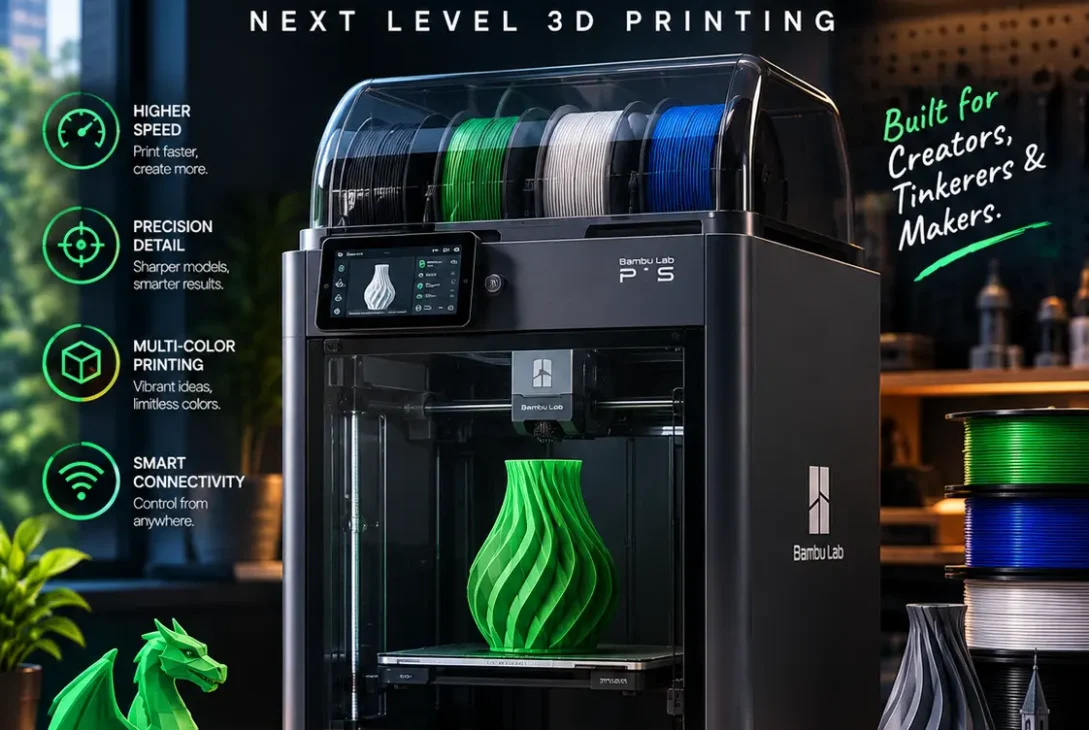
The Bambu Lab P2S is an enclosed desktop 3D printer designed for people who want fast printing, consistent results, and fewer complicated setup steps. It builds on the popular P1-series design with a colour touchscreen, an upgraded extruder, a quick-swap hotend, improved airflow, and a camera system designed to help identify printing failures.
For beginners, the appeal is straightforward: spend less time adjusting settings and more time making useful objects. For experienced makers, the combination of CoreXY motion, automatic calibration, and support for a broad range of filament materials makes the machine worth considering for prototypes, replacement parts, household accessories, and small production jobs.
However, buying a 3D printer is not just about maximum speed or a long feature list. Print quality, material compatibility, operating costs, maintenance, and the price of optional accessories matter just as much.
In this guide, we examine the Bambu Lab P2S specifications, main features, supported materials, real-world strengths, limitations, and differences from the P1S. The goal is to help readers in the United States and United Kingdom decide whether this printer fits their projects and budget.
Table of Contents
- What Is the Bambu Lab P2S?
- Bambu Lab P2S Specifications
- 9 Important Features
- Print Quality and Performance
- Supported Filaments
- Bambu Lab P2S vs P1S
- Price and Value
- Who Should Buy It?
- FAQs
- Final Verdict
What Is the Bambu Lab P2S?
The Bambu Lab P2S is an enclosed fused deposition modeling (FDM) printer. FDM printing works by melting plastic filament and depositing it in successive layers to create a three-dimensional object.
Its enclosed design helps manage airflow and temperature around the print. This can be useful when printing materials that are more sensitive to cooling and warping than basic PLA. The printer uses a CoreXY motion system, a configuration designed to support fast movement while keeping the machine relatively compact.
Bambu Lab introduced the P2S in October 2025 as a substantial update to the P1 series. It brings together features from the company’s newer printer technology, including a modern touchscreen, a redesigned extrusion system, adaptive airflow, and improved print monitoring.
The Bambu Lab P2S is aimed at users who want more convenience than a basic entry-level printer but do not necessarily need a larger industrial machine. It can suit hobbyists, designers, educators, small businesses, and people who regularly produce functional parts.
Official announcement: Bambu Lab introduces the P2S.
Bambu Lab P2S Specifications
Here are the main published specifications to consider before purchasing.
| Specification | Details |
|---|---|
| Printing technology | Fused Deposition Modeling (FDM) |
| Build volume | 256 × 256 × 256 mm |
| Maximum nozzle temperature | 300°C |
| Maximum heatbed temperature | 110°C |
| Included nozzle | 0.4 mm hardened steel |
| Supported nozzle sizes | 0.2, 0.4, 0.6, and 0.8 mm |
| Maximum toolhead speed | Up to 600 mm/s |
| Maximum acceleration | 20,000 mm/s² |
| Display | 5-inch touchscreen |
| Camera | 1080p camera |
| Extruder | Permanent-magnet synchronous motor design |
| Build plate | Textured PEI flexible steel plate |
| Connectivity | Wi-Fi and USB; check regional specifications |
| Dimensions | Approximately 392 × 406 × 478 mm |
| Weight | Approximately 14.9 kg |
The Bambu Lab P2S also supports an automatic material system configuration. Buyers interested in multicolour printing should check the exact package contents because the printer-only version and Combo bundle are different purchases.
9 Important Features of the Bambu Lab P2S
1. Fast CoreXY Printing
The CoreXY motion system is designed for fast toolhead movement while maintaining a compact printer footprint. Bambu Lab lists a maximum toolhead speed of 600 mm/s and acceleration of up to 20,000 mm/s².
These figures can make a difference when producing multiple parts or iterating through prototypes. However, a small model with fine details may need slower settings to achieve the best surface finish. Large prints can also take time because of layer count, support structures, and material changes.
The important advantage is not simply reaching a high speed once. It is having a printer that can combine efficient movement with automatic calibration and a workflow that is accessible to less experienced users.
2. Upgraded Extruder
The printer uses a permanent-magnet synchronous motor (PMSM) servo extruder. According to Bambu Lab, the system can deliver up to 8.5 kg of maximum extrusion force and monitor resistance and position at high frequency to help detect problems such as filament grinding and clogs.
Consistent extrusion matters because uneven filament flow can create gaps, weak layers, rough surfaces, or inconsistent dimensions. Monitoring the extrusion process may help identify certain failures earlier, although it cannot prevent every printing issue.
For users who regularly produce functional parts, this upgraded extrusion system is one of the more meaningful hardware improvements in the Bambu Lab P2S.
3. Five-Inch Colour Touchscreen
The larger touchscreen replaces the simpler display and controls found on the older P1S. It provides a more modern interface for operating the printer, checking job information, and accessing available controls.
A clear display is particularly helpful for beginners who may not be familiar with every printer setting. Instead of relying entirely on a computer, users can interact with the machine directly.
The screen is a convenience feature rather than a direct guarantee of better print quality, but it makes everyday operation easier and gives the printer a more contemporary feel.
4. Quick-Swap Hotend
The quick-swap hotend is designed to make nozzle assembly replacement easier. Bambu Lab describes a one-clip mechanism that releases the nozzle and heatsink assembly without requiring users to disconnect individual wiring connections.
This is useful when a hotend becomes clogged, damaged, or needs to be changed for a different nozzle size. A smaller nozzle can help with fine details, while a larger nozzle may be useful for stronger, faster functional prints.
Users should still follow the manufacturer’s instructions and allow hot components to cool before handling them. Quick replacement reduces the complexity of maintenance, but it does not eliminate the need to care for the nozzle and filament path.
5. Adaptive Airflow System
Airflow management is an important part of printing different materials. Some filaments benefit from strong part cooling, while others are more prone to warping if they cool too quickly.
The Bambu Lab P2S uses an adaptive airflow design intended to balance cooling for lower-temperature materials with heat retention for more demanding filaments. Bambu Lab says the system helps users print a wider range of materials with the enclosure closed.
The printer does not have a dedicated actively heated chamber. This distinction matters if you regularly print engineering materials that require tightly controlled chamber temperatures. Adaptive airflow and heat retention are not the same as active chamber heating.
6. AI-Assisted Error Detection
The printer includes camera-based monitoring and AI-assisted detection designed to identify common failures such as spaghetti-like filament buildup, nozzle blobs, and printing in mid-air without proper material deposition.
It can also check certain setup conditions, including whether the selected plate or nozzle matches the print configuration. These features may help reduce wasted filament and make remote monitoring more convenient.
However, AI detection is not foolproof. A camera may miss small defects, and some print failures are difficult to identify visually. Users should still check the first layers and inspect important parts before relying on them for practical use.
7. 1080p Camera and Remote Monitoring
The built-in 1080p camera improves visibility compared with lower-resolution monitoring systems. It can be used to check a print remotely and create timelapse recordings, depending on the software and settings.
Remote monitoring is useful when a print takes several hours or when the printer is located in a workshop. It allows users to check progress without standing next to the machine.
A camera cannot replace every physical inspection, but it is a helpful convenience for people who regularly print larger models or run multiple jobs throughout the day.
8. Automatic Calibration
Calibration helps the printer establish suitable operating parameters and prepare for a job. The Bambu Lab P2S supports automated calibration functions intended to reduce manual setup.
Automatic calibration can be particularly helpful for newcomers, because manual adjustments are one of the reasons 3D printing sometimes feels complicated. It can also save time for experienced users who frequently change projects.
Still, calibration does not guarantee that every model will print perfectly. Poorly designed files, unsuitable temperatures, damp filament, dirty build plates, and incorrect material settings can still cause failures.
Print Quality and Performance
Print quality depends on more than the printer itself. Model geometry, filament quality, nozzle size, layer height, temperature, speed, and cooling all influence the result.
The Bambu Lab P2S combines automatic calibration, controlled extrusion, and an enclosed build area to support consistent printing. These features can make it useful for both decorative models and functional objects such as brackets, organisers, holders, enclosures, and replacement parts.
For fine details, slower settings and a smaller nozzle can help improve definition. For larger practical parts, a bigger nozzle and suitable layer height may reduce print time. Users should select settings based on the intended use rather than always choosing the fastest available profile.
Independent reviews have also highlighted the machine’s ease of use and feature improvements. Tom’s Hardware gave the P2S an Editor’s Choice award in its review, while WIRED’s September 2026 review of the Combo praised its accessible operation and print consistency but noted that the machine’s movement can cause shaking and that multicolour printing produces waste.
Sources: Tom’s Hardware review and WIRED review of the P2S Combo.
Supported Filaments
The printer supports a range of common and more demanding filament types. Published supported materials include PLA, PETG, ABS, ASA, TPU, PET, PA, PC, PVA, and several fibre-reinforced variants.
PLA
PLA is a popular choice for beginners because it is relatively easy to print and works well for decorative models, prototypes, organisers, and many indoor objects.
PETG
PETG is useful for parts that need a balance of durability and flexibility. It is often chosen for brackets, containers, and everyday functional items.
ABS and ASA
ABS and ASA can be useful for parts that need greater heat resistance than ordinary PLA. They require more care with printing conditions, ventilation, and warping. ASA is often selected for applications where outdoor durability matters.
TPU
TPU is a flexible material used for protective covers, bumpers, grips, and other parts that need some elasticity. Its handling and print settings differ from rigid filaments.
Engineering and Reinforced Materials
The manufacturer lists various PA, PC, and fibre-reinforced filaments among supported materials. Compatibility depends on the exact material, nozzle configuration, print settings, and any additional accessories required.
An enclosed printer can make some material workflows easier, but the P2S’s lack of an actively heated chamber is an important limitation for users whose projects require controlled high chamber temperatures.
When printing ABS, ASA, or other materials that can release fumes, use suitable ventilation and follow the filament manufacturer’s safety guidance. An activated carbon filter should not be treated as a guarantee that all emissions are removed.
Bambu Lab P2S vs P1S
The P1S remains a relevant alternative for buyers who want an enclosed Bambu Lab printer but do not need every new feature. The P2S updates the experience with a touchscreen, redesigned extruder, quick-swap hotend, improved camera, and adaptive airflow.
| Feature | Bambu Lab P2S | Bambu Lab P1S |
|---|---|---|
| Build volume | 256 × 256 × 256 mm | 256 × 256 × 256 mm |
| Display | 5-inch touchscreen | Simpler display and controls |
| Maximum nozzle temperature | 300°C | 300°C |
| Camera | 1080p | Lower-resolution camera |
| Hotend replacement | Quick-swap design | Older assembly design |
| Extrusion system | Updated PMSM servo design | Earlier extruder design |
| Enclosure | Yes | Yes |
| Multicolour option | AMS 2 Pro Combo | AMS-compatible configurations |
| Best reason to choose | Newer controls and hardware | Potentially lower purchase cost |
The P2S is more attractive if you value the improved user interface, easier hotend changes, and newer monitoring features. The P1S may offer better value if you mainly print standard materials and can find it at a substantially lower price.
Price and Value
The purchase price varies by country, retailer, bundle, and promotion. At the time of the cited US launch coverage, Tom’s Hardware reported a price of $549 for the standalone printer and $799 for the Combo. Later offers and regional prices can differ, so check the current official store before making a decision.
The Bambu Lab P2S Combo costs more because it includes the AMS 2 Pro system. That additional expense can be worthwhile if you regularly need multicolour printing or want the system’s filament-management features. If you mainly print single-colour parts, spending the difference on filament, spare nozzles, or other useful accessories may be more sensible.
Remember to budget for consumables, replacement parts, electricity, and filament waste. For business use, also consider how much time the printer saves and whether it can reliably produce the parts you need.
Who Should Buy the Bambu Lab P2S?
The printer may suit:
- Beginners who want a relatively automated setup and an accessible interface.
- Hobbyists making models, accessories, decorations, and practical objects.
- Designers and engineers who need quick physical prototypes.
- Small businesses producing custom parts, product samples, and short-run items.
- Multicolour printing enthusiasts who can benefit from the AMS 2 Pro Combo.
It may be less suitable for buyers who only need basic PLA prints at the lowest possible cost. It is also not the ideal choice for every advanced engineering application because it does not have a dedicated actively heated chamber.
Before buying, list the materials you expect to use, the size of your typical models, and whether multicolour printing is genuinely important. This will help determine whether the P2S’s extra features justify the price.
FAQs
1. Is the Bambu Lab P2S good for beginners?
Yes, it can be a good option for beginners who want an enclosed printer with automatic calibration, a touchscreen, and camera-based monitoring. New users should still learn basic filament handling, build-plate care, and safe ventilation practices.
2. What is the build volume of the Bambu Lab P2S?
Its published build volume is 256 × 256 × 256 mm. This is suitable for many household items, prototypes, models, and small functional parts. Larger objects can sometimes be split into separate pieces and assembled.
3. How fast can the P2S print?
Bambu Lab lists a maximum toolhead speed of up to 600 mm/s. Actual print times depend on model complexity, filament, nozzle size, layer height, and quality settings. The maximum figure is not a guarantee that every print will run at that speed.
4. Can the printer make multicolour objects?
Yes. The P2S Combo includes the AMS 2 Pro system, which supports automatic filament changes for compatible multicolour and multi-material workflows. Multicolour printing can increase print time and filament waste because material changes may require purging.
5. Does the P2S have an actively heated chamber?
No dedicated active chamber heater is listed for the P2S. Its adaptive airflow design helps manage cooling and retain heat, but this is not the same as actively controlling the chamber temperature.
6. Which filaments can the P2S print?
The published material list includes PLA, PETG, ABS, ASA, TPU, PET, PA, PC, PVA, and selected fibre-reinforced variants. Check the specific filament’s requirements and the manufacturer’s compatibility guidance before printing.
7. Is the P2S better than the P1S?
The P2S offers a newer touchscreen, updated extrusion system, quick-swap hotend, improved camera, and adaptive airflow. The P1S can still be a good value if its lower price matters more than those improvements.
8. Is the AMS 2 Pro worth buying?
It is most useful for people who frequently print in multiple colours or need automatic filament management and drying. If your projects are almost always single-colour, the standalone printer may offer better value.
9. Can the P2S be used for a small business?
It can be suitable for prototypes, custom accessories, small parts, and short production runs. Business users should test reliability, calculate material waste and operating costs, and make sure the printer’s build volume and supported materials match their products.
10. Where should I buy the P2S?
Start with the official Bambu Lab store and reputable authorised retailers. Compare the printer-only and Combo bundles, warranty terms, shipping costs, local support, and return policies. Prices and bundle contents can change over time.
Final Verdict
The Bambu Lab P2S is a compelling enclosed desktop 3D printer for people who want a modern interface, fast CoreXY motion, easier hotend replacement, automated calibration, and improved print monitoring. Its 256 mm build volume and broad published material support make it suitable for many hobby, prototyping, and small-business projects.
The main trade-offs are the purchase price, possible filament waste during multicolour printing, and the absence of a dedicated actively heated chamber. Those limitations matter more to some users than others.
Choose the standalone printer if you mostly print single-colour parts. Consider the Combo if the AMS 2 Pro’s multicolour and filament-management features will genuinely improve your workflow. Compare current prices and alternatives before purchasing, and select the configuration that fits the work you actually plan to do.