Artificial intelligence has changed the way businesses communicate with customers, automate repetitive tasks, and deliver digital services. Instead of relying only on traditional chatbots with fixed responses, companies can now build AI agents that understand questions, retrieve information, perform actions, and communicate through different channels.
Botpress is a platform designed for building, testing, and deploying AI agents and chatbots. Its current platform includes tools such as Botpress Studio, the Botpress ADK, Cloud API, Integrations, Webchat, and Botpress Desk.
For people who want to create an AI-powered assistant without building every component from scratch, the platform provides a visual development environment alongside more advanced development tools.
What Is Botpress?
Botpress is an AI agent-building platform that allows developers and businesses to create conversational applications.
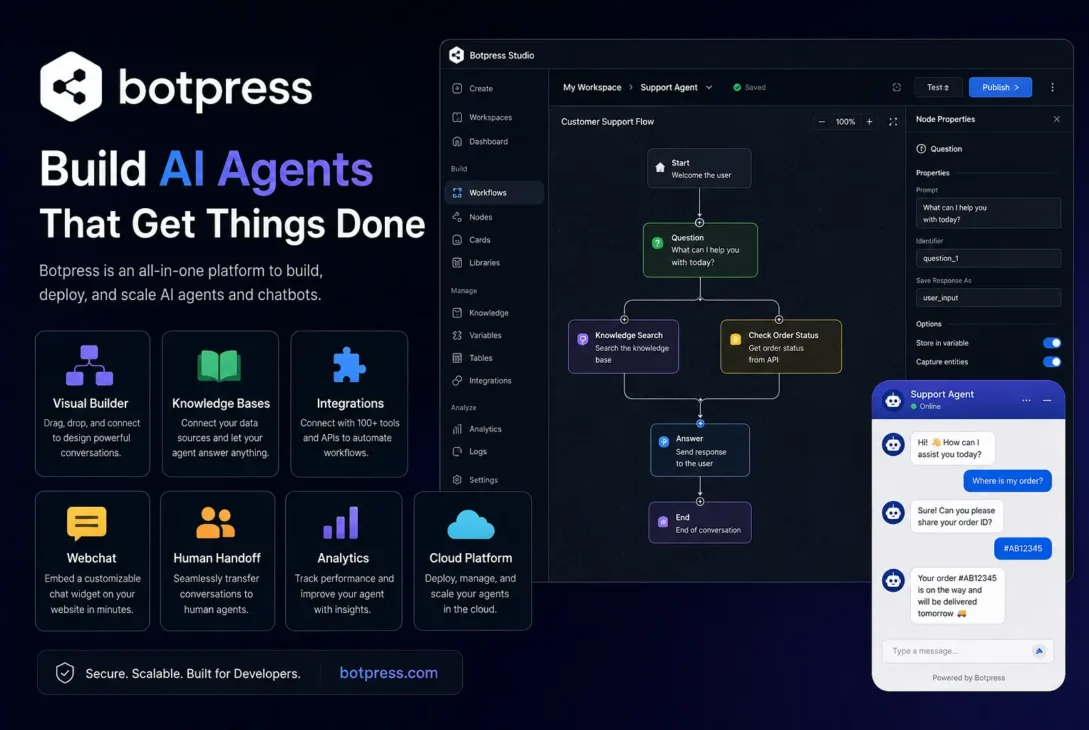
Its central development environment, Botpress Studio, works as an integrated development environment for building, testing, and managing AI agents and chatbots. It combines visual, drag-and-drop development with tools for creating workflows, nodes, cards, knowledge bases, tables, and variables.
This approach makes the platform useful for both technical and less technical users.
A developer can build more customized functionality using code and APIs, while someone with less programming experience can use the visual interface to construct an agent and configure its behavior.
How Does Botpress Work?
The basic process is relatively straightforward.
You create an AI agent, provide instructions and information, configure how it should behave, test conversations, and then deploy it where your users can interact with it.
The platform’s current quickstart documentation says users can create an agent, test it, customize its appearance and behavior, and deploy it through Webchat or another supported channel.
The exact architecture can become much more advanced as an agent grows.
For example, an AI agent could be connected to a company’s documentation, product information, customer-service workflows, external applications, and business systems.
This allows the agent to do more than simply generate conversational responses.
Botpress Studio
Botpress Studio is one of the most important parts of the platform.
It provides a visual environment where users can design how their agents operate.
The platform organizes development around concepts such as workflows, nodes, cards, knowledge bases, tables, and variables.
Workflows
Workflows define sequences of steps that an agent can follow.
A simple customer-support workflow might begin when a customer asks a question, determine what information is required, search a knowledge source, and then provide an answer.
More complex workflows can include conditions, actions, integrations, and human handoff.
Nodes
Nodes represent steps within a workflow.
They can be used to control what happens during a conversation.
This makes it possible to create structured experiences instead of depending entirely on a single AI prompt.
Cards
Cards represent actions that can be performed within nodes.
Depending on the available functionality, cards can handle tasks such as capturing information, querying knowledge, interacting with integrations, and controlling other parts of the agent.
This modular approach allows an agent to combine AI-generated responses with predictable business logic.
1. AI Agent Building
The main reason people use Botpress is to build AI agents.
An AI agent can be designed to answer questions, follow instructions, retrieve information, perform actions, and interact with users through supported channels.
The platform also provides specialized agents that extend what a bot can do.
Current Botpress documentation lists components including the Summary Agent, Personality Agent, Policy Agent, Translator Agent, Knowledge Agent, Analytics Agent, Vision Agent, and HITL Agent.
This allows developers to build systems that go beyond basic question-and-answer chatbots.
For example, a customer-service agent could use a Personality Agent to maintain a particular communication style, a Policy Agent to enforce business rules, and a Knowledge Agent to retrieve information from company documentation.
2. Knowledge Bases
Knowledge bases are another major feature.
Instead of expecting an AI model to know every detail about a particular company, you can provide the agent with relevant information.
Botpress allows knowledge bases to contain sources such as websites, documents, tables, web search results, rich text, and supported integrations.
This can be useful for organizations that want an agent to answer questions using their own information.
For example, an online store could provide:
- Product documentation
- Shipping information
- Return policies
- Pricing information
- Frequently asked questions
- Support documentation
The agent can then search those sources when responding to users.
Website Knowledge Sources
A website can be added as a knowledge source, allowing the platform to discover pages from a domain or use specific pages.
Botpress also provides recrawling options so website-based knowledge can be updated as the source changes.
This can be particularly useful for businesses whose documentation changes regularly.
3. Knowledge Agent
The Knowledge Agent is responsible for retrieving information from the agent’s knowledge bases.
According to the current documentation, it can retrieve information from sources such as FAQs, documents, websites, and structured databases. It can also expose generated answers and citations that can be used within conversations.
This is important because simply uploading information isn’t enough.
The agent needs a mechanism for finding the relevant information when a user asks a question.
For example, if a customer asks about a company’s refund policy, the Knowledge Agent can search the relevant knowledge source and provide information that is more closely tied to the company’s own documentation.
4. Integrations
Modern AI agents often need to communicate with other software.
Botpress provides integrations that allow agents to connect with external services, APIs, tools, and communication channels.
This can expand what an agent is capable of doing.
Instead of only answering questions, an agent could potentially interact with other business systems to retrieve information or trigger actions.
For example, an organization could connect its agent to supported communication channels or external business tools.
The available integrations change over time, so users should check the current integration catalog when planning a specific project.
Why These Features Matter
The biggest advantage of using a platform like Botpress is that you don’t have to build every part of an AI agent independently.
The platform combines visual development, AI functionality, knowledge retrieval, integrations, deployment tools, and other components into one ecosystem.
That can reduce development complexity and make experimentation faster.
At the same time, advanced projects may still require programming knowledge, API work, careful prompt design, testing, security controls, and ongoing maintenance.
An AI agent is only as reliable as the instructions, data, integrations, and safeguards behind it.
Who Is Botpress For?
Botpress can be useful for several types of users.
Developers
Developers can use the platform’s visual tools, APIs, integrations, and development capabilities to create customized AI agents.
Businesses
Businesses can use AI agents for customer support, internal assistance, lead qualification, documentation, and other conversational workflows.
Startups
Startups can use an AI agent to automate parts of customer communication without building an entire conversational infrastructure from the ground up.
Non-Technical Users
The visual development approach can also make experimentation easier for users who don’t want to write every part of an application manually.
However, more complex production systems may still require technical expertise.
Botpress Cloud
One important point for anyone researching older Botpress tutorials is the platform’s transition away from self-hosted versions.
Botpress states that v12 and other self-hosted or locally installed versions have been officially sunset and are no longer available for new deployments. The company directs new development toward Botpress Cloud.
This matters because older tutorials may describe installation methods that are no longer appropriate for new projects.
If you’re starting a new project today, check the current Botpress Cloud documentation rather than relying on older self-hosted guides.
In the next section, we’ll look at more of the platform’s practical capabilities, including Webchat, deployment, AI agents, integrations, use cases, limitations, and what you should consider before choosing Botpress.
5. Webchat
Webchat is one of the easiest ways to put an AI agent directly on a website.
Botpress provides Webchat as a customizable frontend that can be embedded using a script or integrated into a React application. It can also be added to platforms such as WordPress, Wix, and Webflow.
This makes it practical for businesses that want visitors to communicate with an AI assistant without leaving their website.
The appearance and behavior can also be customized. Current Webchat settings include bot identity, appearance, deployment options, proactive messages, file uploads, conversation history, and other features.
For developers, the Webchat API provides methods for opening and closing the chat, sending messages, updating user information, restarting conversations, and responding to events.
6. Human Handoff
AI isn’t suitable for every customer-service situation.
A customer may have a complicated problem, request a refund, report a sensitive issue, or simply want to speak with a person.
Botpress supports human handoff so conversations can move from an AI agent to a human support representative.
For new workspaces, Botpress directs users toward Botpress Desk for human-in-the-loop support. Desk is designed as a customer-experience workspace where human agents can work alongside AI.
This creates a useful combination:
AI handles routine questions → complex conversations go to humans.
That approach can reduce the workload on support teams without forcing customers to interact with AI when human judgment is needed.
7. Botpress Desk
Botpress Desk extends the platform toward customer support.
Its current documentation describes features such as suggested answers, two-way translation, AI-assisted knowledge access, AI insights, and knowledge-gap reports.
This makes Desk particularly relevant to businesses that want AI to assist human support teams rather than completely replace them.
For example, an AI system can handle common questions while support agents focus on unusual or high-value cases.
API and Developer Tools
Developers can also interact with Botpress programmatically.
The platform provides a Cloud API and authentication options for users, bots, and integrations.
This makes it possible to connect an AI agent with existing applications and business systems.
Developers should protect API credentials carefully. Personal access tokens can provide significant access to account data, so they should never be exposed publicly or placed in client-side code where they can be easily retrieved.
Common Botpress Use Cases
There are many situations where an AI agent can be useful.
Customer Support
An agent can answer frequently asked questions, explain products, provide documentation, and route complicated conversations to support staff.
Lead Generation
A website agent can ask visitors questions, collect contact details, identify their requirements, and pass qualified leads to a sales workflow.
Internal Knowledge
Companies can build assistants around internal documentation so employees can find information without manually searching through large collections of files.
Education
Educational organizations can create assistants that answer questions about courses, schedules, policies, or learning materials.
E-Commerce
An AI assistant can help customers find products, understand policies, and navigate common purchasing questions.
Advantages of Botpress
The biggest advantage is the combination of visual development and AI functionality.
Users don’t necessarily need to build an entire conversational system from the ground up.
Other benefits include:
- Visual workflow development
- Knowledge bases
- AI agents
- Webchat
- Integrations
- APIs
- Human handoff
- Analytics and support tools
The platform can therefore grow from a relatively simple chatbot into a more sophisticated AI application.
Limitations to Consider
Despite its capabilities, Botpress isn’t a magic solution.
Building a reliable AI agent still requires planning.
Poor instructions can produce poor responses.
Incomplete knowledge sources can lead to incomplete answers.
Badly designed workflows can create confusing conversations.
External integrations can fail.
AI-generated responses also require testing, particularly when an agent handles sensitive customer information or business processes.
Businesses should therefore treat AI-agent development as a software project rather than simply switching on a chatbot.
Botpress Cloud and Older Tutorials
Anyone researching Botpress should pay attention to the date of tutorials they find online.
Older guides may describe self-hosted versions or workflows that are no longer appropriate for new projects.
Botpress states that its older v12 and self-hosted versions have been sunset, while current development is centered around its cloud platform.
This means current documentation should be preferred when following setup instructions.
Is Botpress Worth Using?
For developers and businesses that want to build AI agents with a combination of visual tools, workflows, knowledge retrieval, integrations, and deployment options, Botpress can be a strong option.
It is particularly interesting when a basic chatbot isn’t enough.
A well-designed agent can connect knowledge sources, interact with external systems, communicate through Webchat, and transfer difficult conversations to human agents.
However, the platform isn’t automatically the right choice for every project.
Before committing, consider the complexity of your requirements, required integrations, expected usage, security needs, budget, and the amount of technical control you need.
Final Verdict
Botpress provides a modern environment for creating AI agents without requiring developers to build every conversational component from scratch.
Its combination of Studio, knowledge bases, integrations, Webchat, APIs, and human-support capabilities makes it suitable for everything from simple website assistants to more advanced business workflows.
The strongest use cases are those where an AI agent can automate repetitive communication while still having access to reliable information and a clear path to human assistance.
If your goal is to experiment with AI agents or build a production conversational application, Botpress is worth evaluating against other AI-agent platforms before making a final decision.
Frequently Asked Questions
What is Botpress used for?
Botpress is used to build AI agents and conversational applications. Businesses and developers can use it for customer support, lead generation, internal knowledge assistants, website chatbots, and other automated workflows.
Is Botpress free?
Botpress offers cloud-based plans, including options that allow users to get started and experiment. Pricing and included usage can change, so check the official pricing page for the latest limits, features, and plan details.
Is Botpress good for beginners?
It can be. The visual development environment makes it possible to create workflows without writing every component manually. However, advanced agents involving APIs, integrations, complex logic, or production requirements can still require technical knowledge.
Can I use Botpress on my website?
Yes. Webchat can be embedded into websites and customized to match the site’s experience. Botpress provides documentation for adding Webchat to websites and supported frameworks. (botpress.com)
Can Botpress connect to external services?
Yes. Integrations and developer tools allow agents to interact with external services and applications. The exact capabilities depend on the integration and configuration.
Can Botpress use my company’s documents?
Yes. Knowledge bases can use supported sources such as documents, websites, tables, and other information sources. This allows an agent to retrieve information relevant to a company’s own content.
Can Botpress replace customer-support employees?
It can automate some repetitive support tasks, but completely replacing human support isn’t appropriate for every business.
A better approach for many organizations is to let AI handle routine questions while human representatives handle complicated or sensitive cases.
Is Botpress self-hosted?
Current Botpress documentation states that v12 and self-hosted versions have been sunset. New development is directed toward Botpress Cloud. (botpress.com)
Does Botpress require coding?
Not necessarily for basic workflows. The visual tools can reduce the amount of code required. However, coding knowledge becomes more useful when building advanced integrations, custom logic, APIs, or complex production systems.
What is Botpress Studio?
Botpress Studio is the visual development environment used to create and manage AI agents. It provides tools for workflows, nodes, cards, knowledge bases, tables, variables, and other components.
Botpress vs Traditional Chatbots
Traditional chatbots often rely heavily on predefined rules and decision trees.
For example, a traditional chatbot might respond:
User: What are your opening hours?
Bot: Our opening hours are 9 AM to 5 PM.
If the customer asks something outside the predefined structure, the chatbot may struggle.
An AI agent can provide a more flexible conversational experience.
It can interpret natural-language questions, search relevant information, and generate a response based on available context.
However, flexibility also creates additional responsibility.
Businesses need to provide reliable information, create appropriate instructions, test responses, and establish safeguards.
Botpress for Small Businesses
Small businesses can use an AI agent to automate repetitive customer interactions without building a complete AI infrastructure themselves.
For example, a service company could create an assistant that answers questions about pricing, availability, services, and policies.
A more advanced setup could collect customer requirements and pass qualified leads to a human employee.
This can help a small team respond to customers outside normal working hours.
The important factor is keeping the agent’s scope clear.
A focused assistant with accurate information is generally more useful than an AI bot that attempts to answer every possible question without sufficient knowledge.
Botpress for Developers
Developers can use the platform when they want more control over the behavior and integration of an AI agent.
Visual workflows can handle predictable business logic, while APIs and development tools can extend the system.
This hybrid approach is useful because not every part of an AI application needs custom code.
Developers can use visual components where they are convenient and programmatic tools where more control is required.
What Makes a Good Botpress Agent?
A good AI agent isn’t simply one with many features.
It should have a clearly defined purpose.
Its instructions should be specific.
Its knowledge should be accurate and regularly maintained.
Its workflows should account for unexpected user behavior.
Sensitive actions should have appropriate safeguards.
And when the AI cannot confidently handle a situation, there should be a clear fallback.
Human handoff can be particularly valuable for customer-service applications.
Final Verdict
Botpress is a capable platform for building modern AI agents and conversational applications.
Its combination of visual development, knowledge bases, AI agents, integrations, Webchat, APIs, and human-support tools makes it useful for businesses, developers, startups, and other organizations exploring conversational AI.
The platform is particularly attractive when you need more than a basic chatbot.
You can create an agent that understands natural-language requests, retrieves information from your own sources, interacts with supported services, communicates through a website, and transfers difficult conversations to human representatives.
However, successful AI-agent development still requires good planning.
You need reliable knowledge sources, clear instructions, appropriate workflows, testing, security practices, and ongoing maintenance.
For new projects, pay attention to the current Botpress Cloud platform rather than older tutorials based on sunset self-hosted versions.
Overall, Botpress is worth considering if you want a structured way to experiment with or deploy AI agents while combining visual development with more advanced developer capabilities.
Key Takeaways
- Botpress is a platform for building AI agents.
- Botpress Studio provides visual development tools.
- Knowledge bases let agents work with external information.
- Integrations allow connections with supported services.
- Webchat can bring agents directly to websites.
- APIs provide additional developer control.
- Human handoff can connect AI conversations with support teams.
- Botpress Cloud is the current direction for new development.
- Older self-hosted v12 deployments have been sunset.
- Complex production agents still require testing and careful design.