Introduction
When Apple introduced the iPad Pro M4, many people expected a simple performance upgrade. Instead, the company completely changed what a premium tablet could be. With a thinner design, an incredible OLED display, and the powerful M4 chip, the iPad Pro M4 feels less like a traditional tablet and more like a professional computer that happens to be incredibly portable.
Whether you’re a creative professional, a student, a gamer, or someone who wants the best Apple device for productivity, the iPad Pro M4 offers something unique. It combines desktop-level speed with a lightweight body that you can carry almost anywhere. Add accessories like the Apple Pencil Pro and Magic Keyboard, and it becomes a capable workstation for work, creativity, and entertainment.
In this guide, we’ll explore everything you need to know about the iPad Pro M4. From its design and display to its performance, battery life, software, and real-world value, this article will help you decide whether Apple’s latest flagship tablet deserves a place in your daily routine.
iPad Pro M4 Design: Thin, Premium, and Built for Professionals
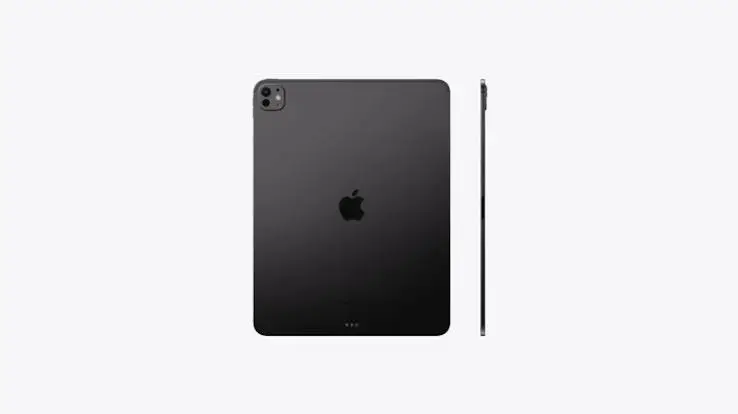
Apple has always been known for premium hardware, but the iPad Pro M4 takes that philosophy to another level. It is one of the thinnest products Apple has ever created, making it incredibly comfortable to hold for long periods. Even though it’s thinner than previous models, it still feels solid, durable, and exceptionally well-built.
The aluminum chassis gives the tablet a premium finish while keeping the overall weight surprisingly low. Whether you’re carrying it between meetings, using it during classes, or traveling internationally, the lightweight design makes a noticeable difference. It easily slips into backpacks and laptop sleeves without adding unnecessary bulk.
The minimalist design also complements modern workspaces. Combined with the redesigned Magic Keyboard and Apple Pencil Pro, the iPad Pro M4 transforms from a simple entertainment device into a professional productivity machine. Every detail, from the placement of the cameras to the magnetic accessory support, reflects Apple’s attention to quality and usability.
Stunning Ultra Retina XDR OLED Display
The display is one of the biggest reasons people choose the iPad Pro M4. Apple introduced the Ultra Retina XDR display with Tandem OLED technology, delivering deeper blacks, brighter highlights, and significantly improved contrast compared to previous generations. Everything from watching movies to editing photos looks incredibly vibrant.
The display also supports ProMotion technology with a refresh rate of up to 120Hz. Scrolling feels smooth, animations are fluid, and using the Apple Pencil becomes remarkably natural. Whether you’re sketching detailed artwork or simply browsing the web, every interaction feels responsive and polished.
Another impressive feature is color accuracy. Creative professionals working in photography, graphic design, or video production can rely on the display for consistent and accurate colors. HDR content looks spectacular, making streaming movies and editing high-resolution videos an enjoyable experience. It’s one of the best displays available on any tablet today.
M4 Chip Performance That Feels Like a Desktop Computer
The biggest upgrade inside the iPad Pro M4 is, of course, Apple’s latest M4 processor. Built using advanced manufacturing technology, the chip delivers exceptional performance while maintaining excellent power efficiency. Everyday tasks like browsing, note-taking, multitasking, and streaming are completed instantly without slowing down.
The real strength of the M4 chip becomes obvious during demanding workloads. Video editing in Final Cut Pro, editing RAW photos in Lightroom, creating digital illustrations, and rendering complex 3D models all feel incredibly smooth. The tablet handles professional applications with confidence, making it a genuine option for content creators.
Gaming performance is equally impressive. Modern games run with excellent frame rates and detailed graphics thanks to the improved GPU architecture. Combined with the high-refresh-rate display, gaming feels immersive and responsive. Whether you’re playing competitive shooters or graphically intensive adventure games, the iPad Pro M4 delivers a premium gaming experience without overheating.
Productivity Features That Replace a Laptop for Many Users
The iPad Pro M4 isn’t just about raw power. Apple has continued improving iPadOS, making multitasking more capable than ever before. Features like Stage Manager, Split View, and external display support allow users to organize multiple apps efficiently, making work much easier than on older iPads.
Pairing the tablet with the Magic Keyboard creates an experience that closely resembles using a laptop. The keyboard offers comfortable typing, while the built-in trackpad supports precise cursor control. Writing documents, managing spreadsheets, responding to emails, and attending video meetings all become convenient tasks.
For professionals who regularly use cloud storage, collaboration tools, and productivity apps, the iPad Pro M4 offers excellent flexibility. Applications like Microsoft Office, Google Workspace, Notion, Adobe Creative Cloud, and Apple’s own productivity suite work seamlessly. For many users, especially those who primarily work online, the iPad Pro M4 can comfortably replace a traditional laptop.
Apple Pencil Pro Makes Creativity Feel Natural
One of the biggest reasons artists, designers, and students choose the iPad Pro M4 is its support for the Apple Pencil Pro. Apple has introduced several smart features that make writing and drawing feel more natural than ever before. The Pencil responds instantly, offers incredible precision, and creates an experience that closely resembles writing on real paper.
The new squeeze gesture and haptic feedback add another level of convenience. Instead of interrupting your workflow to switch tools, you can access shortcuts directly from the Pencil. These small improvements save time and make creative work much smoother. Whether you’re illustrating, taking notes, or editing images, the Apple Pencil Pro feels like an essential companion rather than an optional accessory.
Students can also benefit from these improvements. Handwritten notes, PDF annotations, and digital textbooks become much easier to manage. Instead of carrying multiple notebooks, the iPad Pro M4 allows you to organize everything in one place while keeping your notes searchable and accessible across Apple devices.
Battery Life and Everyday Performance
Despite being thinner than previous models, the iPad Pro M4 still delivers excellent battery life. Apple has optimized both the hardware and software to provide all-day usage for most users. You can comfortably browse the internet, stream videos, attend online meetings, edit documents, and take notes without constantly searching for a charger.
The M4 chip plays a significant role in improving efficiency. Because it consumes less power while delivering higher performance, users enjoy longer battery life even during demanding tasks. Casual users may only need to charge the device every couple of days, while professionals working with heavy creative applications can still expect a full day’s productivity.
Charging through the Thunderbolt USB-C port is both fast and convenient. It also supports high-speed data transfer, making it easy to connect external SSDs, monitors, cameras, and other professional accessories. This versatility makes the iPad Pro M4 far more than just a tablet—it becomes a complete workstation for users on the move.
Is the iPad Pro M4 Worth Buying?
The answer depends on how you plan to use it. If your daily activities involve professional design work, video editing, photography, programming, digital illustration, or advanced multitasking, the iPad Pro M4 is one of the best investments you can make. Its performance rivals many premium laptops while offering the flexibility of a touchscreen device.
However, casual users who mainly browse social media, watch Netflix, read eBooks, or attend occasional online classes may not need this level of performance. Apple’s iPad Air already handles these tasks exceptionally well at a lower price. In that case, spending extra on the Pro model may not provide significant additional value.
For users who want the absolute best tablet available today, the iPad Pro M4 remains difficult to beat. It combines cutting-edge hardware, premium build quality, long software support, and a growing ecosystem of professional applications. If your budget allows it, you’ll likely enjoy using this device for many years without feeling limited.
Final Verdict
The iPad Pro M4 represents a major leap forward in tablet technology. Apple has successfully combined desktop-class performance with a lightweight design, an industry-leading OLED display, and accessories that enhance productivity and creativity. It’s no longer just a device for media consumption—it has evolved into a powerful tool for professionals, students, and creators alike.
Its exceptional display, powerful M4 processor, long battery life, and seamless integration with Apple’s ecosystem make it one of the most complete premium tablets available. Whether you’re editing videos, designing graphics, writing documents, taking notes, or simply enjoying entertainment, the experience feels fast, smooth, and enjoyable.
Although the price is higher than many competing tablets, the overall quality, performance, and long-term software support justify the investment for users who can take advantage of its capabilities. If you’re looking for a tablet that can handle both work and entertainment without compromise, the iPad Pro M4 is an outstanding choice.
Frequently Asked Questions (FAQs)
1. Is the iPad Pro M4 better than the iPad Air?
Yes. The iPad Pro M4 offers a more powerful processor, a superior Ultra Retina XDR OLED display, better speakers, advanced camera features, and support for professional workflows. However, the iPad Air provides better value for users with basic everyday needs.
2. Can the iPad Pro M4 replace a laptop?
For many users, yes. If your work mainly involves writing, browsing, presentations, photo editing, video editing, graphic design, or cloud-based applications, the iPad Pro M4 paired with the Magic Keyboard can comfortably replace a laptop.
3. Does the iPad Pro M4 support Apple Pencil Pro?
Yes. The iPad Pro M4 is fully compatible with the Apple Pencil Pro, which introduces new features like squeeze gestures, haptic feedback, barrel roll, and improved precision for creative work.
4. Is the iPad Pro M4 good for gaming?
Absolutely. Thanks to the powerful M4 chip and 120Hz ProMotion display, the iPad Pro M4 delivers excellent gaming performance with smooth frame rates and impressive graphics quality.
5. Which storage option should I choose?
The 256GB model is suitable for most users. If you frequently edit 4K videos, work with large design projects, or store extensive media libraries, the 512GB or 1TB models provide additional flexibility.