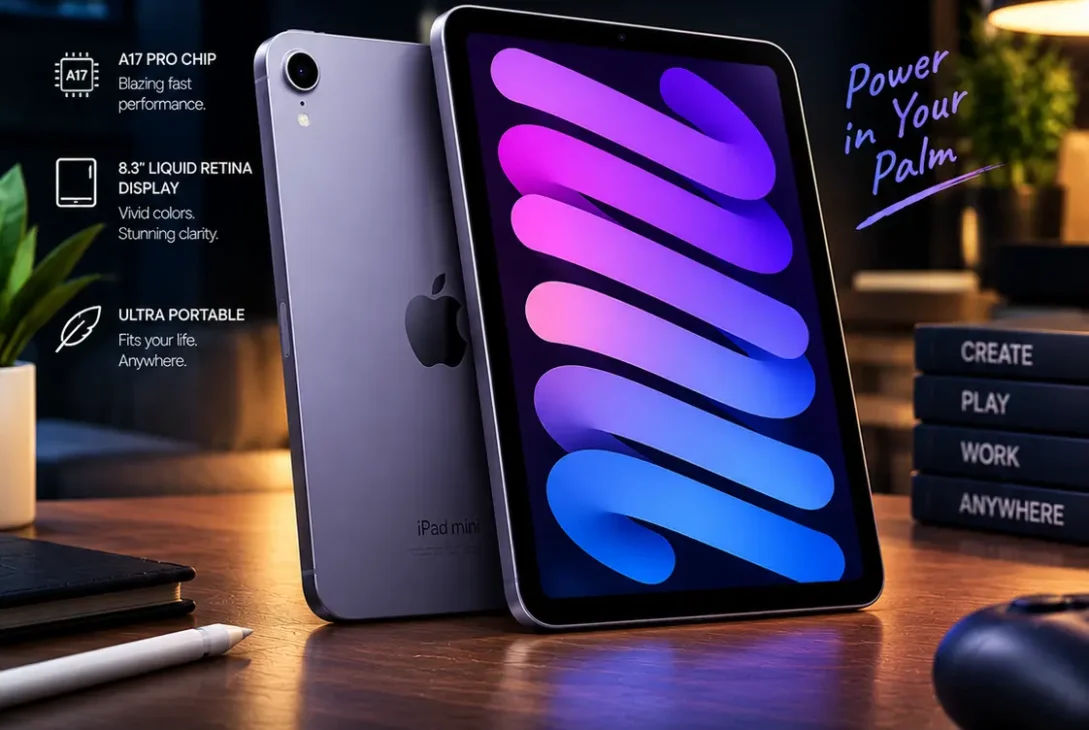
The iPad mini 7 is Apple’s compact tablet for people who want strong performance without carrying a large iPad. Introduced in 2024, it combines an 8.3-inch Liquid Retina display with the A17 Pro chip, USB-C, Apple Pencil Pro support, and compatibility with Apple Intelligence features. Its small size makes it useful for reading, travel, note-taking, gaming, and everyday productivity.
However, the iPad mini 7 is not a complete redesign. It keeps a familiar exterior, a 60Hz display, and Touch ID instead of Face ID. That makes it important to understand what has actually improved before spending money on it.
This guide covers the iPad mini 7’s specifications, performance, display, cameras, battery life, accessories, limitations, and value in 2026. It also explains who should buy it and who may be better off with a larger iPad.
Table of Contents
- What Is the iPad mini 7?
- iPad mini 7 Specifications
- Design and Portability
- Display Quality
- A17 Pro Performance
- Apple Intelligence and iPadOS
- Cameras and Video Calls
- Battery Life and Charging
- Apple Pencil and Accessories
- Gaming and Entertainment
- What Are the Main Limitations?
- iPad mini 7 vs. iPad mini 6
- Who Should Buy the iPad mini 7?
- Frequently Asked Questions
- Final Verdict
- SEO Details
What Is the iPad mini 7?
Apple’s seventh-generation iPad mini is officially listed as the iPad mini (A17 Pro). It arrived in 2024 as an update to the iPad mini 6, keeping the compact design while upgrading the internal hardware and starting storage capacity. Apple’s official specifications list 128GB, 256GB, and 512GB storage options, along with Wi-Fi and Wi-Fi + Cellular configurations.
The biggest changes are the A17 Pro processor, support for Apple Intelligence, Apple Pencil Pro compatibility, and Wi-Fi 6E. These improvements make the tablet more capable for demanding apps and creative tasks, even though its overall appearance is very similar to the previous model.
The iPad mini 7 is best understood as a performance refresh rather than a complete redesign. If you already own the previous generation, the upgrade may not feel dramatic. If you are buying your first small iPad or replacing an older model, the newer chip and larger base storage are more compelling.
iPad mini 7 Specifications
Here are the key specifications to know before buying.
| Feature | iPad mini 7 |
|---|---|
| Display | 8.3-inch Liquid Retina IPS |
| Resolution | 2266 × 1488 pixels, 326 ppi |
| Processor | Apple A17 Pro |
| Rear camera | 12MP Wide |
| Front camera | 12MP Ultra Wide with Center Stage |
| Storage | 128GB, 256GB, or 512GB |
| Connectivity | Wi-Fi 6E, Bluetooth 5.3 |
| Cellular option | 5G on supported networks |
| Port | USB-C with USB 3 support |
| Biometrics | Touch ID |
| Stylus support | Apple Pencil Pro and Apple Pencil (USB-C) |
| Battery claim | Up to 10 hours of Wi-Fi web browsing or video playback |
| Weight | 293g Wi-Fi; 297g Wi-Fi + Cellular |
| Colors | Blue, Purple, Starlight, Space Gray |
Specifications can vary by model and region. For the full technical details, consult Apple’s official iPad mini specifications.
Design and Portability
Portability is the main reason to choose the iPad mini 7 over a larger tablet. At around 293 grams for the Wi-Fi model, it is light enough to carry in a small bag and comfortable to hold for reading or browsing. Its flat edges and compact aluminium body give it the familiar modern iPad appearance.
The tablet is available in Blue, Purple, Starlight, and Space Gray. Its top button includes Touch ID, so you can unlock the device and authenticate purchases using a fingerprint. It does not include Face ID.
The small form factor is especially convenient on flights, public transport, in classrooms, and while travelling. You can hold it in one hand more easily than a larger iPad, although long typing sessions are usually more comfortable with an external keyboard.
The design is also a compromise. The bezels remain noticeable, and the front camera is positioned for portrait use rather than the landscape orientation preferred for many video calls. If you primarily use a tablet on a desk for meetings, a larger iPad with a landscape front camera may be more practical.
Display Quality
The iPad mini 7 has an 8.3-inch Liquid Retina display with a resolution of 2266 × 1488 pixels and a pixel density of 326 pixels per inch. It supports P3 wide colour, True Tone, an anti-reflective coating, and up to 500 nits of typical brightness.
Text looks sharp, photos have rich colours, and the screen is well suited to ebooks, web pages, PDFs, comics, and handwritten notes. True Tone adjusts the display’s colour temperature to match the surrounding light, which can make reading more comfortable in different environments.
However, this is not an OLED display, and it does not offer a high refresh rate such as 120Hz. Users upgrading from a ProMotion iPad Pro may notice less fluid scrolling. The screen is also smaller than those on the iPad Air and iPad Pro, which means multitasking and editing large documents can feel cramped.
For a compact tablet, the display is sharp and colourful. For professional video editing, large spreadsheets, or working with several apps at once, the extra screen space of a larger iPad is more valuable.
A17 Pro Performance
The A17 Pro chip is the major hardware upgrade. It features a six-core CPU, a five-core GPU, and a 16-core Neural Engine. That combination gives the iPad mini 7 the power to handle everyday productivity, creative apps, demanding games, and supported AI features.
Common tasks such as browsing, streaming, messaging, note-taking, and switching between apps should feel responsive. More demanding work—including photo editing, drawing, and selected video-editing tasks—is also within its capabilities.
The A17 Pro also supports hardware-accelerated ray tracing and mesh shading. These technologies can improve graphics in compatible games, although the experience depends on the individual game and its optimisation. The iPad mini 7 is powerful for its size, but it should not be treated as a replacement for a high-end gaming PC or a professional workstation.
Performance alone is not the only factor to consider. The compact display can limit how comfortable complex work feels, and the available apps determine what you can accomplish. If you want a small device with considerable processing power, this tablet is an appealing option.
Apple Intelligence and iPadOS
Apple lists Apple Intelligence compatibility among the capabilities of the iPad mini 7. Depending on software version, language, region, and feature availability, Apple’s AI tools can assist with writing, text rewriting, summaries, image-related tasks, and other supported functions.
These features may be useful for students who need help refining notes, professionals who work with text, or users who want to organise information. Availability is not identical everywhere, and some functions may require supported languages, updated software, or an internet connection.
The iPad mini 7 also benefits from iPadOS features such as multitasking, widgets, the Files app, Notes, and support for external accessories. The exact tools you can use depend on the iPadOS version installed and the apps you choose.
It is worth buying a device for the capabilities it offers today rather than relying entirely on promised future features. Before purchasing, check Apple’s current Apple Intelligence availability and requirements for your language and region.
Cameras and Video Calls
The rear camera is a 12MP Wide camera with an ƒ/1.8 aperture. It supports features such as Smart HDR 4 and can record 4K video at up to 60 frames per second. Although most people do not buy a tablet primarily for photography, the camera can be useful for scanning documents, capturing classroom whiteboards, photographing notes, or recording quick clips.
The front camera is a 12MP Ultra Wide camera with Center Stage. Center Stage can keep a person framed during supported video calls by adjusting the view as they move. This makes the tablet useful for FaceTime and other compatible video-conferencing apps.
The main drawback is the camera’s placement. Since it remains on the short edge, you may appear off-centre during landscape video calls. Image quality is adequate for meetings and casual use, but a modern smartphone will generally be more convenient for everyday photography.
Battery Life and Charging
Apple rates the iPad mini 7 for up to 10 hours of web browsing over Wi-Fi or video playback. Cellular models are rated for up to nine hours of web browsing over mobile data. Actual battery life depends on screen brightness, network conditions, background activity, gaming, and the apps running on the device.
For reading, browsing, note-taking, and watching videos, the battery should be suitable for many everyday situations. Demanding games and long creative sessions can use power more quickly, so people who work away from a charger all day should consider their usage carefully.
The USB-C port handles charging and supports USB 3 data transfer up to 10Gb/s, along with DisplayPort output. This makes it possible to connect compatible accessories and an external display using the appropriate cable or adapter.
A USB-C connection is useful, but not every accessory performs identically. Check compatibility and power requirements before buying a hub, storage drive, or display adapter.
Apple Pencil and Accessories
One of the most useful upgrades is support for Apple Pencil Pro. The iPad mini 7 also supports Apple Pencil (USB-C), giving users a choice depending on their needs and budget. Apple Pencil Pro includes additional controls such as squeeze and barrel roll, while the USB-C model is a simpler option for writing and drawing.
The tablet’s size makes it practical for handwritten notes, marking up PDFs, sketching, and brainstorming. Students can carry it between classes, while artists may appreciate having a digital sketchbook that fits into a small bag.
There is one important compatibility detail: the iPad mini 7 does not support Apple Pencil (2nd generation). If you already own an older Pencil, check the exact model before purchasing. You may need a different stylus, adding to the total cost.
A protective case is also worth considering. A case can improve grip and help protect the tablet during travel, but it adds weight and bulk. If you want to keep the device as compact as possible, choose accessories carefully.
Gaming and Entertainment
The A17 Pro makes the iPad mini 7 capable of running many demanding iPad games, including titles with advanced graphics. The compact display can be comfortable for handheld gaming, and the tablet is easy to carry when travelling.
It also works well for video streaming, ebooks, digital comics, podcasts, and music apps. Landscape stereo speakers provide a more immersive experience than a single speaker, although headphones can be better in noisy environments.
There are still limitations. The screen is relatively small for games with complex controls, and the tablet lacks the high-refresh-rate display found on some premium devices. Extended gaming sessions may also increase heat and battery consumption.
If gaming is your main priority, compare the available game library, controller support, screen size, and price with a dedicated handheld gaming device. If you want a device that combines gaming with reading, drawing, and everyday apps, the iPad mini 7 offers more flexibility.
What Are the Main Limitations?
Before buying, keep these drawbacks in mind:
- No major exterior redesign: The tablet looks very similar to the previous generation.
- 60Hz display: Scrolling is not as fluid as on a 120Hz ProMotion screen.
- No Face ID: Unlocking relies on Touch ID.
- Portrait-positioned front camera: Landscape video calls may feel less natural.
- Apple Pencil compatibility: Apple Pencil 2 is not supported.
- Small workspace: Split-screen multitasking and detailed editing can feel cramped.
- Accessories cost extra: A compatible Pencil, keyboard, case, or hub can increase the overall price.
These limitations do not make it a bad tablet. They simply mean the device is designed around portability rather than offering every premium feature available in larger iPads.
iPad mini 7 vs. iPad mini 6
The iPad mini 7 retains much of the design and display of the iPad mini 6, so the differences are mostly internal. The newer model uses the A17 Pro chip, supports Apple Intelligence, works with Apple Pencil Pro, supports Wi-Fi 6E, and starts at 128GB of storage rather than the previous model’s 64GB base option.
For owners of an iPad mini 6, the decision depends on performance needs, storage, and stylus compatibility. If the older tablet still runs the apps you need and has sufficient storage, upgrading may not be urgent. If you want the newer chip, AI compatibility, or more base storage, the newer model is a more meaningful step.
For buyers coming from a much older iPad, the iPad mini 7 offers a stronger combination of performance and modern connectivity. Compare current prices before deciding, because a discount on the previous generation can change the value calculation.
Who Should Buy the iPad mini 7?
The iPad mini 7 is a strong choice for people who prioritise portability. It is particularly suitable for:
- Students who take notes, read textbooks, and annotate PDFs.
- Travellers who want a lightweight device for maps, books, videos, and browsing.
- Professionals who need to review documents or take notes on the go.
- Artists who want a compact sketching tablet with Apple Pencil Pro support.
- Casual gamers who want strong performance in a small device.
- Readers who prefer a colour screen and access to a broad app library.
It is less suitable as a primary laptop replacement for people who need a large screen, frequent multitasking, or extensive desktop-style workflows. A larger iPad Air or a laptop may be a better fit for those tasks.
Frequently Asked Questions
Is the iPad mini 7 worth buying in 2026?
The iPad mini 7 remains worth considering if you want a compact tablet with strong performance, Apple Pencil Pro support, and a sharp 8.3-inch screen. Its value depends on the current price and whether you prefer portability over a larger display.
What chip does the iPad mini 7 use?
It uses Apple’s A17 Pro chip, with a six-core CPU, five-core GPU, and 16-core Neural Engine.
Does the iPad mini 7 support Apple Intelligence?
Yes, it is compatible with Apple Intelligence. Specific features depend on software version, language, region, and Apple’s current availability requirements.
How much storage does the iPad mini 7 have?
Apple offers 128GB, 256GB, and 512GB configurations. Consider your needs for downloaded videos, games, photos, and creative projects before choosing storage.
Does the iPad mini 7 support Apple Pencil Pro?
Yes. It supports Apple Pencil Pro and Apple Pencil (USB-C), but it does not support Apple Pencil (2nd generation).
Does the iPad mini 7 have a 120Hz display?
No. Its 8.3-inch Liquid Retina display runs at a standard refresh rate rather than the 120Hz ProMotion technology found on some iPad Pro models.
How long does the iPad mini 7 battery last?
Apple rates it for up to 10 hours of Wi-Fi web browsing or video playback, and up to nine hours of web browsing on cellular models. Real-world results vary with use.
Can the iPad mini 7 replace a laptop?
It can handle many everyday tasks, especially with a keyboard, but its small display and iPadOS workflow may not suit people who rely on desktop software or extensive multitasking.
Does the iPad mini 7 have Face ID?
No. It uses Touch ID built into the top button for fingerprint authentication.
What colours are available?
The listed colours are Blue, Purple, Starlight, and Space Gray. Availability may vary by country and retailer.
Final Verdict
The iPad mini 7 is a compact, capable tablet built for people who value portability more than screen size. Its A17 Pro chip, 128GB starting storage, Apple Pencil Pro support, Wi-Fi 6E, and compatibility with Apple Intelligence make it a meaningful upgrade over older mini models.
Its familiar design, 60Hz display, Touch ID, and portrait-positioned front camera are compromises worth understanding before buying. It is not the best choice for everyone, especially if you need a large workspace or a laptop replacement.
For reading, travel, handwritten notes, casual gaming, and everyday productivity, the iPad mini 7 remains a compelling small tablet. Compare current prices and accessory costs, then choose it if the compact design fits how you actually use a device.